Introduction
This instruction manual provides detailed guidance for the proper setup, operation, and maintenance of your Forge TSA Approved Cable Luggage Locks. These locks are designed to provide security for your belongings while allowing authorized TSA agents to inspect your luggage without damage to the lock or your bag.

Image: Two Forge TSA Approved Cable Luggage Locks, showcasing their design and cable shackle.
Product Features
- Durable Construction: Constructed with special alloy lock bodies, tightly braided and sheathed steel cables, and hardened steel cable lock ends for enhanced durability.
- Easy-to-Set 3-Digit Combination: Features a user-friendly lever mechanism for setting and resetting your personal 3-digit combination.
- Flexible Cable Design: The cable is thin enough to pass through standard-sized zippers and hard case lock holes, offering versatility for various luggage types. The cable length is approximately 4 inches from end to end, with an internal looped length of 1.5 inches when locked.
- TSA Accepted and Re-locking Mechanism: Recognized and accepted by the Transportation Security Administration (TSA). Designed to ensure that TSA agents must re-lock your suitcase to remove their key after inspection, preventing your luggage from being left unsecured.
- Multi-Purpose Use: Suitable for securing a wide range of items beyond suitcases, including briefcases, gym lockers, purses, backpacks, and laptop bags.
Setup: Setting Your Combination
Your Forge TSA Approved Cable Luggage Lock comes preset to the factory default combination of 0-0-0. Follow these steps to set your personal combination:
- Ensure the lock is set to the default combination (0-0-0) and the cable is unlocked.
- Locate the reset button/lever on the side or bottom of the lock. Use a pen or a pointed object to push and hold the reset button/lever.
- While holding the reset button/lever, rotate the three number dials to your desired 3-digit combination. Choose a memorable combination.
- Release the reset button/lever. Your new combination is now set.
- Scramble the dials to lock the mechanism. Test your new combination to ensure it opens the lock correctly before securing your belongings.
You can change your combination as many times as needed by repeating these steps.

Image: Side view of the lock highlighting the reset button, which is used to set or change the combination.
Operating Instructions
Locking and Unlocking
- To lock: Align the dials to your set combination. Insert the cable end into the lock body until it clicks securely into place. Scramble the dials to secure the lock.
- To unlock: Align the dials to your set combination. The cable will release from the lock body.
TSA Inspection
Your Forge lock is equipped with a special keyhole that allows TSA (Transportation Security Administration) agents to open your luggage for inspection using a universal master key. This prevents damage to your lock or luggage during security checks.

Image: A Forge TSA lock with a TSA agent inspecting luggage, illustrating the safe inspection process without damaging the lock.
Alert Indicator
The lock features an alert indicator (a small red dot or pop-out button) that will appear if the lock has been opened by a TSA agent. This provides immediate notification that your luggage has been inspected.
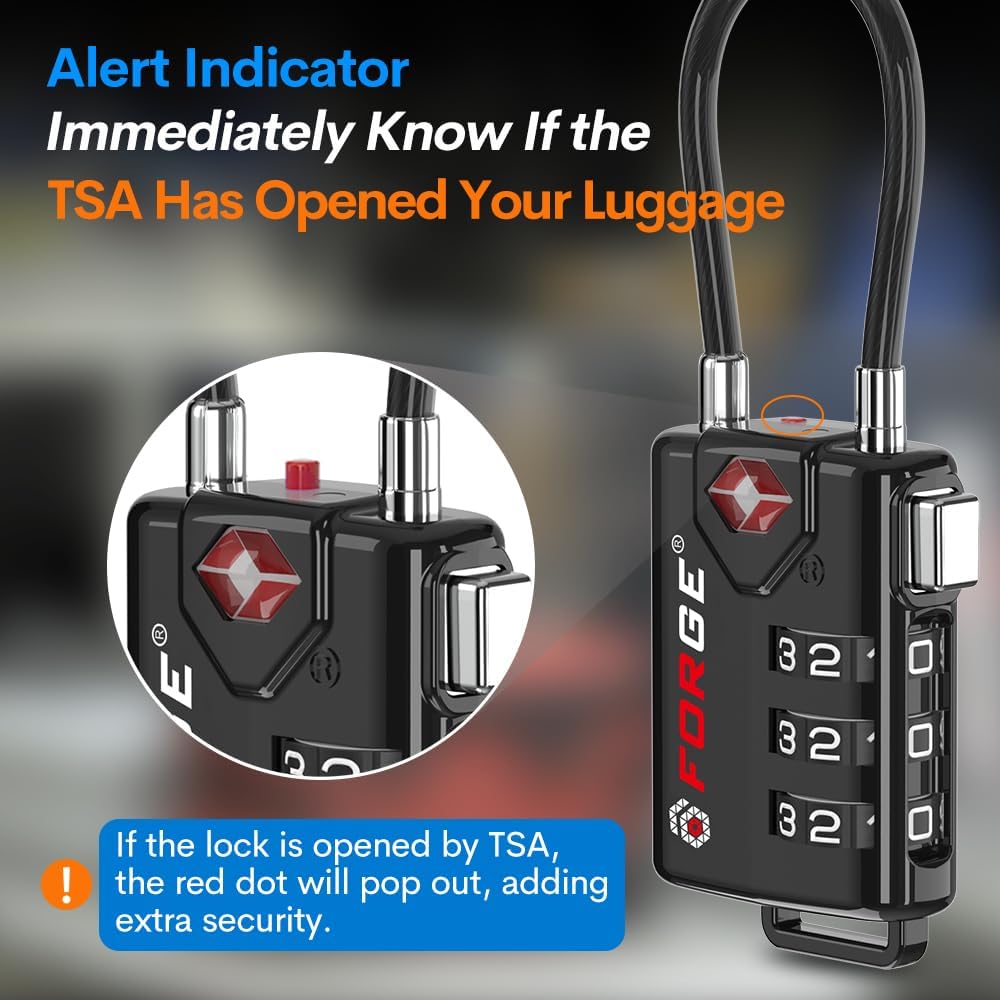
Image: A close-up view of the lock, demonstrating the red alert indicator that pops out when the lock has been opened by TSA.
Maintenance
To ensure the longevity and smooth operation of your Forge TSA Approved Cable Luggage Locks, consider the following maintenance tips:
- Keep Clean: Periodically wipe the lock body and dials with a soft, dry cloth to remove dust and grime. Avoid using harsh chemicals or abrasive cleaners.
- Lubrication (Optional): If the dials become stiff over time, a small amount of graphite powder or a silicone-based lubricant can be applied to the moving parts. Avoid oil-based lubricants as they can attract dirt.
- Storage: Store the locks in a dry environment when not in use to prevent corrosion.
Troubleshooting
Lock Will Not Open with Correct Combination
- Verify Combination: Double-check that you have entered the correct 3-digit combination. Ensure each number is precisely aligned in the center of the display window.
- Reset Attempt: If you are certain of the combination and it still won't open, try resetting the combination following the 'Setup' instructions. This can sometimes resolve minor internal alignment issues.
- Physical Obstruction: Inspect the cable and the lock mechanism for any foreign objects or debris that might be preventing it from opening.
Dials Are Stiff or Hard to Turn
- Clean Dials: Dirt or dust can accumulate in the dial mechanism. Clean the dials thoroughly as described in the Maintenance section.
- Lubrication: Apply a small amount of graphite powder or silicone spray to the dials to improve their movement.
If issues persist after attempting these troubleshooting steps, please refer to the Warranty and Support section.
Specifications
| Feature | Detail |
|---|---|
| Brand | Forge |
| Special Feature | TSA Approved |
| Lock Type | Combination Lock |
| Item Dimensions (L x W x H) | 1.2 x 0.7 x 3.4 inches |
| Material | Alloy Steel, Chrome, Iron, Metal, Stainless Steel, Zinc |
| Recommended Uses | Travel lock, luggage locks, cable lock, golf bag lock, carry-on lock, suitcase lock, gym locker, toolbox, Pelican case |
| Style | Modern |
| Color | Black 2 Pack |
| Number of Pieces | 1 (per lock) |
| Finish Type | Painted |
| Controller Type | Jog dial |
| Shape | Rectangular |
| Item Weight | 0.32 ounces |
| Control Method | Touch |
| UPC | 646648185015 |
| Manufacturer | Forge |
Warranty and Support
Forge stands behind the quality and durability of its TSA Approved Cable Luggage Locks. These locks are backed by an unconditional lifetime guarantee. If you encounter any issues with your lock that are not resolved by the troubleshooting steps, please contact Forge customer support for assistance.
For support inquiries, please visit the official Forge website or refer to the contact information provided with your product packaging. Please have your model number (646648185015) ready when contacting support.
Note: No official product videos were available with relevant creator types for embedding in this manual.


