
1. Introduction
This manual provides essential information for the safe and efficient operation of your Njoy Horus Plus 800 VA Line Interactive Uninterruptible Power Supply (UPS). Please read this manual thoroughly before installation and use, and retain it for future reference. The Njoy Horus Plus UPS is designed to protect sensitive electronic equipment from power fluctuations and outages, ensuring continuous operation and data integrity. Its line-interactive mode regulates voltage over a wide range for advanced AC filtering without activating backup mode, and the Automatic Voltage Regulation (AVR) system protects against electrical input damage from large power fluctuations.
2. Safety Instructions
WARNING: Failure to follow these safety instructions may result in fire, electric shock, or injury.
- Do not open the UPS casing. There are no user-serviceable parts inside. Refer servicing to qualified personnel.
- Do not connect appliances that could overload the UPS, such as laser printers or vacuum cleaners.
- Ensure the UPS is connected to a grounded AC power outlet.
- Do not expose the UPS to rain, water, or excessive humidity.
- Place the UPS in a well-ventilated area, away from direct sunlight or heat sources.
- Ensure the total load of connected equipment does not exceed the UPS's rated capacity (800 VA / 480 W).
- In case of emergency, press the power button to turn off the UPS and disconnect it from the AC power source.
3. Package Contents
Verify that all items are present in the package:
- Njoy Horus Plus 800 VA UPS Unit
- USB Communication Cable
- User Manual (this document)
- Software CD (or download instructions)
4. Product Overview
4.1 Front Panel

The front panel features the LCD touchscreen display and the power button. The LCD provides real-time information about the UPS status, including input/output voltage, battery capacity, and load level.
4.2 Rear Panel
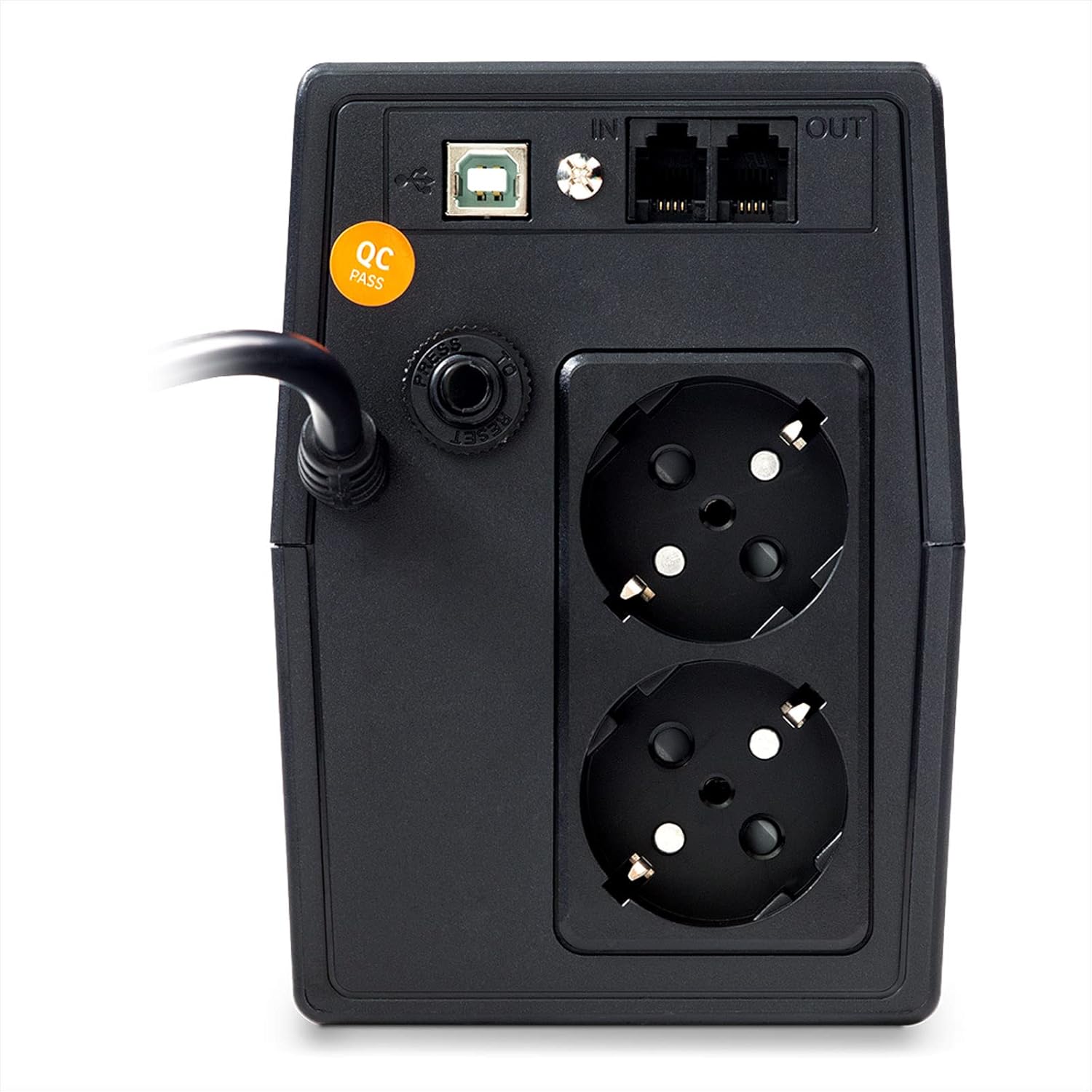
The rear panel includes:
- AC Input Power Cord: Connects the UPS to the wall outlet.
- Schuko Outlets (x2): Provide battery backup and surge protection for connected devices.
- USB Communication Port: For connecting to a computer for monitoring and management software.
- RJ11/RJ45 In/Out Ports: Provide surge protection for telephone/network lines.
- Reset Button: Used to reset the UPS in certain error conditions.
4.3 LCD Display

The LCD touchscreen displays critical operational data. Users can tap the screen to cycle through information such as:
- Input Voltage
- Output Voltage
- Battery Capacity
- Load Level
- Operating Mode (AC, Battery, AVR)
5. Setup
- Unpacking: Carefully remove the UPS from its packaging. Inspect for any shipping damage.
- Placement: Position the UPS on a flat, stable surface in a cool, dry, and well-ventilated area. Avoid direct sunlight, heat sources, and moisture. Ensure adequate clearance around the ventilation openings.
- Initial Charging: Connect the UPS to a standard grounded AC wall outlet using its integrated power cord. Allow the UPS to charge for at least 8 hours before connecting any devices to ensure optimal battery performance. The LCD will indicate battery charging status.
- Connecting Devices:
- Plug your computer, monitor, and other critical electronic equipment into the Schuko outlets on the rear panel.
- For surge protection of telephone or network lines, connect the incoming line to the "IN" RJ11/RJ45 port and connect your device to the "OUT" port.
- Software Installation (Optional): Connect the USB cable from the UPS to your computer. Install the included management software (refer to the software's specific instructions for installation). This software allows for advanced monitoring, configuration, and automatic shutdown of your computer during extended power outages.
6. Operating Instructions
6.1 Turning On the UPS
After initial charging, press and hold the power button on the front panel for approximately 2 seconds until you hear a beep and the LCD display illuminates. The UPS will perform a self-test and then enter AC mode, providing power to connected devices.
6.2 Turning Off the UPS
Press and hold the power button for approximately 2 seconds until you hear a beep and the LCD display turns off. This will shut down the UPS and cut power to connected devices.
6.3 LCD Touchscreen Operation
Tap the LCD screen to cycle through various display modes, showing real-time information such as input voltage, output voltage, battery charge level, and connected load percentage.
6.4 Automatic Voltage Regulation (AVR)
The Njoy Horus Plus features an Automatic Voltage Regulation (AVR) function. In AC mode, if the input voltage fluctuates outside the acceptable range (160-280 VAC), the AVR will automatically adjust the output voltage to a safe level (196-255 VAC) without switching to battery power. This protects connected equipment from voltage sags and surges.
6.5 Battery Mode Operation
During a power outage or if the input voltage goes beyond the AVR's correction capabilities, the UPS will automatically switch to battery mode. The LCD will indicate battery operation, and an audible alarm will sound (typically beeping every 10 seconds). The UPS will provide power from its internal battery for a limited duration, depending on the connected load.
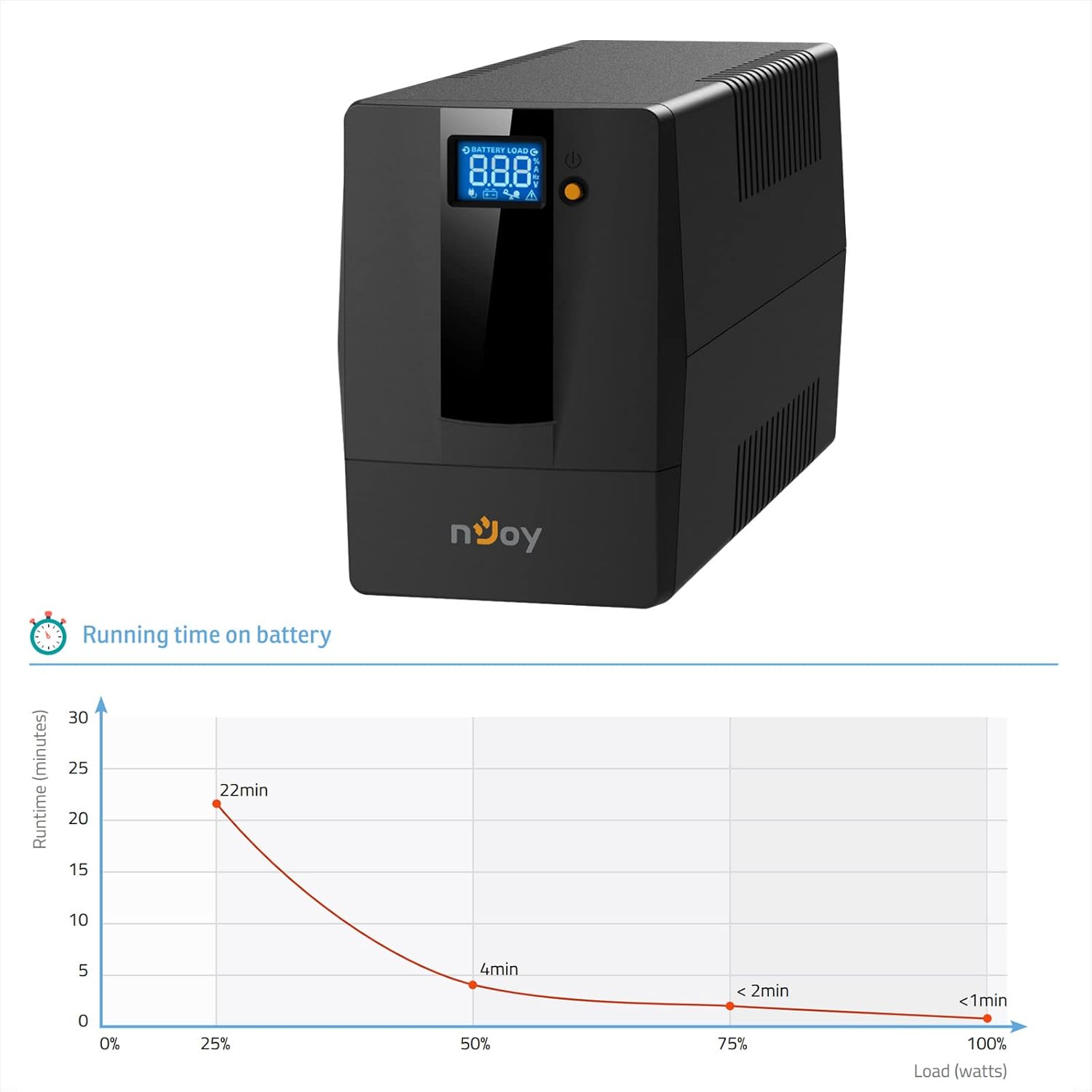
When the battery capacity is low, the alarm will sound more frequently (e.g., every second). It is recommended to save your work and shut down connected equipment gracefully during this time.
6.6 Auto-Restart Function
If a power outage occurs and the UPS shuts down due to low battery, it will automatically restart and resume normal operation once AC power is restored and the battery has recharged sufficiently.
6.7 Cold Start Function
The UPS can be started directly from battery power even when no AC input is available. To perform a cold start, ensure the UPS is off, then press and hold the power button for approximately 5 seconds. The UPS will turn on and provide battery power to connected devices.
7. Maintenance
- Cleaning: Use a soft, dry cloth to clean the exterior of the UPS. Do not use liquid or aerosol cleaners.
- Battery Care: To maximize battery life, ensure the UPS is always connected to an AC outlet to keep the battery charged. If the UPS is stored for an extended period, recharge the battery every three months for at least 8 hours.
- Battery Replacement: The internal battery is not user-replaceable. Battery replacement should only be performed by qualified service personnel.
- Ventilation: Regularly check that the ventilation openings are clear of dust and obstructions to prevent overheating.
8. Troubleshooting
| Problem | Possible Cause | Solution |
|---|---|---|
| UPS does not turn on. | Battery discharged or not connected to AC power. | Connect to AC power and allow to charge for 8 hours. Ensure power button is pressed correctly. |
| UPS beeps continuously in AC mode. | Overload condition. | Disconnect non-essential equipment. Ensure total load is within 480W. |
| UPS switches to battery mode frequently. | Unstable AC input power or AVR limits exceeded. | Check AC power quality. If problem persists, consult an electrician. |
| Short backup time. | Battery not fully charged or battery end-of-life. | Allow UPS to charge for 8 hours. If battery is old, consider professional replacement. |
| LCD display is off. | UPS is off or in power-saving mode. | Press the power button to turn on. Tap the screen to activate display. |
9. Specifications
| Feature | Detail |
|---|---|
| Model | PWUP-LI080H1-AZ01B |
| Capacity | 800 VA / 480 W |
| Input Voltage (Nominal) | 230 V AC |
| Input Voltage Range | 160 – 280 V AC |
| Output Voltage Range (AVR) | 196 – 255 V AC |
| Frequency | 50 Hz or 60 Hz ± 1 Hz (auto-sensing) |
| Output Sockets | 2 x Schuko |
| Communication Port | USB |
| Data Line Protection | RJ11 / RJ45 In/Out |
| Battery Type | 1 x 12 V / 9 Ah (Sealed Lead Acid) |
| Transfer Time | 2-6 ms (typical) |
| Operating Temperature | 0°C ~ 40°C |
| Dimensions (L x W x H) | 300 x 101 x 142 mm |
| Weight | 5 kg |
| Special Features | LCD Touchscreen, AVR, Auto-Restart, Cold Start Function, Software Management |
10. Warranty and Support
For warranty information and technical support, please refer to the warranty card included with your product or visit the official NJOY website. Keep your purchase receipt as proof of purchase for warranty claims.
Manufacturer: nJoy
Contact: Please refer to the contact information provided on the official NJOY website or your regional distributor for support.


