
KERUI KERUI-W18
KERUI W18 WIFI+GSM Wireless Smart Burglar Security Alarm System User Manual
Model: KERUI-W18
1. Product Overview
The KERUI W18 is a comprehensive 2.4G WIFI and GSM wireless smart burglar security alarm system designed for home, apartment, and business use. It features remote APP control, auto-dial capabilities, and supports external sirens. The system is equipped with a TFT color display and a humanized menu with voice prompts for ease of use.
This DIY kit provides robust security features including 99 zones with optional zone types, scheduled arm/disarm functions, and automatic dialing to preset phone numbers during power failure. It also offers two-way communication and supports both iOS and Android applications for convenient management.
Package Contents

The KERUI W18 alarm system package includes the following components:
- 1 x Alarm Panel (GSM SIM card not included)
- 2 x Wireless PIR Motion Sensors
- 5 x Wireless Door Sensors
- 2 x Wireless Remote Controls
- 1 x Wired Siren
- 1 x UK Adapter for Alarm Panel
- 1 x English Manual
Image Description: A complete view of the KERUI W18 alarm system kit, showing the central control panel, two passive infrared (PIR) motion sensors, five door/window contact sensors, two remote controls, and a wired siren. This image illustrates all the main components included in the standard package.
2. Setup Guide
Before initial use, ensure you read this manual thoroughly. It is crucial to remove the insulating sheets from inside all sensors that come with pre-installed batteries to activate them.
2.1 System Connection and Power-Up
- Connect Power: Plug the UK adapter into the alarm panel's power input and then into a wall outlet.
- Insert SIM Card (Optional): If using GSM features, insert a standard-sized GSM SIM card (not included) into the designated slot on the side of the alarm panel.
- Connect Wired Siren: Plug the wired siren into the siren port on the alarm panel.
- Activate Sensors: Remove the insulating sheets from the battery compartments of all wireless PIR motion sensors and door/window sensors.
Image Description: A close-up view of the KERUI W18 alarm panel, highlighting the connection points for the power adapter, wired siren, and SIM card slot. This image helps users identify where to connect essential components.
2.2 WiFi Configuration

The system operates on 2.4GHz WiFi only (5GHz WiFi is not supported). Follow these steps to connect your alarm system to your home WiFi network:
- Download the App: Search for "tuya smart" in your mobile app store (iOS App Store or Google Play Store) or scan the QR codes provided in the image to download and install the application on your smartphone. Download for iOS
- Connect Phone to 2.4GHz WiFi: Ensure your smartphone is connected to a 2.4GHz WiFi network (802.11b/g/n).
- Access WiFi Settings on Panel: On the alarm control panel, navigate to the "WiFi Settings" menu.
- Select WiFi Config: Press button "1" for "WiFi Config".
- Enter WiFi Password: In the application on your smartphone, select your WiFi network and enter its password. Ensure the password does not contain any special characters that might cause issues.
Image Description: This image displays the "W18 Alarm" mobile application interface on a smartphone, showing the "Armed" status. Alongside, it provides step-by-step instructions for WiFi setup, including QR codes for downloading the "tuya smart" app for both iOS and Android, and screenshots of the alarm panel's WiFi settings menu.
2.3 GSM Settings (Optional)
If you choose to use the GSM functionality, the system requires a standard GSM SIM card with credit (not provided). The system supports GSM 850/900/1800/1900MHz frequencies, compatible with various carriers like O2, Vodafone, and T-mobile Pay as You Go SIM cards.
- Preset Phone Numbers: The system allows you to set up to 6 groups of alarm phone numbers. In case of an alarm, the system will automatically dial these preset numbers.
- SMS Notifications: When an alarm is triggered, the system will send SMS text messages to notify you which zone has a security breach.
- Two-Way Intercom: The GSM feature enables a two-way intercom function, allowing you to check the panel status remotely via phone call.
- Voice Recording: A 10-second automatic message recording with built-in artificial voice helps users identify the alarm location and zone when receiving an alarm call remotely.
3. Operating Instructions
The KERUI W18 alarm system offers various operating modes and remote control options for comprehensive security management.
3.1 Arming and Disarming

- Remote Control: Use the provided key fobs to arm or disarm the system.
- Mobile App Control: The "W18" or "tuya smart" app allows you to arm, disarm, home arm, and delay arm the system from anywhere. You can also adjust scheduled alarm times and zone attributes.
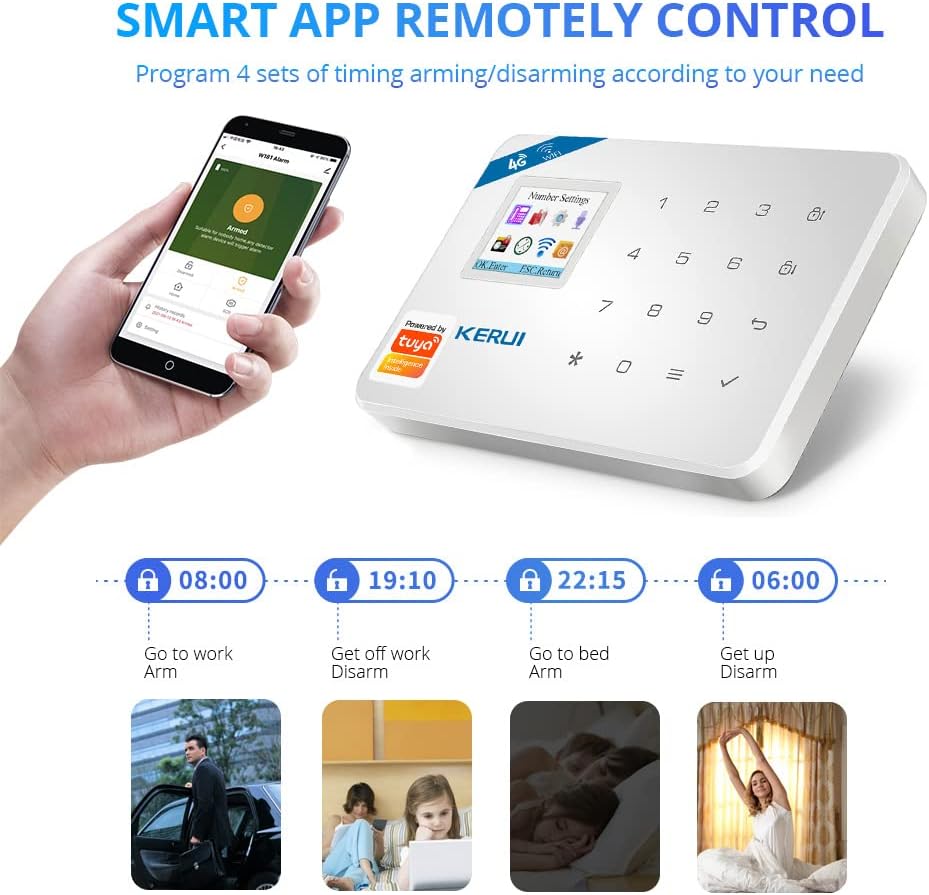
- Scheduled Arm/Disarm: Set up to 4 sets of scheduled arm/disarm/stay arm functions based on zone, day, and time. This feature is ideal for automating security routines, such as arming when you leave for work and disarming when you return.
Image Description: This image illustrates the "Smart App Remotely Control" feature, showing how users can program 4 sets of timing arming/disarming schedules via the mobile application. Examples include setting schedules for going to work, getting off work, going to bed, and waking up.
3.2 Two-Way Audio Communication

The alarm panel can function as a common phone, allowing you to make and receive calls directly. Additionally, the mobile application enables two-way audio communication through the host panel.
- Direct Calling: The host can call other phones directly.
- Remote Monitoring: Users can control the host panel to play voice messages via the app, which can be used to deter intruders or communicate with individuals on-site.
Image Description: This image demonstrates the two-way audio functions of the KERUI W18 system. It shows a user interacting with the alarm panel as if it were a phone, and another scenario where the app is used to play a voice message ("you were discovered") through the panel to scare away a potential thief.
3.3 Alarm Notifications and Siren
- Automatic Dialing: When an alarm is triggered, the system automatically dials up to 6 preset phone numbers.
- SMS Alerts: Text messages are sent to notify you of the specific zone that triggered the alarm.
- Loud Siren: The external siren produces a loud alarm, up to 110dB, to alert occupants and neighbors.
- Emergency Button: Children and seniors can press the emergency alarm button on the remote controller to trigger all alarms and send emergency calls/messages to family members.

Image Description: A diagram illustrating the operational flow of the KERUI W18 alarm system. It shows the steps: 1. Connect power, insert SIM, connect WiFi; 2. Arm/disarm via remote or phone; 3. Detector/sensor triggers alarm; 4. System notifies user via SMS, call, or app, and auto-dials help numbers.
3.4 System Applications

The KERUI W18 alarm system is versatile and suitable for various security needs:
- Burglar Alarm: Detects unauthorized entry with door/window sensors and motion detectors.
- SOS Function: Provides an emergency call feature for immediate assistance.
- Child Safety Protection: Helps monitor and secure areas to protect children.
- Business Security: Ideal for securing small businesses, offices, or shops.
- Home Security: Comprehensive protection for houses and apartments.
Image Description: A collage showcasing various applications of the KERUI W18 alarm system, including burglar detection, SOS functionality for emergencies, child safety monitoring, and security for both home and business environments.
4. Maintenance
- Battery Monitoring: The system features low-voltage indication for sensors and the main panel. Replace batteries promptly when indicated to ensure continuous operation. The main panel has an internal rechargeable battery that provides up to 6 hours of operation during power failures.
- Sensor Batteries: Wireless PIR motion sensors and door/window sensors use AAA batteries (12 AAA batteries included in total for the system, likely distributed among sensors).
- Anti-Tamper Feature: The system includes an anti-tamper function to detect unauthorized attempts to disable or remove components.
- Cleaning: Gently wipe the alarm panel and sensors with a soft, dry cloth. Avoid using abrasive cleaners or solvents.
5. Troubleshooting
If you encounter issues with your KERUI W18 alarm system, please refer to the following common troubleshooting tips:
- System Not Powering On:
- Ensure the power adapter is securely connected to the alarm panel and a working power outlet.
- Check if the internal rechargeable battery is charged.
- Sensors Not Responding:
- Verify that the insulating sheets have been removed from the sensor batteries.
- Check and replace sensor batteries if the low-voltage indicator is active.
- Ensure sensors are within the wireless range of the main panel.
- WiFi Connection Issues:
- Confirm your WiFi network is 2.4GHz. The system does not support 5GHz WiFi.
- Double-check the WiFi password entered in the app. Avoid special characters if possible.
- Ensure the alarm panel is within range of your WiFi router.
- Restart your router and the alarm panel.
- GSM Features Not Working:
- Ensure a standard-sized GSM SIM card with active credit is properly inserted.
- Check the SIM card's signal strength on the alarm panel display.
- Verify that the preset phone numbers are correctly configured.
- App Control Issues:
- Ensure your smartphone has an active internet connection (WiFi or mobile data).
- Verify that the app is updated to the latest version.
- Log out and log back into the app.
For further assistance, please contact customer support via email at fuers.csc01@outlook.com. They will provide professional replies during working hours.
6. Specifications
| Feature | Detail |
|---|---|
| Model Number | KERUI-W18 |
| Connectivity Technology | Wireless (2.4G WIFI + GSM) |
| Display | TFT Color Display |
| Alarm Zones | 99 Zones (8 optional zone types) |
| Alarm Phone Numbers | 6 groups preset |
| Alarm Recording | 10s automatic message recording |
| Siren Output | 110dB (wired siren included) |
| Power Source | Battery Powered (internal rechargeable battery, up to 6 hours backup) |
| Sensor Batteries | AAA batteries (12 included for sensors) |
| Compatible Devices | Smartphone (iOS/Android App) |
| Max Sensors Supported | 150 various sensors |
| Item Weight | 1.01 Kilograms |
| Package Dimensions | 22.7 x 14.1 x 10.8 cm |
7. Customer Support
For any questions, technical assistance, or other needs regarding your KERUI W18 alarm system, please contact our customer service team:
Email: fuers.csc01@outlook.com
Our team will provide professional assistance during our working hours.
Ask a question about this manual
Ask about setup, troubleshooting, compatibility, parts, safety, or missing instructions. Manuals+ will review the question and use this page’s manual context to help answer it.