
1. Introduction
This instruction manual provides essential information for the proper installation, operation, and maintenance of the Turbochef CON-3012-1 Service Kit, Control Board 2020. This genuine OEM replacement part is designed to ensure the continued safety, reliability, and performance of your TurboChef oven. Please read this manual thoroughly before proceeding with any installation or service.
2. Safety Information
WARNING:
- Always disconnect power to the appliance before installing or servicing the control board. Failure to do so can result in serious injury or death.
- Installation should only be performed by qualified service personnel.
- Use only genuine TurboChef replacement parts to ensure compatibility and maintain product warranty.
- Handle electronic components with care to prevent electrostatic discharge (ESD) damage.
3. Product Overview
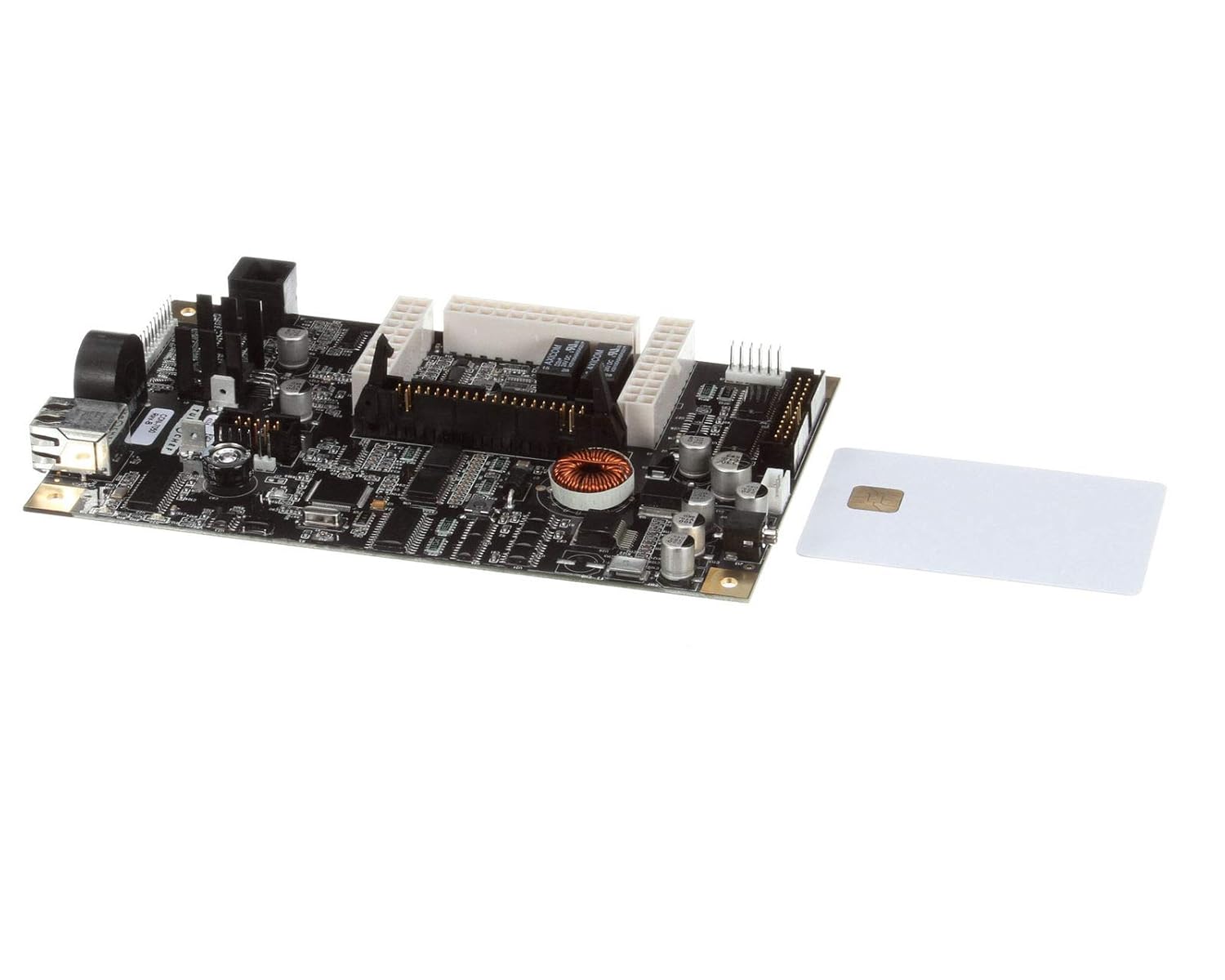
Figure 1: The Turbochef CON-3012-1 Control Board, featuring various electronic components, connectors, and a separate white smart card with a gold chip. This image illustrates the primary components of the service kit.
The CON-3012-1 Service Kit includes the main control board and associated components necessary for replacement in compatible TurboChef oven models. This board is crucial for managing the oven's functions, including temperature control, cooking cycles, and user interface interactions.
4. Setup and Installation
This section outlines the general steps for replacing the control board. Refer to your specific oven model's service manual for detailed, model-specific instructions and diagrams.
- Preparation:
- Ensure the oven is completely disconnected from the power supply.
- Gather necessary tools (e.g., screwdrivers, pliers, anti-static wrist strap).
- Clear a clean, static-free workspace.
- Accessing the Control Board:
- Carefully open the oven's access panel where the control board is located. This typically involves removing screws or latches.
- Take photos of existing wiring connections before disconnecting to aid reassembly.
- Removing the Old Board:
- Disconnect all wiring harnesses and connectors from the old control board. Note their positions.
- Unmount the old control board from its housing.
- Installing the New Board:
- Carefully place the new CON-3012-1 control board into position and secure it.
- Reconnect all wiring harnesses and connectors to their correct positions on the new board, referring to your photos if needed. Ensure all connections are secure.
- Final Steps:
- Close and secure the oven's access panel.
- Reconnect the oven to the power supply.
- Perform initial power-on tests as per your oven's service manual.
5. Operating Principles
The CON-3012-1 control board is the central processing unit for your TurboChef oven. Once installed and powered, it manages various operational aspects:
- Temperature Regulation: Monitors and controls heating elements to maintain precise cooking temperatures.
- Program Execution: Executes pre-programmed cooking cycles and user-defined settings.
- Sensor Integration: Processes data from various sensors (e.g., temperature, door sensors) to ensure safe and efficient operation.
- User Interface Communication: Facilitates interaction between the user and the oven's display and controls.
- Diagnostic Functions: Performs self-diagnostics and reports errors through the oven's display or service codes.
No direct user operation of the control board itself is required beyond its proper installation and the normal operation of the oven it controls.
6. Maintenance
The Turbochef CON-3012-1 Control Board is designed for long-term reliability. Regular maintenance primarily involves ensuring the environment around it is clean and free from obstructions.
- Cleaning: Periodically, with power disconnected, gently clean any dust or debris from around the control board using a soft brush or compressed air. Avoid using liquids or abrasive cleaners.
- Inspections: During routine oven maintenance, visually inspect the control board for any signs of damage, loose connections, or overheating (e.g., discoloration).
- Environmental Control: Ensure the oven's ventilation systems are clear and functioning correctly to prevent excessive heat buildup around the control board.
Note: Do not attempt to repair the control board yourself. If a fault is suspected, replace the board with a genuine OEM part.
7. Troubleshooting
If your TurboChef oven experiences issues after control board replacement, consider the following common troubleshooting steps. For complex issues, consult a qualified service technician.
| Symptom | Possible Cause | Solution |
|---|---|---|
| Oven does not power on after board replacement. | Loose power connection, incorrect wiring, faulty power supply. | Verify all power connections are secure. Double-check wiring against diagrams. Test power outlet. |
| Oven displays error codes. | Sensor malfunction, communication error, component failure. | Refer to your oven's specific service manual for error code definitions and troubleshooting steps. Ensure all sensors are properly connected. |
| Inconsistent heating or cooking. | Faulty temperature sensor, calibration issue, or board malfunction. | Check temperature sensor connections. If issues persist, the board may require replacement or professional calibration. |
| User interface (display/buttons) unresponsive. | Loose ribbon cable, board communication issue. | Ensure all ribbon cables connecting the UI to the control board are firmly seated. |
8. Specifications
- Model Number: CON-3012-1
- Product Type: Food Service Supply / Oven Control Board
- Package Dimensions: 10.04 x 6.77 x 3.15 inches (25.5 x 17.2 x 8 cm)
- Item Weight: Approximately 13.93 ounces (395 grams)
- Manufacturer: Turbochef
- Country Of Origin: United States
- Compatibility: Designed for specific TurboChef oven models (refer to oven's service manual for exact compatibility).
9. Warranty and Support
This Turbochef CON-3012-1 Service Kit, Control Board 2020, as a genuine OEM part, is covered by TurboChef's standard warranty policy for replacement parts. For specific warranty terms and conditions, please refer to the documentation provided with your original TurboChef oven or contact TurboChef customer support directly.
For technical support, service inquiries, or to locate authorized service centers, please visit the official TurboChef website or contact their customer service department. When contacting support, please have your oven's model and serial number, along with the CON-3012-1 part number, ready.
Official TurboChef Website: www.turbochef.com