
1. Introduction
This manual provides essential instructions for the safe operation, maintenance, and troubleshooting of your DEWALT DWHT75900 Carbon Fiber Composite Hammer Tacker. Please read this manual thoroughly before using the tool to ensure proper function and safety.
The DEWALT DWHT75900 features a lightweight carbon fiber composite structure, designed to reduce overall tool weight and vibration. This design aims to minimize user fatigue during extended periods of work.
2. Safety Information
Always observe basic safety precautions when using any hand tool. Failure to follow these instructions may result in injury.
- Wear appropriate personal protective equipment, including safety glasses, at all times.
- Keep hands and body parts clear of the stapling area.
- Ensure the work surface is stable and secure.
- Do not point the tool at yourself or others.
- Use only the specified staple sizes: 5/16", 3/8", and 1/2" heavy-duty staples.
- Store the tool in a dry, secure location out of reach of children.
3. Product Overview
The DEWALT DWHT75900 Hammer Tacker is designed for efficient and comfortable stapling tasks. Key features include a carbon fiber composite body for reduced weight and a vibration-absorbing grip for enhanced comfort.

Figure 1: Front view of the DEWALT DWHT75900 Hammer Tacker, showcasing its carbon fiber composite construction and ergonomic handle.

Figure 2: Side view of the DEWALT DWHT75900 Hammer Tacker, highlighting the overall design and grip area.
4. Setup
4.1 Loading Staples
The DWHT75900 features a drop-in loading mechanism for quick and easy reloading of fasteners.
- Locate the staple magazine release at the rear of the tool.
- Pull the magazine open or slide it out according to the tool's design.
- Insert a strip of 5/16", 3/8", or 1/2" heavy-duty staples into the magazine with the points facing down.
- Close the magazine securely until it locks into place. Ensure it is fully seated to prevent misfires or jams.

Figure 3: Illustrates the staple loading mechanism, showing the magazine ready for staple insertion.
5. Operating Instructions
5.1 General Operation
To operate the hammer tacker, hold the tool firmly by the vibration-absorbing grip. Position the stapling end against the material to be fastened. Strike the tool against the surface with a controlled motion to drive the staple. The auto-lock, anti-jam pinch latch system is designed for reliable operation and to minimize staple jams.
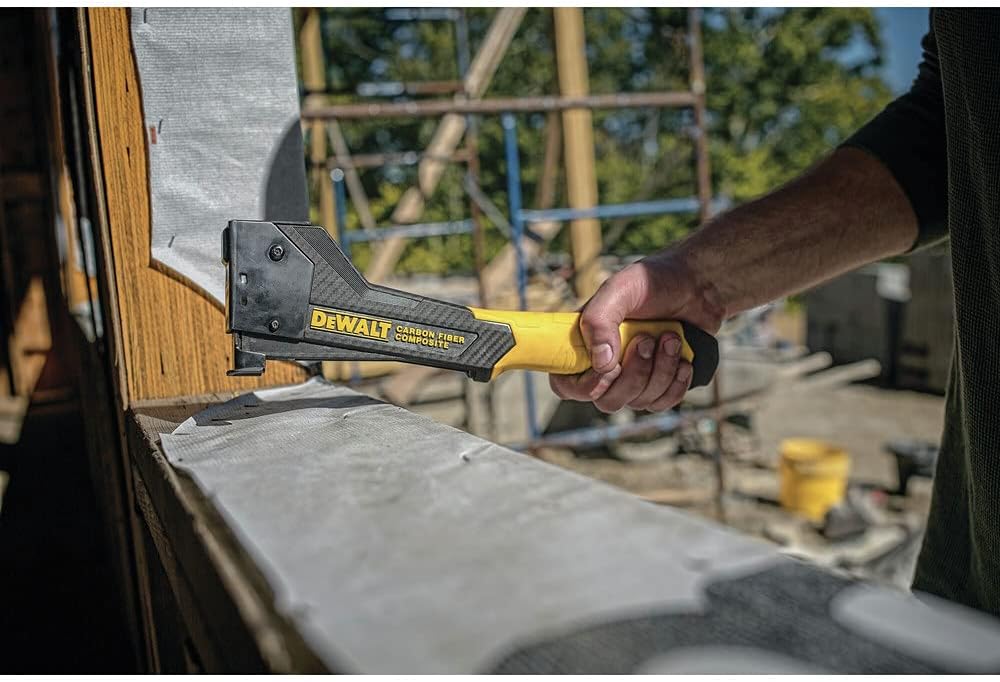
Figure 4: The DEWALT DWHT75900 Hammer Tacker being used to fasten material, demonstrating proper grip and application.
5.2 Common Applications
- Roofing underlayment installation
- Carpet installation
- Sheathing house wrap attachment
- Insulation fastening
6. Maintenance
Regular maintenance ensures the longevity and optimal performance of your hammer tacker.
- Cleaning: Periodically clean the tool with a dry cloth to remove dust and debris. Do not use solvents or harsh chemicals.
- Inspection: Before each use, inspect the tool for any signs of damage, loose parts, or wear. Ensure the staple magazine operates smoothly.
- Lubrication: No specific lubrication is typically required for manual hammer tackers. Refer to the manufacturer's guidelines if unusual resistance is encountered.
- Storage: Store the tool in a clean, dry environment. Remove any staples from the magazine before storing for extended periods.
7. Troubleshooting
If you encounter issues with your hammer tacker, refer to the following common troubleshooting steps.
- Staples Not Firing:
- Check if the magazine is loaded with staples and properly closed.
- Ensure the staples are the correct size (5/16", 3/8", or 1/2" heavy-duty).
- Inspect for any jammed staples in the firing mechanism.
- Staple Jams:
- Open the staple magazine and carefully remove any bent or misaligned staples.
- Use a small tool (e.g., pliers or screwdriver) to gently clear any staples stuck in the firing channel. Always ensure hands are clear of the firing mechanism.
- Ensure the magazine is clean and free of debris.
- Staples Not Driving Fully:
- Verify that you are striking the tool with sufficient force.
- Check the material being fastened; some harder materials may require more force or a different fastening method.
If problems persist after attempting these steps, contact DEWALT customer support for further assistance.
8. Specifications
| Feature | Detail |
|---|---|
| Brand | DEWALT |
| Model Number | DWHT75900 |
| Material Type | Carbon Fiber Composite / Blend |
| Staple Compatibility | 5/16", 3/8", & 1/2" Heavy Duty Staples |
| Product Dimensions | 37.8L x 12.7W Centimetres |
| Weight Reduction | 45% Less Weight (compared to standard models) |
| Muscle Exertion Reduction | 25% Less Muscle Exertion (compared to standard models) |
| Features | Quick Drop-in Loading, Auto-lock, Anti-Jam Pinch Latch, Vibration Absorbing Grip |
9. Warranty and Support
For warranty information, technical support, or service inquiries, please refer to the official DEWALT website or contact DEWALT customer service directly. Keep your purchase receipt as proof of purchase for warranty claims.
DEWALT Contact Information:
- Website: www.dewalt.com
- Customer Service: Refer to the website for regional contact numbers.


