
Introduction
This manual provides detailed instructions for the safe operation and maintenance of your Contixo F3 RC Drone. Please read this manual thoroughly before operating the drone to ensure proper use and to prevent damage or injury. The Contixo F3 features an integrated 720p WiFi FPV camera, Altitude Hold, 2.4GHz control, 6-Axis Gyro, and One-Key Landing/Take-Off functions.
Safety Guidelines
- Always operate the drone in open areas, away from people, animals, and obstacles.
- Do not fly near airports, power lines, or restricted airspace.
- Ensure the drone battery is fully charged before each flight.
- Keep fingers and hair away from rotating propellers.
- Adult supervision is recommended for users under 14 years of age.
- Do not operate in strong winds or adverse weather conditions.
- Turn off the drone and remote control when not in use.
Package Contents
Verify that all components are present in your package:
- Contixo F3 RC Drone
- Remote Control Transmitter
- USB Charging Cable
- Spare Propellers
- Propeller Guards
- Landing Gear
- Screwdriver
- User Manual

Image: Contixo F3 Drone, remote control, and packaging. This image shows the drone, its remote, and the retail box, indicating the main components included.
Setup
1. Drone Battery Installation & Charging
- Locate the battery compartment on the underside of the drone.
- Insert the drone battery, ensuring correct polarity.
- Close the battery compartment securely.
- Connect the USB charging cable to the drone battery and a USB power source (e.g., computer, USB adapter).
- Allow the battery to fully charge before first use. Charging time may vary.
2. Remote Control Battery Installation
- Open the battery cover on the back of the remote control.
- Insert 3 AAA batteries (not included) according to the polarity markings.
- Close the battery cover.
3. Propeller Guard and Landing Gear Installation
- Attach the propeller guards to each motor arm for protection.
- Securely attach the landing gear to the drone's underside.

Image: Contixo F3 Drone with propeller guards and landing gear installed. This image displays the drone fully assembled with its protective propeller guards and landing gear.
4. Pairing the Drone and Remote Control
- Place the drone on a flat, level surface.
- Turn on the drone. The indicator lights will flash.
- Turn on the remote control.
- Push the left joystick (throttle) all the way up, then all the way down. The drone lights will become solid, indicating successful pairing.
5. App Download and FPV Setup
- Download the Contixo FPV app from your smartphone's app store (iOS or Android).
- Turn on the drone and connect your smartphone to the drone's Wi-Fi network (usually named "Contixo-F3-XXXX").
- Open the Contixo FPV app to view the live camera feed and access advanced controls.

Image: Contixo F3 Drone, remote control, and a smartphone showing the FPV app interface. This image illustrates the complete setup for FPV flight.
Operating Instructions
Basic Controls (Remote Control)
- Left Joystick (Throttle): Up/Down for altitude, Left/Right for yaw (rotation).
- Right Joystick: Up/Down for forward/backward flight, Left/Right for left/right sideward flight.
- One-Key Take-Off/Landing Button: Press once to automatically take off or land.
- Trim Buttons: Adjust for stable hovering if the drone drifts.
- Speed Mode Button: Cycle through different flight speeds (beginner, intermediate, advanced).
- 360° Flip Button: Press and then move the right joystick in the desired direction to perform a flip.

Image: Contixo F3 Drone remote control. This image shows the layout of the remote control with its various buttons and joysticks.
Advanced Features
- Altitude Hold: The drone maintains its current altitude automatically, allowing for easier control and stable video recording.
- FPV (First Person View) Camera: Stream live 720p video to your smartphone via the Contixo FPV app. Record videos and capture photos directly to your device.
- G-Sensor Control (via App): Use your smartphone's accelerometer to control the drone's flight direction by tilting your phone.
- Track-Controlled Flight (via App): Draw a flight path on your smartphone screen, and the drone will follow the designated route automatically.
Maintenance
- Cleaning: Use a soft, dry cloth to clean the drone body and camera lens. Avoid using liquids.
- Propeller Replacement: If a propeller is damaged, carefully remove it and replace it with a new one, ensuring the correct propeller type (A or B) is installed in the corresponding position.
- Battery Care: Store batteries in a cool, dry place. Do not overcharge or over-discharge.
- Storage: When not in use for extended periods, remove batteries from both the drone and remote control.
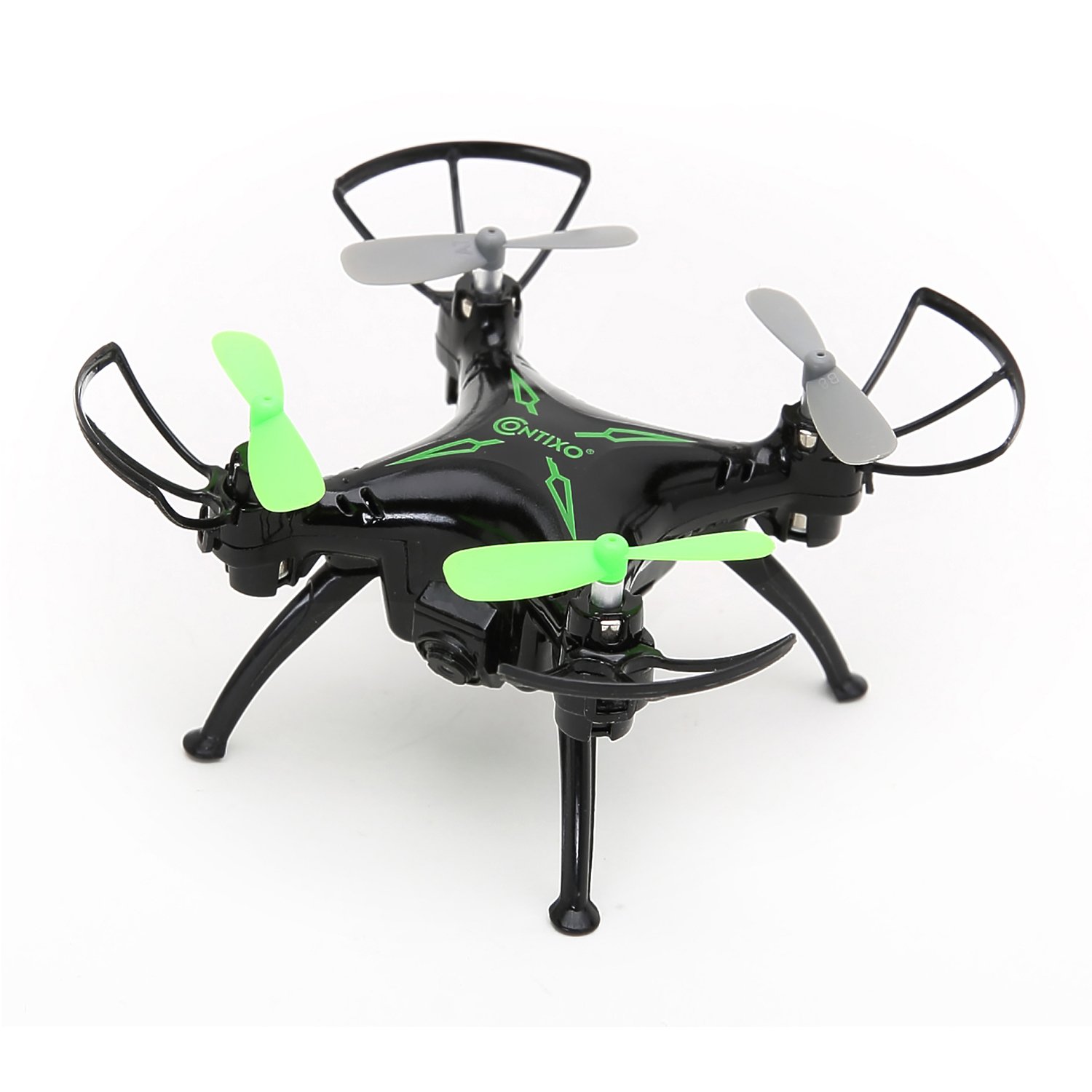
Image: Top view of the Contixo F3 Drone. This image provides a clear view of the drone's propellers and body for maintenance reference.
Troubleshooting
| Problem | Possible Cause | Solution |
|---|---|---|
| Drone does not respond to remote. | Not paired; low battery; interference. | Re-pair the drone and remote; charge batteries; move to an open area. |
| Drone drifts during flight. | Not calibrated; trim settings incorrect. | Calibrate the drone on a flat surface; use trim buttons to adjust. |
| FPV video is choppy or disconnected. | Weak Wi-Fi signal; too far from drone; app issue. | Ensure strong Wi-Fi connection; fly closer to the drone; restart app/drone. |
| Drone does not take off. | Low battery; propellers blocked; not paired. | Charge battery; check for obstructions; re-pair drone. |
Specifications
- Brand: Contixo
- Model: F3
- Color: Black
- Skill Level: Beginner, Professional
- Item Weight: 3.52 ounces (approximately 100 grams)
- Battery Capacity: 220 Milliamp Hours (Lithium Polymer)
- Control Type: Remote Control
- Video Output Resolution: 1280x720 Pixels (720p HD FPV)
- Connectivity: 2.4GHz (Remote Control), Wi-Fi (FPV)
- Gyroscope: 6-Axis Gyro
- Special Features: Altitude Hold, One-Key Landing/Take-Off, FPV Camera, G-Sensor Control, Track-Controlled Flight
Warranty and Support
For warranty information, technical support, or replacement parts, please visit the official Contixo website or contact their customer service. Keep your purchase receipt as proof of purchase.
Contixo Official Website: www.contixo.com
Note: Specific warranty terms may vary by region and retailer.