
Introduction
This user manual provides comprehensive instructions for the safe and effective operation, maintenance, and troubleshooting of your Axon V168 Behind-The-Ear (BTE) Sound Enhancement device. Please read this manual thoroughly before using the device to ensure optimal performance and longevity.
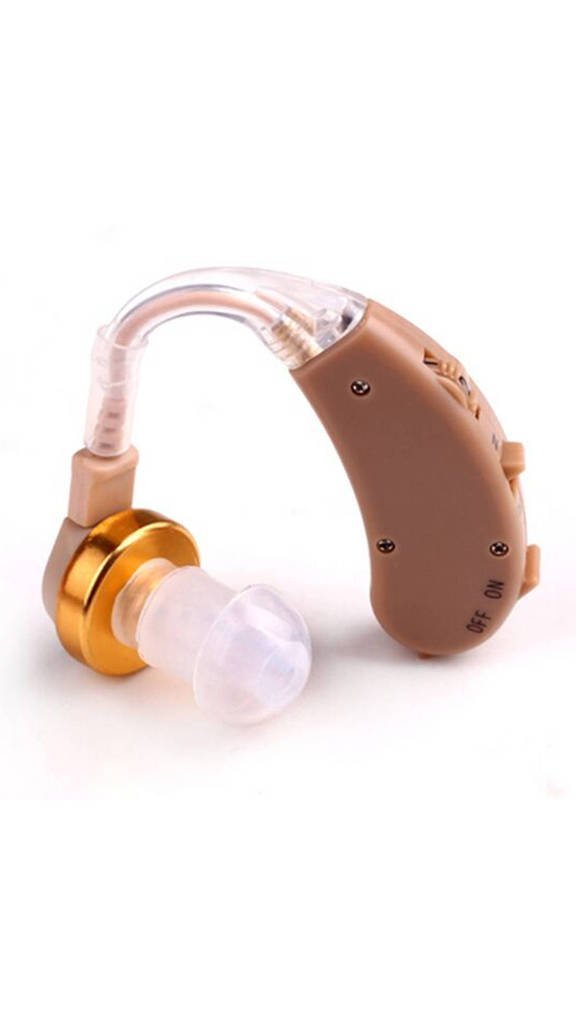
Image: Axon V168 BTE Sound Enhancement device. This image displays the compact, beige-colored device, illustrating its behind-the-ear design.
Safety Information
- Consult a medical professional before use if you have any pre-existing ear conditions.
- Keep out of reach of children and pets. Small parts can be a choking hazard.
- Avoid exposure to extreme temperatures, moisture, and direct sunlight.
- Do not attempt to repair or modify the device yourself. Contact authorized service personnel.
- Remove batteries when the device is not in use for extended periods.
Package Contents
Please verify that all items are present in the package:
- Axon V168 BTE Sound Enhancement Device
- Ear tips (various sizes)
- Cleaning brush
- User Manual
- Battery (1, type unknown, included as per specifications)
Setup
1. Battery Installation
- Locate the battery compartment on the device.
- Gently open the battery door.
- Insert one battery (type as specified in the Specifications section) with the correct polarity (+/-).
- Close the battery door securely.
2. Ear Tip Selection and Placement
- Choose an ear tip size that fits comfortably and securely in your ear canal. A proper fit is crucial for sound quality and to prevent feedback.
- Attach the selected ear tip firmly to the sound output nozzle of the device.
- Place the BTE unit behind your ear, then gently insert the ear tip into your ear canal.
Operating Instructions
1. Powering On/Off
- To power on the device, locate the power switch (often integrated with the volume control) and slide it to the "On" position.
- To power off, slide the switch to the "Off" position.
2. Volume Adjustment
- The device features a rotary volume control. Rotate the wheel upwards to increase volume and downwards to decrease volume.
- Start with a low volume setting and gradually increase it to a comfortable level. Avoid excessively high volumes to prevent hearing damage.
3. Initial Use and Adaptation
It may take some time to adapt to your new sound enhancement device. Begin by using it in quiet environments and gradually introduce it to noisier settings. Your brain needs time to re-learn how to process sounds with amplification.
Maintenance
1. Daily Cleaning
- After each use, gently wipe the device and ear tip with a soft, dry cloth.
- Use the provided cleaning brush to remove any earwax or debris from the ear tip and sound port.
- Do not use water, cleaning solutions, or alcohol directly on the device.
2. Storage
- Store the device in a cool, dry place, away from direct sunlight and heat.
- When not in use for an extended period, remove the battery to prevent corrosion.
3. Battery Replacement
Replace the battery when the sound becomes weak or the device stops functioning. Refer to the "Battery Installation" section for replacement instructions.
Troubleshooting
| Problem | Possible Cause | Solution |
|---|---|---|
| No sound or weak sound |
|
|
| Whistling or feedback sound |
|
|
| Intermittent sound |
|
|
Specifications
| Feature | Detail |
|---|---|
| Model Number | V168 |
| Brand | Axon |
| Type | Behind-The-Ear (BTE) Sound Enhancement |
| Color | Beige |
| Material | Plastic |
| Power Source | Battery Powered |
| Battery Type | 1 Unknown battery required (included), Alkaline |
| Control Type | Button Control (Volume) |
| Item Weight | 200 g |
| Package Dimensions | 22.6 x 16.2 x 3.6 cm |
| Special Features | Compact size, Durable construction |
Warranty and Support
For information regarding warranty coverage and customer support, please refer to the warranty card included with your product or visit the official Axon website. Keep your purchase receipt as proof of purchase for any warranty claims.
For technical assistance or service inquiries, please contact Axon customer support through the channels provided on their official website or product packaging.