
1. Product Overview
The United Pacific 36934 is a high-power dual Osram LED 1157 bulb designed for automotive applications. This bulb features a bright 2-watt Osram LED, delivering 250 lumens of light. It is engineered with a double contact and an offset pin configuration, making it suitable for specific vehicle sockets. This red LED bulb is intended for use in applications requiring an 1157 type bulb, such as brake lights or turn signals, where a red light output is desired.

Image 1.1: Front view of the United Pacific 36934 Red LED 1157 Bulb.
2. Features
- High Power Osram LED: Equipped with a bright 2-watt Osram LED for superior illumination.
- High Brightness: Delivers 250 lumens of light output.
- 1157 Base Type: Designed with a standard 1157 bulb base.
- Double Contact: Features a double contact design for dual-function applications (e.g., tail light and brake light).
- Offset Pin Configuration: Ensures correct fitment in compatible sockets.
- Red LED/Clear Lens: Provides red light output through a clear lens.
3. What's in the Box
Each package contains:
- One (1) United Pacific High Power Dual Osram LED 1157 Bulb (Red)
Note: If multiple bulbs are required, please ensure the correct quantity is ordered.
4. Installation Instructions
Before beginning installation, ensure your vehicle's ignition is off and the battery is disconnected to prevent electrical shorts or injury.
- Locate the Bulb Socket: Identify the specific light assembly (e.g., tail light, turn signal) where the 1157 bulb needs to be replaced. Consult your vehicle's service manual for exact locations and access procedures.
- Remove the Old Bulb: Carefully twist or pull the bulb socket from the light assembly. Once the socket is accessible, press down and twist the old 1157 incandescent bulb counter-clockwise to remove it.
- Inspect the Socket: Check the bulb socket for any corrosion or damage. Clean if necessary.
- Insert the LED Bulb: Align the offset pins of the United Pacific 36934 LED bulb with the slots in the socket. Gently push the bulb into the socket and twist clockwise until it locks into place. Ensure the double contacts on the bulb base make proper contact with the socket terminals.
- Test the Bulb: Before reassembling the light assembly, reconnect the vehicle's battery and test the light function (e.g., turn on parking lights, apply brakes, activate turn signals) to ensure the LED bulb illuminates correctly.
- Reassemble: Once confirmed operational, reinsert the bulb socket into the light assembly and secure it.

Image 4.1: Side view of the LED bulb, showing its form factor.
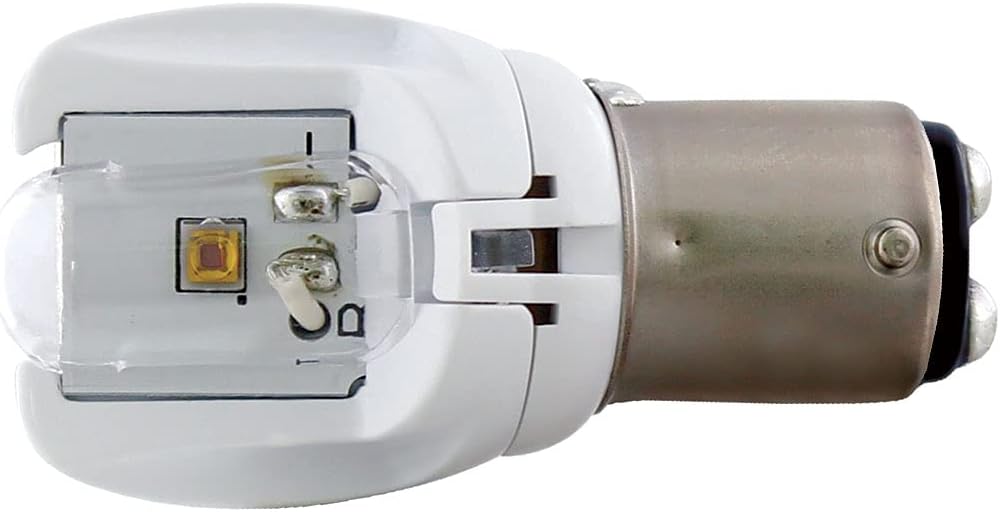
Image 4.2: Bottom view of the LED bulb, highlighting the double contacts and offset pin design.
Important Note on Fitment: Some older vehicle sockets or specific deep sockets may have limited clearance. Ensure the bulb seats fully and securely into the socket. If the bulb does not seat correctly, it may not make proper electrical contact or could be incompatible with the specific socket design.
5. Operation
Once correctly installed, the United Pacific 36934 LED bulb operates automatically with your vehicle's existing lighting system. It will illuminate when the corresponding light function (e.g., parking lights, brake lights, turn signals) is activated.
- Dual Functionality: As an 1157 type bulb, it supports dual brightness levels for applications like tail lights (dimmer) and brake lights/turn signals (brighter).
6. Maintenance
LED bulbs are generally maintenance-free due to their long lifespan and durable construction. No regular maintenance is required for the bulb itself. However, it is recommended to periodically check the vehicle's light assemblies for dirt, moisture, or damage that could affect bulb performance or lifespan.
7. Troubleshooting
| Problem | Possible Cause | Solution |
|---|---|---|
| Bulb does not light up. |
|
|
| Bulb flickers or is dim. |
|
|
| Hyper-flashing (turn signals). |
|
|
8. Specifications
| Attribute | Detail |
|---|---|
| Brand | United Pacific |
| Model Number | 36934 |
| Bulb Type | 1157 LED |
| Light Source Type | Osram LED |
| Wattage | 2 Watts |
| Lumen Output | 250 Lumens |
| Color | Red |
| Voltage | 12 Volts |
| Contact Type | Double Contact |
| Pin Configuration | Offset Pin |
| Fit Type | Universal Fit |
| Item Weight | 0.986 ounces |
| Product Dimensions | 4.95 x 3.25 x 1.15 inches |
| UPC/GTIN | 710270369348 |
9. Safety Information
- Always disconnect the vehicle's battery before performing any electrical work to prevent injury or damage.
- Wear appropriate safety gear, such as gloves and eye protection, during installation.
- Ensure the bulb is securely installed and makes proper contact to avoid intermittent operation or failure.
- Do not touch the LED chips directly, as oils from your skin can reduce their lifespan.
- Dispose of old bulbs responsibly according to local regulations.
10. Warranty and Support
United Pacific products are manufactured under strict quality control standards. For specific warranty information regarding your 36934 LED bulb, please refer to the packaging or visit the official United Pacific website. For technical support, troubleshooting assistance, or inquiries about replacement parts, please contact United Pacific customer service directly.
You can find more information and contact details on the United Pacific Brand Store.