
Introduction
This manual provides essential instructions for the safe and efficient operation of your Panasonic SC-AKX880 Audio System. Please read this manual thoroughly before using the product and retain it for future reference. The SC-AKX880 is a powerful mini-component audio system featuring Airquake Bass, an external 25cm superwoofer, 4GB internal memory, and Bluetooth connectivity for versatile audio playback.
Setup
1. Unpacking
- Carefully remove all components from the packaging.
- Verify that all items are present: Main unit, two main speakers, one external superwoofer, remote control, power cord, and speaker cables.
- Retain packaging materials for future transport or service.
2. Component Placement
Place the main unit, speakers, and superwoofer on a stable, level surface. Ensure adequate ventilation around the main unit. For optimal sound performance, position the main speakers equidistant from the listening area and the superwoofer in a suitable location for bass response. Note that the speaker cables are typically short, requiring the main unit and speakers to be placed relatively close together. An approximate space of 1.50m (length) x 37cm (width) x 43cm (height) may be required for the complete setup.
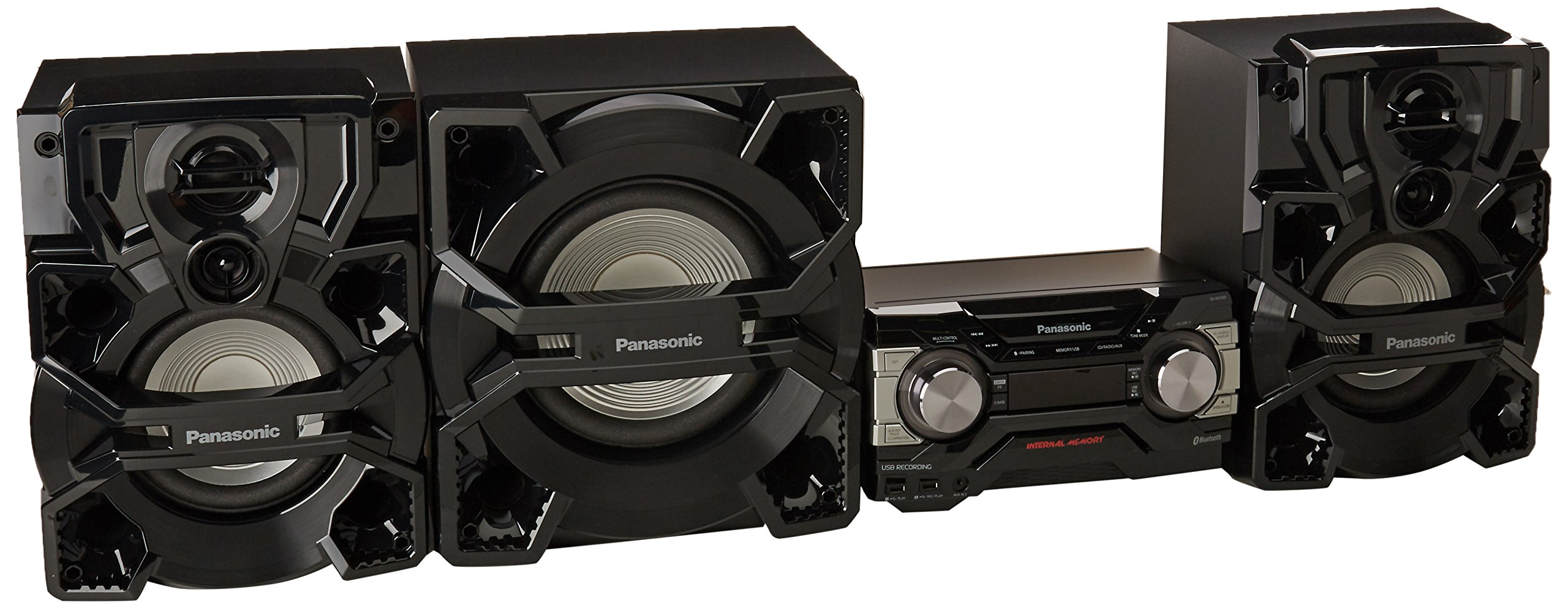
Image: The main unit of the Panasonic SC-AKX880 audio system. It features a central display, control knobs for volume and selection, and various input/output ports. The unit is black with silver accents.
3. Connecting Speakers and Superwoofer
- Connect the main speakers to the corresponding speaker terminals on the rear of the main unit. Ensure correct polarity (+ to + and - to -).
- Connect the external superwoofer to its dedicated output on the main unit.
4. Power Connection
- Plug the power cord into the AC inlet on the main unit.
- Insert the other end of the power cord into a suitable wall outlet.
5. Initial Power On
- Press the POWER button on the main unit or remote control to turn on the system.
- Follow any on-screen prompts for initial setup, such as language selection.
Operating Instructions
1. Basic Controls
- Power On/Off: Press the POWER button.
- Volume Adjustment: Use the VOLUME +/- knob on the main unit or buttons on the remote control.
- Source Selection: Press the CD/RADIO/AUX or MEMORY/USB buttons on the main unit, or corresponding buttons on the remote control to switch between input sources (CD, Radio, AUX, USB, Bluetooth, Internal Memory).
2. Bluetooth Connectivity
- Press the Bluetooth button on the main unit or remote control to select Bluetooth mode.
- On your smartphone, tablet, or laptop, enable Bluetooth and search for available devices.
- Select "SC-AKX880" from the list of devices to pair.
- Once paired, you can stream audio wirelessly from your device to the audio system.
3. CD Playback
- Press the CD/RADIO/AUX button to select CD mode.
- Press the OPEN/CLOSE button to open the CD tray.
- Place a CD with the label side up in the tray and close it.
- Playback will start automatically or by pressing the PLAY/PAUSE button.
4. USB Playback and Recording
- Playback: Insert a USB device into the USB port. Press MEMORY/USB to select USB mode. Use navigation buttons to select and play tracks.
- Recording: The system supports USB recording. Refer to the on-screen menu or specific buttons (e.g., USB REC) for recording from CD, Radio, or AUX sources to a USB device.
5. Internal Memory (4GB)
- The system includes 4GB of internal memory for storing music.
- Use the MEMORY/USB button to access internal memory.
- Music can be transferred from CDs or USB devices to the internal memory. Consult the on-screen menu for transfer options.
6. Airquake Bass
The Airquake Bass system, combined with the 25cm external superwoofer, delivers dynamic and powerful bass. This feature is automatically engaged to enhance low-frequency sound reproduction. Adjust bass levels using the D.BASS button or equalizer settings if available.
7. Using the Remote Control
The included remote control provides full functionality for the audio system. Ensure batteries are correctly inserted. Point the remote control towards the main unit's sensor.

Image: The remote control for the Panasonic SC-AKX880 audio system. It features buttons for power, volume, source selection, playback control, numeric input, and various sound settings.
Maintenance
- Cleaning: Wipe the unit and speakers with a soft, dry cloth. Do not use liquid cleaners, aerosols, or abrasive cloths, as they may damage the finish.
- Ventilation: Ensure that the ventilation openings on the main unit are not blocked. Overheating can cause malfunctions.
- Environmental Conditions: Avoid exposing the system to direct sunlight, extreme temperatures, high humidity, or dusty environments.
- CD Tray Care: Keep the CD tray clean and free of debris. Do not force the tray open or closed.
Troubleshooting
| Problem | Possible Cause | Solution |
|---|---|---|
| No power | Power cord not connected; power outlet faulty. | Check power cord connection; try a different outlet. |
| No sound | Volume too low; incorrect source selected; speaker cables disconnected. | Increase volume; select correct input source; check speaker cable connections. |
| Bluetooth pairing fails | Device too far; Bluetooth not enabled on device; system not in pairing mode. | Move device closer; enable Bluetooth on device; ensure system is in Bluetooth pairing mode. |
| CD not playing | CD inserted incorrectly; CD dirty or scratched; incorrect source selected. | Reinsert CD correctly; clean CD; select CD source. |
| Remote control not working | Batteries depleted or inserted incorrectly; obstruction between remote and unit. | Replace batteries; check battery polarity; remove obstructions. |
Specifications
| Feature | Detail |
|---|---|
| Brand | Panasonic |
| Model Number | SC-AKX880 |
| Connectivity Technology | Bluetooth |
| Color | Black |
| Speaker System Type | 2.1 Channel with External Superwoofer (25cm) |
| Power Source | Electric Cable |
| Compatible Devices | Smartphone, Tablet, Laptop |
| Audio Output Mode | Stereo |
| Internal Memory | 4 GB |
| Item Weight | 5 Kilograms (Main Unit) |
| ASIN | B01M0IZ95Q |
Note: Dimensions for individual components (main unit, speakers, superwoofer) are not explicitly provided in the source data. The listed item weight likely refers to the main unit.
Warranty Information
The Panasonic SC-AKX880 Audio System comes with a 1-year warranty. This warranty covers defects in manufacturing only. For any warranty claims or issues, please contact the manufacturer directly.
Support
For further assistance, technical support, or service inquiries regarding your Panasonic SC-AKX880 Audio System, please refer to the official Panasonic website or contact their customer service department. Keep your product model number (SC-AKX880) and proof of purchase readily available when seeking support.
You can visit the official Panasonic store for more information: Panasonic Store