1. Introduction
Thank you for purchasing the Panasonic NC-BG3000 Electric Pump Thermo Pot. This appliance is designed to boil water and keep it warm efficiently, featuring a 3.0L capacity and a 220V 700W power rating. It incorporates VIP (Vacuum Insulation Panel) technology for energy saving and a Binchotan-carbon fluoride coating for far-infrared emission. This manual provides essential information for safe and effective use, including setup, operation, maintenance, and troubleshooting.
Please read this manual thoroughly before using the appliance and keep it for future reference.
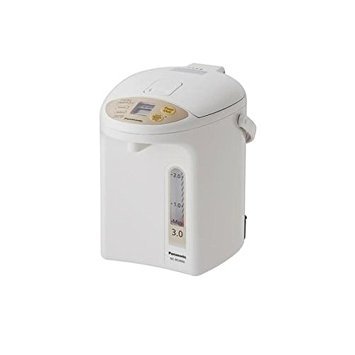
Image 1.1: Front view of the Panasonic NC-BG3000 Electric Pump Thermo Pot. This image displays the main body of the thermo pot, typically showing the control panel, dispensing spout, and handle. The white finish of the appliance is visible.
2. Important Safety Precautions
To prevent personal injury, electric shock, fire, or damage to the appliance, always observe the following safety precautions:
- This appliance operates on 220-240 Volts. Do not use it in regions with different voltage standards (e.g., USA or Canada).
- Do not immerse the appliance, power cord, or plug in water or other liquids.
- Always place the thermo pot on a stable, flat, heat-resistant surface, away from edges.
- Keep out of reach of children. Hot water and steam can cause severe burns.
- Do not open the lid while water is boiling or dispensing.
- Ensure the lid is securely closed before operating.
- Do not overfill the water tank beyond the maximum fill line.
- Unplug the appliance from the power outlet when not in use and before cleaning.
- Do not operate the appliance if the power cord or plug is damaged, or if the appliance malfunctions or has been damaged in any way.
- Use only genuine Panasonic replacement parts and accessories.
3. Parts Identification
Familiarize yourself with the components of your thermo pot:
- Lid: Covers the water tank, includes steam vent.
- Handle: For carrying the appliance.
- Control Panel: Contains buttons for various functions (e.g., Boil, Keep Warm, Dispense, Slow Drip).
- Water Level Indicator: Shows the current water volume inside.
- Dispensing Spout: Where hot water is dispensed.
- Inner Pot (Water Tank): Fluoride-coated with Binchotan-carbon for heating water.
- Power Cord Inlet: For connecting the detachable power cord.
- Base: Provides stability and houses heating elements.
4. Setup and First Use
Before using your thermo pot for the first time, follow these steps:
- Unpack: Carefully remove the thermo pot and all accessories from the packaging. Retain packaging for future transport if needed.
- Clean: Wash the inner pot and lid with warm water and a mild detergent. Rinse thoroughly and wipe dry. Do not use abrasive cleaners or scourers.
- Placement: Place the thermo pot on a stable, level, heat-resistant surface, ensuring adequate ventilation around the unit.
- Fill Water: Open the lid and fill the inner pot with fresh water up to the 'MAX' fill line. Do not overfill.
- Close Lid: Securely close the lid until it clicks into place.
- Connect Power: Insert the power cord into the appliance's power inlet, then plug the other end into a grounded 220-240V AC power outlet.
- Initial Boil: Press the 'Boil' button. Allow the water to boil completely, then dispense and discard this first batch of hot water. This cleans the internal components and removes any manufacturing residues.
5. Operating Instructions
5.1 Boiling Water
- Ensure the thermo pot is filled with water and the lid is closed.
- Plug the appliance into a suitable power outlet.
- Press the 'Boil' button. The indicator light will illuminate, and the boiling process will begin.
- Once boiling is complete, the appliance will automatically switch to the 'Keep Warm' mode.
5.2 Keep Warm Function
The thermo pot automatically maintains the water at a warm temperature after boiling. The VIP (Vacuum Insulation Panel) technology helps save energy during this process.
- To select a specific keep warm temperature (if available on your model), refer to the control panel buttons and follow the instructions.
- The Binchotan-carbon coating helps maintain water quality during the keep warm period.
5.3 Dispensing Water
To dispense hot water:
- Place a cup or container under the dispensing spout.
- Press and hold the 'Dispense' button. Water will flow from the spout.
- Release the button to stop dispensing.
5.4 Slow Drip Feature (for Drip-Brewed Coffee)
This feature allows for a slower, controlled dispense, ideal for drip-brewed coffee:
- Prepare your coffee dripper and cup.
- Press the 'Slow Drip' button. The indicator light will confirm activation.
- Press and hold the 'Dispense' button. Water will be dispensed at a reduced flow rate.
- Release the button to stop dispensing.
- Press the 'Slow Drip' button again to deactivate the feature.
6. Maintenance and Cleaning
Regular cleaning ensures optimal performance and longevity of your thermo pot.
6.1 Daily Cleaning
- Unplug: Always unplug the appliance and allow it to cool completely before cleaning.
- Exterior: Wipe the exterior with a soft, damp cloth. Do not use abrasive cleaners or solvents.
- Inner Pot: Empty any remaining water. Wipe the inside of the inner pot with a soft sponge or cloth. For stubborn stains, use a mild detergent and rinse thoroughly.
- Lid: The lid may be detachable for easier cleaning. Wash with warm, soapy water, rinse, and dry completely before reattaching.
6.2 Descaling (Monthly or as needed)
Mineral deposits (limescale) can build up over time, affecting performance. Descale your thermo pot regularly:
- Fill the inner pot with water and add a descaling agent suitable for electric kettles/thermo pots (e.g., citric acid solution) according to the descaler's instructions.
- Press the 'Boil' button and allow the solution to boil.
- Let the solution sit for the recommended time (usually 30-60 minutes).
- Dispense and discard the descaling solution.
- Rinse the inner pot thoroughly several times with fresh water to remove any residue. Boil fresh water once or twice and discard before normal use.
7. Troubleshooting
If you encounter issues with your thermo pot, refer to the following table:
| Problem | Possible Cause | Solution |
|---|---|---|
| Appliance does not turn on. | Not plugged in; power outage; faulty outlet. | Check power cord connection; check circuit breaker; try a different outlet. |
| Water not boiling. | Insufficient water; lid not closed properly; 'Boil' button not pressed. | Ensure water level is above MIN; close lid securely; press 'Boil' button. |
| Water dispensing slowly or not at all. | Limescale buildup; 'Dispense' button not pressed firmly; low water level. | Descale the appliance; press 'Dispense' button completely; refill water. |
| Unusual odor or taste in water. | First use residue; limescale buildup; stale water. | Perform initial boil and discard; descale; use fresh water. |
If the problem persists after trying these solutions, please contact Panasonic customer support.
8. Specifications
| Feature | Detail |
|---|---|
| Model Number | NC-BG3000 |
| Capacity | 3.0 Liters |
| Voltage | 220-240 Volts |
| Power Consumption (Boiling) | 700 Watts |
| Dimensions (H x W x D) | 27.5 x 21.7 x 28.7 cm (approx.) |
| Weight (including power cord) | 2.2 kg (approx.) |
| Inner Pot Material | Fluoride containing Binchotan-carbon |
| Energy Saving Feature | VIP (Vacuum Insulation Panel) |
9. Warranty and Support
This Panasonic appliance comes with a standard manufacturer's warranty. Please refer to the warranty card included with your product for specific terms, conditions, and duration. Keep your purchase receipt as proof of purchase.
For technical assistance, spare parts, or warranty claims, please contact Panasonic customer support in your region. You can find contact information on the official Panasonic website or in the documentation provided with your product.
Panasonic Customer Support: www.panasonic.com


