
1. Introduction
This manual provides essential information for the safe and efficient operation of your Makita DSD180Z 18V Li-Ion LXT Drywall Cutter. Please read these instructions thoroughly before first use to ensure proper handling, maximize performance, and prevent injury. Keep this manual for future reference.
The Makita DSD180Z is a cordless drywall cutter designed for precise and clean cutting in drywall and thin wood materials. It features an 18V Li-Ion LXT battery system (battery and charger sold separately), adjustable cutting depth, a screw-down blade clamp, and an integrated dust management system.

Figure 1: Makita DSD180Z 18V Li-Ion LXT Drywall Cutter (Battery and Charger Not Included)
2. Safety Information
Always observe basic safety precautions when using electric tools to reduce the risk of fire, electric shock, and personal injury.
General Power Tool Safety
- Work Area Safety: Keep the work area clean and well-lit. Cluttered or dark areas invite accidents. Do not operate power tools in explosive atmospheres, such as in the presence of flammable liquids, gases, or dust.
- Electrical Safety: Avoid body contact with earthed or grounded surfaces such as pipes, radiators, ranges, and refrigerators.
- Personal Safety: Always wear eye protection. Use hearing protection when operating for extended periods. Wear a dust mask if operations create dust. Dress properly; avoid loose clothing or jewelry.
- Tool Use and Care: Do not force the power tool. Use the correct power tool for your application. Disconnect the battery pack from the power tool before making any adjustments, changing accessories, or storing power tools.
Battery Tool Use and Care
- Recharge only with the charger specified by the manufacturer.
- Use power tools only with specifically designated battery packs.
- When the battery pack is not in use, keep it away from other metal objects.
- Under abusive conditions, liquid may be ejected from the battery; avoid contact.
3. Included Components
The following items are typically included with your Makita DSD180Z Drywall Cutter:
- 1 x Makita DSD180Z Drywall Cutter Unit
- 1 x Saw Blade
- 1 x Blade Cover
- 1 x Base Cover
- 1 x Hex Wrench
Note: Batteries and charger are not included and must be purchased separately.
4. Setup
4.1 Battery Installation and Removal
- To install the battery, align the battery pack with the housing and slide it in until it locks into place.
- To remove the battery, press the release button on the battery pack and slide it out.

Figure 2: Battery charge indicator button on the tool.
4.2 Blade Installation
- Ensure the battery is removed from the tool before installing or removing the blade.
- Loosen the screw on the blade clamp using the provided hex wrench.
- Insert the saw blade into the blade holder, ensuring the teeth are facing the correct direction.
- Tighten the screw on the blade clamp securely with the hex wrench.
- Attach the blade cover for safety.
4.3 Cutting Depth Adjustment
The cutting depth can be adjusted to prevent cutting into underlying structures such as wires or pipes. Refer to the tool's markings and adjustment mechanism to set the desired depth for your material. Ensure the adjustment is locked before operation.
4.4 Base Cover Attachment
Attach the base cover to protect drywall surfaces from scratches and damage during operation. Ensure it is securely fastened.
5. Operation
5.1 Powering On and Off
- To start the tool, depress the trigger switch. The LED job light will illuminate to provide visibility.
- For continuous operation, engage the trigger lock button.
- To stop the tool, release the trigger switch. If the trigger lock is engaged, press the trigger once to release the lock, then release the trigger.
5.2 Cutting Technique
- Hold the tool firmly with both hands.
- Position the base cover flat against the workpiece.
- Start the tool before making contact with the material.
- Guide the tool along the desired cutting line with steady, even pressure. The tool's balance facilitates easy overhead operation.
- Avoid forcing the tool, allowing the blade to cut at its own pace.
5.3 Dust Management
The DSD180Z features a dust box designed to collect dust during overhead applications. For enhanced dust control, the tool can be connected to a compatible dust extractor.
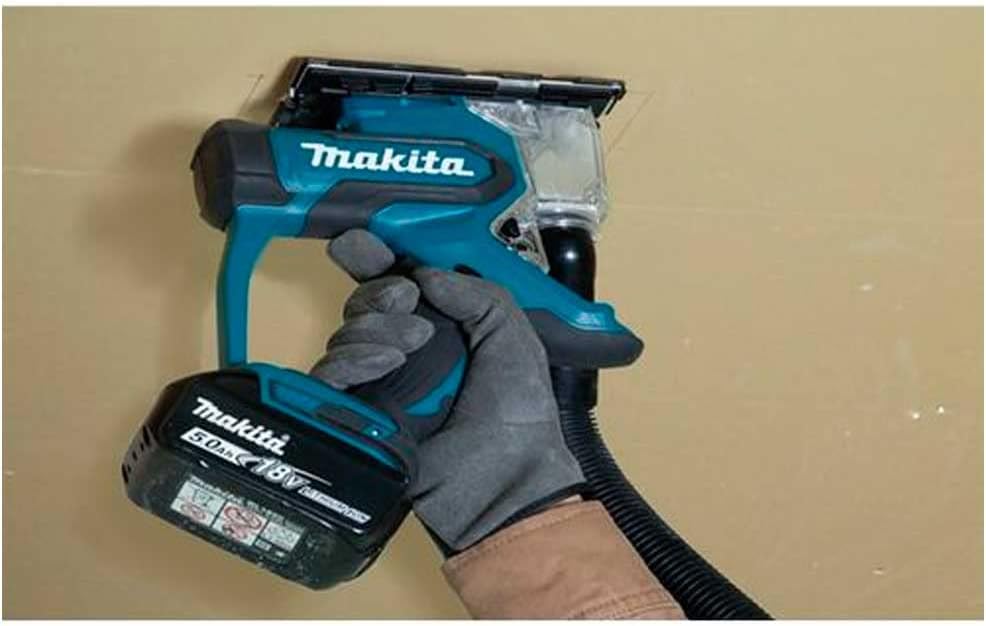
Figure 3: Makita DSD180Z connected to a dust extractor for cleaner operation.
6. Maintenance
6.1 Cleaning
- Always remove the battery before cleaning.
- Regularly clean the tool's ventilation openings to prevent overheating.
- Wipe down the tool with a soft, damp cloth. Do not use harsh chemicals or abrasive cleaners.
- Empty the dust box frequently to maintain effective dust collection.
6.2 Blade Replacement
Replace the saw blade when it becomes dull or damaged to ensure optimal cutting performance and safety. Follow the blade installation steps outlined in Section 4.2.
7. Troubleshooting
| Problem | Possible Cause | Solution |
|---|---|---|
| Tool does not start | Battery not charged or improperly installed. | Ensure battery is fully charged and correctly inserted. |
| Poor cutting performance | Dull or incorrect blade. | Replace with a sharp, appropriate blade. |
| Excessive dust | Dust box full or not properly connected to extractor. | Empty dust box or ensure dust extractor connection is secure. |
If you encounter issues not listed here or if problems persist, please contact Makita customer support.
8. Specifications
| Feature | Specification |
|---|---|
| Model Number | DSD180Z |
| Voltage | 18 Volts |
| Power Source | Battery Powered (Li-Ion LXT) |
| No-Load Speed | 6000 RPM |
| Capacity in Drywall | 30mm |
| Capacity in Wood | 15mm |
| Blade Length | 55 Millimeters |
| Item Weight | 2.9 Pounds (without battery) |
| Product Dimensions | 11.14 x 3.39 x 9.45 inches |
| Blade Material | High Speed Steel |
| Handle Material | Plastic |
9. Warranty and Support
Makita offers a 1-year manufacturer warranty on this product. An additional 2 years of warranty coverage can be obtained by registering the product within 30 days of purchase. This warranty is valid only when genuine or recommended parts and accessories are used with the tool. The use of non-genuine or incompatible batteries and chargers will invalidate the Makita guarantee for the tool.
For further assistance, technical support, or warranty claims, please visit the official Makita website or contact your local Makita service center. You can find more information at the Makita Store on Amazon.


