
Transformers C2962AS0
Transformers MV5 Deluxe Saturn Action Figure Instruction Manual
Brand: Transformers | Model: C2962AS0
1. Introduction
This instruction manual provides essential information for the assembly, operation, and maintenance of your Transformers MV5 Deluxe Saturn Action Figure. This figure allows you to experience the thrilling transformation between robot and vehicle modes, bringing the world of Transformers to life.
The Transformers MV5 Deluxe Saturn Action Figure is designed for collectors and enthusiasts aged 8 years and up, offering intricate detailing and dynamic posing capabilities.
2. Safety Information
WARNING: CHOKING HAZARD - Small Parts. Not For Children under 3 Years.
Please keep all packaging materials away from children. This product contains small parts which may pose a choking hazard. Adult supervision is recommended during play, especially for younger users within the recommended age range.
3. What's in the Box
Upon opening the package, you should find the following components:
- 1 x Transformers MV5 Deluxe Saturn Action Figure (Bumblebee)

4. Setup and Initial Inspection
Carefully remove the figure from its packaging. Inspect the figure for any visible damage or missing parts. Ensure all joints move freely but are firm enough to hold poses. Some parts may be secured with ties or plastic inserts; remove these gently to avoid damaging the figure.
5. Operating Instructions: Transformation
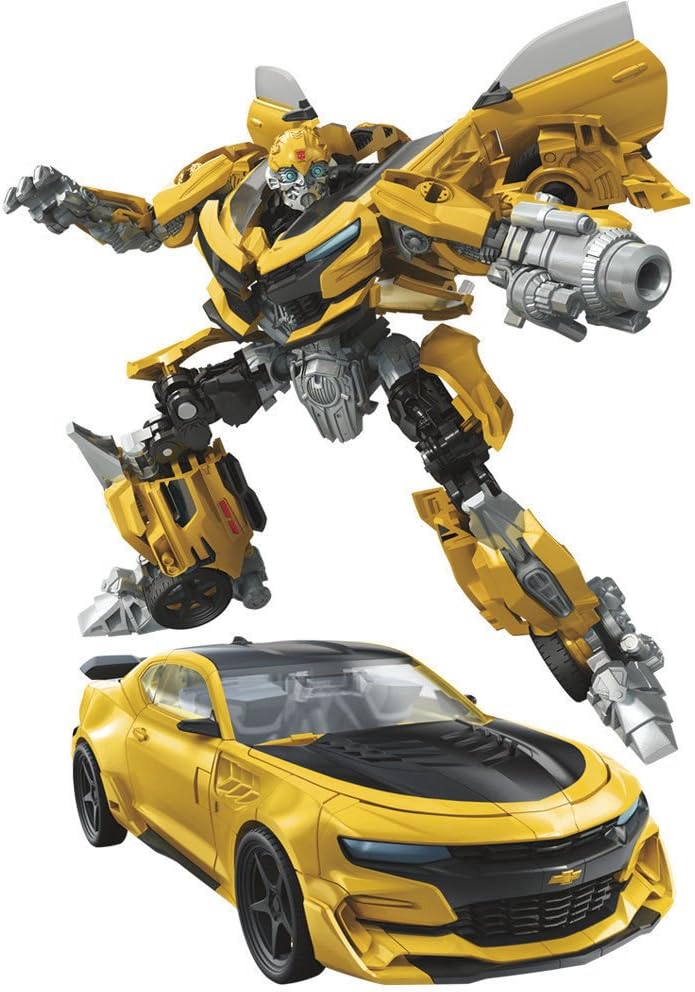
The core feature of your Transformers figure is its ability to convert between robot mode and vehicle mode. This particular model transforms into a Chevrolet Camaro. The transformation process can be intricate and requires careful manipulation of various panels and joints.
General Transformation Tips:
- Gentle Force: Apply gentle, even pressure when moving parts. Avoid forcing any components, as this can lead to breakage.
- Identify Pivot Points: Look for hinges, ball joints, and sliding mechanisms. These are key to the transformation.
- Panel Alignment: Many parts need to align precisely to form the alternate mode. Ensure tabs fit into slots securely.
- Refer to Visuals: While detailed step-by-step instructions are not provided here, observing the figure in both modes (as shown in images) can help you understand the required configuration. Online video tutorials are also a valuable resource for complex transformations.
Note: Some users have reported that the transformation process for this model can be challenging, particularly with the feet and door components. Patience and careful handling are advised.
Posing the Figure:
Once in robot mode, the figure features multiple points of articulation, allowing for dynamic poses. Adjust the arms, legs, and head to recreate iconic action stances. Ensure the figure is balanced to prevent it from toppling over, especially when posing on uneven surfaces.
6. Maintenance and Care
To ensure the longevity of your Transformers figure, follow these care guidelines:
- Cleaning: Use a soft, dry cloth to gently wipe away dust. For stubborn dirt, a slightly damp cloth can be used, but avoid excessive moisture. Do not use harsh chemicals or abrasive cleaners.
- Storage: Store the figure away from direct sunlight, extreme temperatures, and high humidity, which can cause discoloration or material degradation.
- Handling: Always handle the figure by its main body parts. Avoid gripping small, delicate components tightly, especially during transformation.
7. Troubleshooting
If you encounter issues with your figure, consider the following common problems and solutions:
| Problem | Possible Cause / Solution |
|---|---|
| Parts fall off easily (e.g., feet, doors) | This model has been noted to have delicate joints or connections in certain areas. Ensure parts are fully tabbed in or aligned correctly. If a joint is loose, a very small amount of clear nail polish or super glue (applied carefully with a toothpick and allowed to dry completely) can sometimes add friction, but this should be done with extreme caution as it can permanently alter the figure. |
| Figure does not transform correctly / parts don't fit | The transformation sequence is complex. Review online video tutorials for this specific model (C2962AS0) as they often provide clearer visual guidance than static instructions. Ensure all panels are rotated and folded in the correct order and orientation. Do not force parts. |
| Figure is unstable in robot mode | Ensure the feet and leg joints are properly positioned and locked into place. Adjust the pose to distribute weight evenly. Some figures may require a wider stance for stability. |
8. Specifications
| Feature | Detail |
|---|---|
| Product Dimensions | 2 x 4 x 5.5 inches |
| Item Weight | 3.52 ounces |
| ASIN | B01M02GOQ0 |
| Item Model Number | C2962AS0 |
| Manufacturer Recommended Age | 8 years and up |
| Release Date | May 1, 2017 |
| Manufacturer | Hasbro |
9. Warranty and Support
For specific warranty information and customer support regarding your Transformers MV5 Deluxe Saturn Action Figure, please refer to the documentation included with your purchase or visit the official Hasbro website. Warranty terms and conditions typically cover manufacturing defects.
For additional assistance or inquiries, you may also contact the retailer from whom the product was purchased.
Ask a question about this manual
Ask about setup, troubleshooting, compatibility, parts, safety, or missing instructions. Manuals+ will review the question and use this page’s manual context to help answer it.