
DIXELL XR70CX-4N0F3
DIXELL XR70CX-4N0F3 Digital Controller User Manual
Medium & Low Temperature Commercial Thermostat
1. Introduction
This manual provides comprehensive instructions for the installation, operation, and maintenance of the DIXELL XR70CX-4N0F3 Digital Controller. This device is designed for precise temperature control in medium and low temperature commercial refrigeration applications. Please read this manual thoroughly before installation and operation to ensure proper use and to prevent damage.
2. Safety Information
Always adhere to the following safety precautions to prevent personal injury or damage to the device:
- Ensure the power supply matches the device's requirements (110 Volts).
- Installation and maintenance should only be performed by qualified personnel.
- Disconnect power before performing any wiring or maintenance.
- Do not expose the device to water or excessive humidity, as it has an IP65 front protection rating but is not fully waterproof.
- Verify all connections are secure and correct before applying power.
- Do not attempt to repair the unit yourself. Refer to qualified service personnel.
3. Product Overview
The DIXELL XR70CX-4N0F3 is a digital controller featuring a red LED display and intuitive button controls. It is designed for wall mounting and offers programmable features for various temperature control needs.
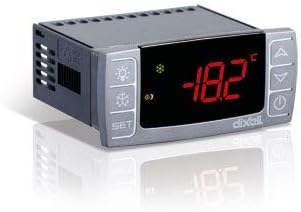
Figure 3.1: Front view of the DIXELL XR70CX-4N0F3 Digital Controller. The display shows a temperature reading, and control buttons are visible on both sides.
Key Features:
- Display: 3-digit red LED display (13mm high) with icons.
- Control Type: Push Button, Touch Control.
- Power Supply: 110 Volts AC.
- Probe Inputs: NTC / PTC for Thermostat, Defrost, and Condenser (on HOT KEY).
- Digital Inputs: Configurable for Alarm, AUX, start defrost, door switch, pressure switch, probe.
- Relay Outputs: Compressor (8A, 16A optional), Defrost (8A, 16A*), Fans (5A, 16A*), Light or alarm (8A, 16A*).
- Other Outputs: Hot Key output, optional X-REP remote display output, TTL serial output.
- Protection: IP65 front protection.
- Data Storage: EEPROM memory.
4. Installation and Setup
The XR70CX-4N0F3 is designed for wall mounting. Ensure proper ventilation and avoid locations with excessive vibration or direct heat sources.
4.1 Wiring Connections:
All connections are made via screw-terminal blocks, suitable for wires up to 2.5mm². Refer to the wiring diagram provided with your unit for specific terminal assignments. Ensure all connections are secure.
- Power Supply: Connect the 110V AC power supply to the designated terminals.
- Probe Inputs: Connect the NTC/PTC temperature probes for thermostat, defrost, and condenser as required by your application.
- Digital Inputs: Connect external devices such as door switches, pressure switches, or alarm contacts to the configurable digital inputs.
- Relay Outputs: Connect the compressor, defrost heaters, fans, and alarm/light circuits to their respective relay outputs. Observe current ratings.
- Serial Output: The TTL serial output can be used for communication with other devices.
4.2 Initial Power-Up:
After completing all wiring, apply power to the unit. The display will illuminate, and the controller will perform a self-test. The current temperature reading from the thermostat probe will be displayed.
5. Operating Instructions
The XR70CX-4N0F3 features a user-friendly interface with push buttons for navigation and parameter adjustment.
5.1 Display and Basic Operation:
- The main display shows the current temperature measured by the thermostat probe.
- Use the SET button to view or modify the setpoint temperature.
- Use the UP and DOWN arrow buttons to navigate menus and adjust values.
- The ON/OFF button controls the power to the unit.
- Specific icons on the display indicate operational status, such as compressor activity, defrost cycle, or alarms.
5.2 Parameter Programming:
The controller is programmable, allowing customization of various operational parameters. Accessing and modifying parameters typically involves a sequence of button presses (e.g., holding SET for a few seconds) to enter programming mode. Refer to the detailed programming manual (often supplied separately or available from DIXELL) for a complete list of parameters and their functions, including:
- Setpoint adjustment range.
- Differential (hysteresis).
- Defrost parameters (type, interval, duration).
- Alarm thresholds and delays.
- Probe calibration.
6. Maintenance
Regular maintenance ensures the longevity and optimal performance of your DIXELL XR70CX-4N0F3 controller.
- Cleaning: Periodically clean the front panel with a soft, damp cloth. Do not use abrasive cleaners or solvents.
- Connections: Annually check all electrical connections for tightness and signs of corrosion.
- Probes: Ensure temperature probes are clean and securely mounted in their intended locations.
- Ventilation: Ensure the area around the controller is free from obstructions to allow for proper heat dissipation.
For any internal maintenance or repair, contact a qualified technician.
7. Troubleshooting
This section provides basic troubleshooting steps for common issues. For complex problems, contact technical support.
| Problem | Possible Cause | Solution |
|---|---|---|
| Display is off | No power, loose connection, internal fuse. | Check power supply. Verify wiring. Consult technician for fuse replacement. |
| Incorrect temperature reading | Faulty probe, incorrect probe type setting, probe not properly installed. | Check probe connection and placement. Verify probe type in parameters. Replace faulty probe. |
| Compressor not activating | Setpoint issue, high temperature alarm, faulty relay, wiring issue. | Check setpoint and differential. Verify alarm status. Inspect wiring. |
| Controller displays an error code | Specific system fault (e.g., probe error, memory error). | Refer to the detailed programming manual for error code definitions and solutions. |
8. Specifications
| Feature | Detail |
|---|---|
| Brand | DIXELL |
| Model Number | XR70CX-4N0F3 |
| Controller Type | Push Button |
| Special Feature | Programmable |
| Color | Black |
| Specific Uses | Commercial refrigeration (110 Volt applications) |
| Temperature Control Type | Digital |
| Connectivity Technology | Wired |
| Included Components | Cable/wire for connectivity |
| Power Source | Corded Electric |
| Voltage | 110 Volts |
| Display Type | LED (Red, 13mm high) |
| Control Method | Touch, Button Control |
| Connectivity Protocol | TTL |
| Mounting Type | Wall Mount |
| Backlight | Yes |
| Manufacturer | DIXELL Italy |
| Housing | Self extinguishing ABS |
| Front Protection | IP65 |
| Operating Temperature | 0°C to 60°C (32°F to 140°F) |
| Storage Temperature | -25°C to 60°C (-13°F to 140°F) |
| Relative Humidity | 20% to 85% (non-condensing) |
| Resolution | 0.1°C or 1°F |
| Connection | Screw-terminal block <2.5mm² |
9. Warranty and Support
Specific warranty details for the DIXELL XR70CX-4N0F3 are typically provided at the point of purchase or within the product packaging. Please retain your proof of purchase for warranty claims.
For technical support, service, or to inquire about replacement parts, please contact your DIXELL distributor or the manufacturer directly. Provide your product model number (XR70CX-4N0F3) and serial number (if applicable) when seeking assistance.
You may also find additional resources and updated documentation on the official DIXELL website.
Related documentsXR70CX-4N0F3


Ask a question about this manual
Ask about setup, troubleshooting, compatibility, parts, safety, or missing instructions. Manuals+ will review the question and use this page’s manual context to help answer it.