
Introduction
This manual provides comprehensive instructions for the Taylor 400 lb. Digital Bathroom Scale, Model 7506-4192. Please read this manual thoroughly before initial use to ensure proper operation and to achieve accurate weight measurements. This scale is designed for personal use to monitor body weight.
Setup
- Battery Installation: The scale requires one (1) Lithium battery. Locate the battery compartment on the underside of the scale. Open the compartment cover and insert the battery, ensuring the correct polarity (+/-) as indicated inside the compartment. Close the cover securely.
- Placement: Place the scale on a hard, flat, and stable surface. Avoid placing the scale on carpets, rugs, or uneven flooring, as this can significantly affect measurement accuracy.
- Initial Calibration: After installing the battery and placing the scale, step onto the scale briefly, then step off. The display will show '0.0' or 'CAL' and then '0.0', indicating that the scale has calibrated itself and is ready for use.
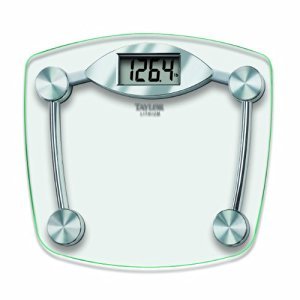
Image: The underside of the Taylor Digital Bathroom Scale, showing the battery compartment. Ensure the battery is inserted with correct polarity.
Operating Instructions
- Taking a Measurement: Gently step onto the scale platform with bare feet. Stand still and centered on the glass surface.
- Reading the Display: The large LCD display will show your weight in pounds. Wait for the reading to stabilize before stepping off.
- Automatic Shut-Off: The scale features an automatic shut-off function to conserve battery life. It will turn off a few seconds after a stable reading is displayed or if no activity is detected.
Image: A person standing on the Taylor Digital Bathroom Scale, demonstrating proper use for accurate weight measurement.
Maintenance
- Cleaning: Clean the scale's glass platform with a damp cloth and a mild glass cleaner or detergent. Do not use abrasive cleaners, harsh chemicals, or immerse the scale in water.
- Storage: Store the scale in a dry place, away from extreme temperatures and direct sunlight.
- Battery Replacement: If the scale will not be used for an extended period, remove the battery to prevent potential leakage and damage to the unit.
Troubleshooting
| Problem | Possible Cause | Solution |
|---|---|---|
| Display shows 'Lo' or 'Err' | Low battery or battery error. | Replace the battery with a new Lithium battery. Ensure correct polarity. |
| Inconsistent or inaccurate readings | Scale not on a hard, flat surface; user movement; initial calibration needed. | Ensure the scale is on a hard, flat surface. Stand still and centered. Step on and off the scale to re-calibrate. |
| Display shows 'O-Ld' | Weight capacity exceeded. | The maximum weight capacity is 400 pounds. Do not exceed this limit. |
| No display | Battery not installed or completely drained. | Check battery installation and replace if necessary. |
Specifications
- Brand: Taylor
- Model: 7506
- Weight Capacity: 400 lbs (180 kg)
- Readout Accuracy: 0.2 pounds
- Display Type: Large LCD
- Material: Tempered Glass
- Power Source: 1 x Lithium Battery
- Dimensions (L x W x H): Approximately 13 in. x 11.7 in. x 1.25 in.
- Item Weight: Approximately 5 lb.
- Special Features: Auto Shut Off, Fault Display, Large Display
Warranty
The Taylor 400 lb. Digital Bathroom Scale, Model 7506-4192, is covered by a 5-year limited warranty from the date of purchase. This warranty covers defects in materials and workmanship under normal household use. For specific details regarding warranty claims, including terms, conditions, and how to initiate a claim, please refer to the official Taylor website or contact their customer support directly. Keep your purchase receipt as proof of purchase.
Support
For technical assistance, inquiries about product features, replacement parts, or any other support needs, please contact Taylor customer service. You can typically find contact information, including phone numbers and email addresses, on the official Taylor website. Please have your product model number (7506-4192) and purchase date available when contacting support.


