1. Important Safety Instructions
Please read all instructions carefully before using this appliance and retain them for future reference. Failure to follow these instructions may result in electric shock, fire, or serious injury.
- Always ensure the heater is placed on a firm, level surface.
- Do not operate the heater near water or in damp locations.
- Keep flammable materials such as furniture, curtains, and bedding at least 1 meter (3 feet) from the front and sides of the heater.
- Do not cover the heater or obstruct the air inlets/outlets. This can cause overheating.
- Unplug the heater from the power outlet when not in use or before cleaning.
- Do not use the heater if the power cord or plug is damaged. Contact qualified service personnel for repair.
- This appliance is not intended for use by persons (including children) with reduced physical, sensory, or mental capabilities, or lack of experience and knowledge, unless they have been given supervision or instruction concerning use of the appliance by a person responsible for their safety.
- Children should be supervised to ensure that they do not play with the appliance.
- Do not insert any objects into the heater openings.
- Avoid using extension cords unless absolutely necessary. If an extension cord is used, ensure it is rated for the heater's power consumption.
2. Product Overview
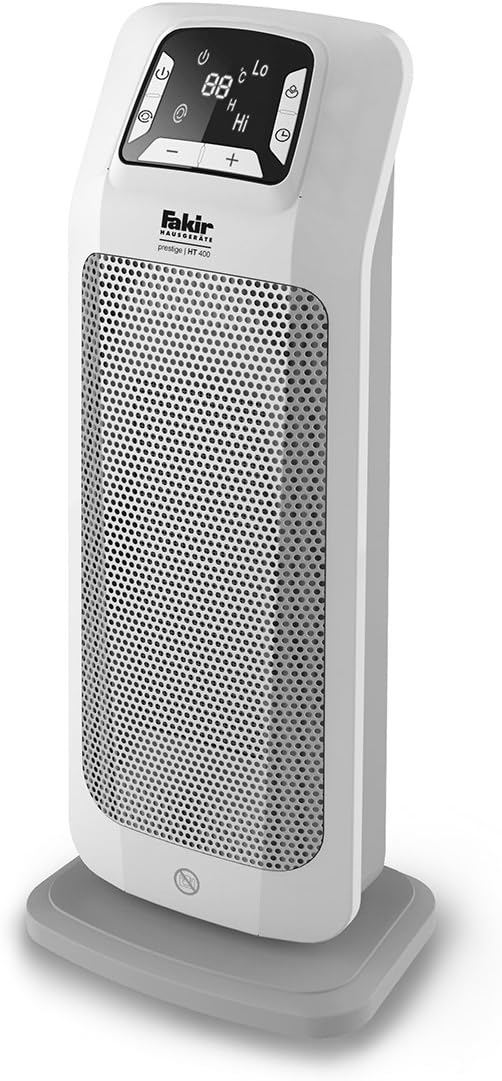
The Fakir Prestige HT 400 is a ceramic tower heater designed for efficient and comfortable heating. It features multiple heating levels, an ECO function for energy saving, and a convenient remote control.
Key Features:
- Two Heating Levels: Offers 1300 Watt (Low) and 2000 Watt (High) power settings.
- Infrared Remote Control: Allows convenient adjustment of settings from a distance.
- ECO Function: Automatically regulates heating levels to maintain desired temperature with reduced power consumption.
- Carrying Handle: For easy portability.
- Thermostat with Frost Protection: Helps prevent freezing in unoccupied rooms.
Product Components:


3. Setup
3.1 Unpacking
- Carefully remove the heater from its packaging.
- Remove all packaging materials, including any protective films or stickers.
- Inspect the heater for any signs of damage. If damaged, do not use and contact your retailer.
3.2 Placement
- Place the heater on a stable, flat, and heat-resistant surface.
- Ensure there is at least 1 meter (3 feet) of clear space around the heater from walls, furniture, and other objects to allow for proper air circulation.
- Do not place the heater directly below a power outlet.
- Avoid placing the heater in areas where it could be easily knocked over.
3.3 Power Connection
- Ensure the heater is switched off before plugging it into a power outlet.
- Plug the power cord into a suitable 220-240V, 50Hz AC power outlet.
- Do not overload the circuit with other high-power appliances.
4. Operating Instructions
The Fakir Prestige HT 400 can be operated using the control panel on the unit or the included remote control.
4.1 Control Panel and Remote Control Functions
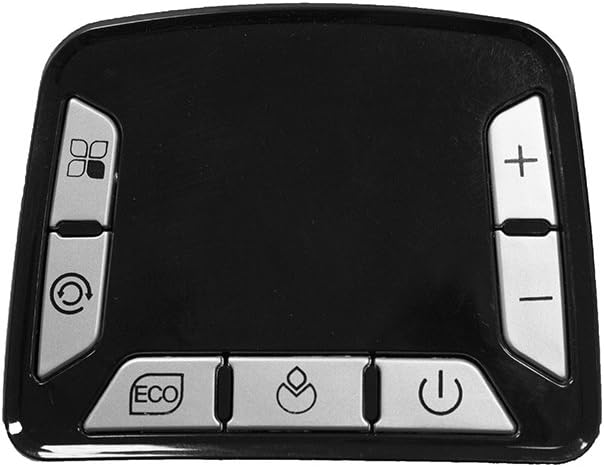
Refer to Image 3 for the control panel layout and Image 4 for the remote control layout.
- Power Button (⏻): Turns the heater ON or OFF.
- Mode Button (☼): Cycles through heating modes (e.g., Low Heat, High Heat).
- Oscillation Button (⟳): Activates or deactivates the oscillation function, allowing the heater to rotate and distribute heat more widely.
- ECO Button (ECO): Engages the energy-saving ECO mode. In this mode, the heater automatically adjusts its power output to maintain the set temperature efficiently.
- Temperature Up (+) / Down (-): Adjusts the desired temperature setting.
4.2 Basic Operation
- Power On: Press the Power button (⏻) on the control panel or remote control. The display will illuminate.
- Set Temperature: Use the Temperature Up (+) or Down (-) buttons to select your desired room temperature. The display will show the set temperature.
- Select Heating Mode: Press the Mode button (☼) to cycle between the 1300W (Lo) and 2000W (Hi) heating levels. The heater will automatically select the appropriate power to reach and maintain the set temperature.
- Activate Oscillation: Press the Oscillation button (⟳) to start the heater rotating. Press it again to stop oscillation.
- ECO Function: Press the ECO button to activate the energy-saving mode. The heater will intelligently adjust its power to maintain the set temperature while minimizing energy consumption.
- Power Off: Press the Power button (⏻) again to turn off the heater. The fan may continue to run for a short period to cool down the heating elements before completely shutting off.
4.3 Frost Protection
The heater includes a frost protection feature. If the ambient temperature drops below a certain threshold (typically around 5°C / 41°F) and the heater is plugged in and in standby mode, it may automatically activate to prevent the room from freezing. Consult the display for specific indicators related to frost protection.
5. Maintenance
Regular cleaning and proper storage will ensure the longevity and efficient operation of your heater.
5.1 Cleaning
- Always unplug the heater from the power outlet and allow it to cool completely before cleaning.
- Wipe the exterior surfaces of the heater with a soft, damp cloth. Do not use abrasive cleaners or solvents, as these can damage the surface.
- Use a vacuum cleaner with a brush attachment to gently remove dust from the air inlet and outlet grilles.
- Never immerse the heater in water or any other liquid.
5.2 Storage
- If storing the heater for an extended period, ensure it is clean and dry.
- Store the heater in its original packaging or a suitable box to protect it from dust and damage.
- Store in a cool, dry place, away from direct sunlight and extreme temperatures.
6. Troubleshooting
If you encounter any issues with your Fakir Prestige HT 400 heater, please refer to the following common problems and solutions:
| Problem | Possible Cause | Solution |
|---|---|---|
| Heater does not turn on. | No power supply. Power button not pressed. Overheat protection activated. | Check if the power cord is securely plugged in. Ensure the power outlet is functional. Press the Power button. Unplug the heater, let it cool for 30 minutes, then plug it back in. |
| Heater produces no heat. | Low heat setting selected. Temperature setting too low. | Press the Mode button to select a higher heat setting (Hi). Increase the desired temperature using the (+) button. |
| Heater stops unexpectedly. | Overheat protection activated. Tip-over switch activated. | Unplug the heater and allow it to cool for at least 30 minutes. Ensure air inlets/outlets are not blocked. Place the heater on a stable, level surface. |
| Remote control not working. | Batteries are dead or incorrectly inserted. Obstruction between remote and heater. | Replace the batteries in the remote control. Ensure there is a clear line of sight between the remote and the heater's sensor. |
If the problem persists after trying these solutions, please contact customer support.
7. Specifications
| Feature | Specification |
|---|---|
| Model | Prestige HT 400 |
| Brand | Fakir |
| Heating Output | 1300W / 2000W |
| Voltage | 220-240V ~ 50Hz (Typical for region, verify on product label) |
| Product Weight | 1.9 Kilogram |
| Color | High-gloss white |
| GTIN (Global Trade Item Number) | 04002780009644 |
8. Warranty and Support
Fakir products are manufactured to high-quality standards. For information regarding warranty terms and conditions, please refer to the warranty card included with your product or visit the official Fakir website. For technical support, spare parts, or service inquiries, please contact your local Fakir service center or authorized dealer.
Please have your model number (Prestige HT 400) and proof of purchase ready when contacting support.


