
1. Important Safety Information
Read and understand this entire manual before operating the generator. Failure to follow instructions can result in serious injury or death. Keep this manual for future reference.
- Carbon Monoxide Hazard: Generators produce carbon monoxide, a colorless, odorless gas. Operate the generator outdoors in a well-ventilated area, far from windows, doors, and vents. Never operate indoors or in enclosed spaces.
- Electrical Shock Hazard: Do not operate the generator in wet conditions. Ensure all electrical connections are dry and properly grounded.
- Fire Hazard: Gasoline is highly flammable. Refuel in a well-ventilated area with the engine off and cool. Do not smoke or allow open flames near the generator.
- Hot Surfaces: The generator engine and muffler become very hot during operation and remain hot for some time after shutdown. Avoid contact with hot surfaces.
Always refer to the owner's manual for complete safety guidelines and operating procedures.

Image: Side view of the A-iPower SUA4500 generator, highlighting safety labels on the fuel tank. These labels provide quick visual reminders for safe operation, including warnings about carbon monoxide, hot surfaces, and proper grounding.
2. Setup and Initial Preparation
Before first use, the A-iPower SUA4500 generator requires assembly and preparation.
2.1 Unpacking and Wheel Kit Installation
Carefully remove the generator from its packaging. The wheel kit is included for easy transport. Follow the instructions provided in the separate assembly guide for attaching the wheels and handles.

Image: The A-iPower SUA4500 portable generator with its wheel kit and handle installed, ready for movement. This view shows the overall structure and portability features.
2.2 Adding Engine Oil
The engine is shipped without oil. Before starting, add the recommended type and amount of engine oil. Refer to the engine section of the full manual for specific oil type and capacity. Do not overfill.
2.3 Adding Fuel
This generator operates on unleaded gasoline. Ensure the engine is off and cool before adding fuel. The fuel tank capacity is 4 gallons. Use a funnel to prevent spills. Do not fill the tank completely to allow for fuel expansion.
3. Operating Instructions
Follow these steps to safely start and operate your A-iPower SUA4500 generator.
3.1 Starting the Engine
- Ensure the generator is on a level surface and all electrical loads are disconnected.
- Open the fuel valve.
- Move the choke lever to the 'CHOKE' position (cold start).
- Turn the engine switch to the 'ON' position.
- Pull the recoil starter handle firmly until the engine starts.
- Once the engine starts, gradually move the choke lever to the 'RUN' position.
3.2 Connecting Electrical Loads
The generator features an ergonomically-angled compact control panel with multiple outlets.
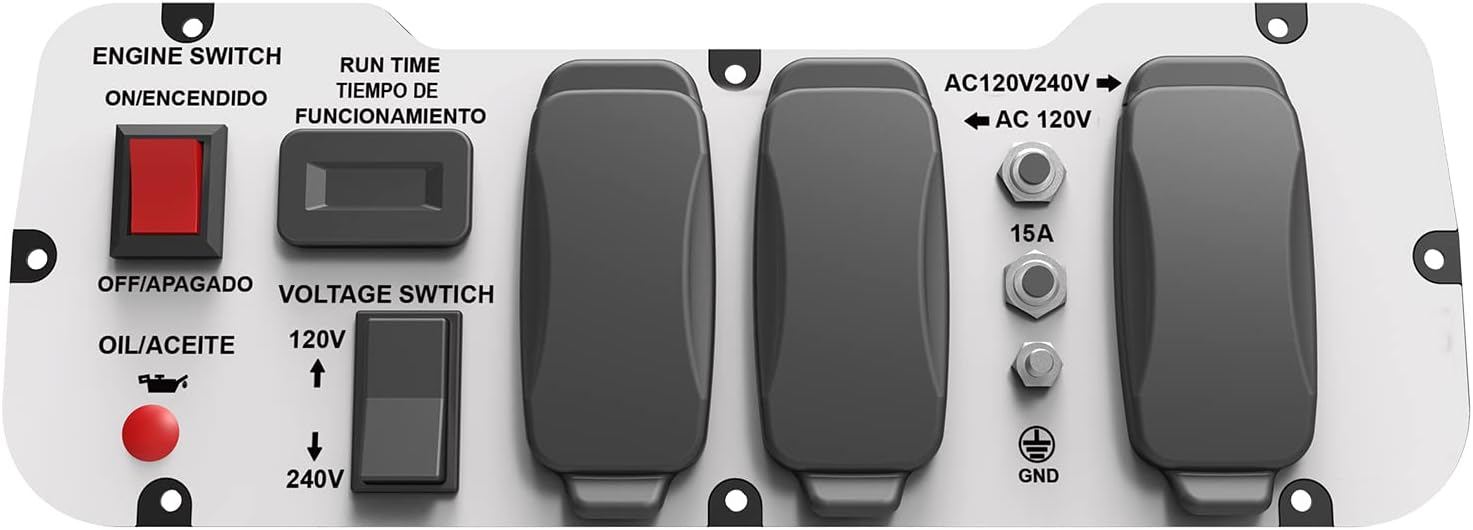
Image: Close-up view of the A-iPower SUA4500 generator's control panel. It shows the engine switch, run time display, voltage switch (120V/240V), oil/aceite indicator, and various AC outlets (120V and 120V/240V) with a ground terminal.
- Voltage Selection: Use the voltage switch to select between 120VAC and 240VAC output as required by your appliances.
- Connecting Devices: Plug your appliances into the appropriate outlets. Do not overload the generator. The generator provides 4,500 starting watts and 3,500 running watts.
- Run Time: The generator can run for approximately 11 hours at 50% load on a full 4-gallon tank.
3.3 Stopping the Engine
- Disconnect all electrical loads from the generator.
- Turn the engine switch to the 'OFF' position.
- Close the fuel valve.
4. Maintenance
Regular maintenance ensures the longevity and reliable operation of your A-iPower SUA4500 generator.
4.1 Engine Maintenance
- Oil Changes: Check engine oil level before each use. Change the oil after the first 20 hours of operation, then every 50-100 hours or seasonally.
- Air Filter: Inspect and clean the air filter regularly, especially in dusty conditions. Replace if damaged.
- Spark Plug: Inspect and clean the spark plug annually or every 100 hours. Replace if necessary.
4.2 Fuel System
- Fuel Filter: Inspect and clean or replace the fuel filter as needed.
- Fuel Storage: For long-term storage, drain the fuel tank and carburetor, or use a fuel stabilizer.
4.3 General Inspection
- Check for loose fasteners, damaged wires, or fuel leaks before each use.
- Keep the generator clean and free of debris.
5. Troubleshooting Guide
This section provides solutions to common operational issues. For problems not listed here, contact customer support.
| Problem | Possible Cause | Solution |
|---|---|---|
| Engine does not start | No fuel Engine switch OFF Choke in wrong position Low oil level | Add fresh fuel Turn engine switch ON Adjust choke (CHOKE for cold, RUN for warm) Add engine oil to correct level |
| No power output | Circuit breaker tripped Overload Voltage switch incorrect | Reset circuit breaker Reduce connected load Ensure voltage switch is set to 120V or 240V |
| Engine runs rough | Stale fuel Dirty air filter Spark plug issue | Drain and refill with fresh fuel Clean or replace air filter Inspect and clean/replace spark plug |
6. Specifications
Key technical specifications for the A-iPower SUA4500 Portable Generator:
| Feature | Specification |
|---|---|
| Model Name | SUA4500 |
| Starting Wattage | 4500 Watts |
| Running Wattage | 3500 Watts |
| Engine Type | 208cc/7hp OHV, 4-Stroke |
| Fuel Type | Gasoline |
| Fuel Tank Volume | 4 Gallons |
| Runtime (50% load) | 11 hours |
| Voltage | 120VAC/240VAC |
| Frequency | 60 Hz |
| Item Weight | 117 Pounds |
| Dimensions (L x W x H) | 34.8" x 24.6" x 19.5" |
| Total Power Outlets | 4 |

Image: The A-iPower SUA4500 generator with its key dimensions (length, width, height) clearly labeled, providing a visual reference for its physical size.
7. Warranty and Support
7.1 Warranty Information
The A-iPower SUA4500 generator comes with a manufacturer's warranty:
- Residential Use: 2-year limited warranty.
- Commercial Use: 1-year limited warranty.
Please retain your proof of purchase for warranty claims. Refer to the full owner's manual for complete warranty terms and conditions.
7.2 Technical Support
For technical assistance, troubleshooting, or parts inquiries, please contact A-iPower customer support:
Phone: (909) 923-2068


