1. Introduction
This manual provides comprehensive instructions for the proper installation, operation, and maintenance of the CALEFFI 720090 USB/Radio Device. Please read this manual thoroughly before using the device to ensure safe and efficient operation and to maximize its lifespan. Keep this manual for future reference.
2. Product Overview
The CALEFFI 720090 is a USB/radio device designed for reading and displaying consumption data. It facilitates bidirectional wireless transmission, enabling communication with compatible systems. The device is intended for use with the SW7200 software, developed for the Microsoft Windows operating system, to manage and visualize collected data.
Key Features:
- USB interface for easy connection to a computer.
- Bidirectional wireless transmission at 868.0 ÷ 868.5 MHz with 20 mW power.
- Compatible with SW7200 software for Microsoft Windows for consumption data management.
Product Image:
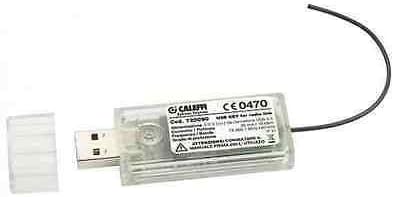
This image displays the CALEFFI 720090 USB/Radio Device. It is a compact, clear plastic USB dongle with a removable cap, revealing the USB-A connector. A small black wire antenna extends from the opposite end. The device features a label with 'CALEFFI' branding, model number '720090', and regulatory markings like 'CE0470', along with technical specifications for its 868 MHz wireless transmission.
3. Setup
Follow these steps to set up your CALEFFI 720090 USB/Radio Device:
- Software Installation: Before connecting the device, install the SW7200 software on your Microsoft Windows computer. Refer to the SW7200 software manual for detailed installation instructions.
- Connect the Device: Insert the CALEFFI 720090 USB/Radio Device into an available USB port on your computer. Ensure the connection is secure.
- Driver Installation: Your operating system should automatically detect and install the necessary drivers. If prompted, follow the on-screen instructions. If automatic installation fails, consult the SW7200 software documentation or CALEFFI support for manual driver installation.
- Verify Connection: Once connected and drivers are installed, open the SW7200 software. The software should recognize the connected USB/radio device.
4. Operating Instructions
Once the device is set up and recognized by the SW7200 software, you can begin using it to read and display consumption data.
- Launch SW7200 Software: Open the SW7200 application on your computer.
- Initiate Data Transmission: Within the software interface, select the option to initiate data transmission or scanning for compatible radio devices. The CALEFFI 720090 will establish a wireless connection.
- Read Consumption Data: Follow the software's instructions to read and collect consumption data from your connected systems.
- View and Analyze Data: The SW7200 software will display the collected data, allowing for analysis and reporting. Refer to the SW7200 software manual for detailed instructions on data interpretation and management features.
5. Maintenance
The CALEFFI 720090 USB/Radio Device requires minimal maintenance to ensure optimal performance.
- Cleaning: Gently wipe the device with a dry, soft cloth. Do not use harsh chemicals or abrasive cleaners.
- Storage: When not in use, store the device in a cool, dry place, away from direct sunlight and extreme temperatures.
- Protection: Keep the USB port covered with its cap when not connected to prevent dust and debris from entering.
- Software Updates: Regularly check for updates to the SW7200 software to ensure compatibility and access to the latest features and bug fixes.
6. Troubleshooting
If you encounter issues with your CALEFFI 720090 USB/Radio Device, refer to the following common troubleshooting steps:
- Device Not Recognized:
- Ensure the device is fully inserted into the USB port.
- Try a different USB port on your computer.
- Restart your computer.
- Verify that the SW7200 software is installed correctly.
- Check Device Manager in Windows for any driver-related issues. Reinstall drivers if necessary.
- No Data Transmission:
- Ensure the device is recognized by the SW7200 software.
- Check the range and potential obstructions between the USB/radio device and the transmitting units.
- Verify that the transmitting units are powered on and functioning correctly.
- Consult the SW7200 software manual for specific instructions on initiating and troubleshooting data acquisition.
- Software Errors:
- Ensure your SW7200 software is up to date.
- Restart the SW7200 application.
- If errors persist, reinstall the SW7200 software.
If these steps do not resolve the issue, please contact CALEFFI customer support for further assistance.
7. Specifications
| Manufacturer | CALEFFI |
| Part Number | 720090 |
| Item Weight | 997.9 g |
| Batteries Required | No |
| Wireless Transmission | Bidirectional 868.0 ÷ 868.5 MHz, 20 mW |
| Compatible Software | SW7200 for Microsoft Windows |
| First Available Date | February 21, 2020 |
8. Warranty and Support
Specific warranty details for the CALEFFI 720090 USB/Radio Device are not provided within the product information. For warranty claims, technical support, or further inquiries, please contact CALEFFI directly through their official website or customer service channels. Ensure you have your product model number (720090) and any purchase documentation available when seeking support.


