1. Introduction
This manual provides instructions for the proper setup, operation, and maintenance of your Brabantia newIcon Pedal Bin 114762. Please read these instructions carefully before using the product to ensure optimal performance and longevity.
2. What's in the Box
- Brabantia newIcon Pedal Bin (Outer Casing)
- Metal Inner Bucket (30 Litre)
- Sample pack of Brabantia PerfectFit bin bags (Code G)
3. Setup
- Unpacking: Carefully remove all packaging materials from the pedal bin and its components. Ensure all parts listed in 'What's in the Box' are present.
- Insert Inner Bucket: Place the metal inner bucket inside the outer casing of the pedal bin. Ensure it sits securely at the bottom.
- Attach Bin Liner: Open the lid using the pedal. Place a bin liner (such as Brabantia PerfectFit Code G bags) around the rim of the inner bucket, ensuring the edges are tucked neatly to prevent them from showing when the lid is closed.
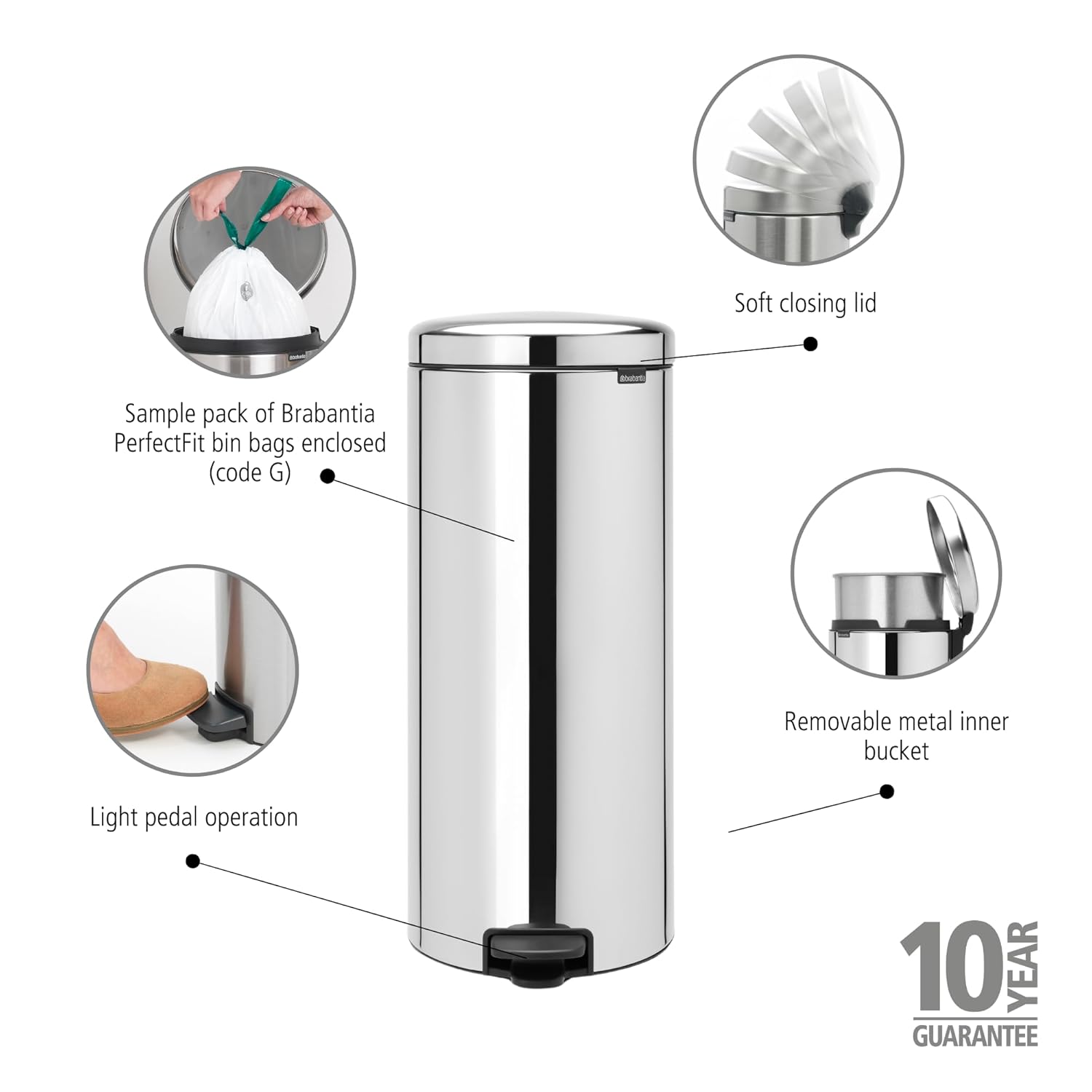
Figure 3.1: Overview of bin features and bin liner placement.
4. Operating Instructions
- Opening the Lid: Gently press the foot pedal located at the base of the bin. The lid will open smoothly. Release the pedal to allow the lid to close softly and silently.
- Removing the Inner Bucket: For emptying or cleaning, the metal inner bucket can be easily lifted out using its integrated handle.

Figure 4.1: The bin with its lid open, showing the removable inner bucket.
5. Maintenance
- Cleaning the Exterior: Wipe the exterior of the bin with a soft, damp cloth and a mild detergent. Avoid abrasive cleaners or scouring pads, as these can damage the Brilliant Steel finish. Dry thoroughly with a soft cloth.
- Cleaning the Inner Bucket: The metal inner bucket can be washed with warm soapy water. Rinse thoroughly and dry completely before placing it back into the bin.
- Odor Control: To minimize odors, regularly empty the bin and clean the inner bucket. Using high-quality bin liners designed for a snug fit can also help contain odors.
6. Troubleshooting
- Lid not closing softly: Check for any obstructions around the lid mechanism or hinges. Ensure the bin is placed on a level surface.
- Pedal not operating smoothly: Inspect the pedal mechanism for any debris or damage. Ensure the pedal is not obstructed.
- Unpleasant odors: Ensure the bin liner is properly secured and not torn. Clean the inner bucket and the bin's interior thoroughly. Consider using an odor absorber if necessary.
7. Specifications
| Brand | Brabantia |
| Model Number | 114762 |
| Capacity | 30 Liters |
| Material | Steel, Plastic |
| Opening Mechanism | Step-On Pedal |
| Dimensions (L x W x H) | 11.54" x 26.73" x 14.96" (29.3 cm x 67.9 cm x 38 cm) |
| Item Weight | 11.15 pounds (5.07 kg) |
| Finish Type | Corrosion resistant, Brilliant Steel |
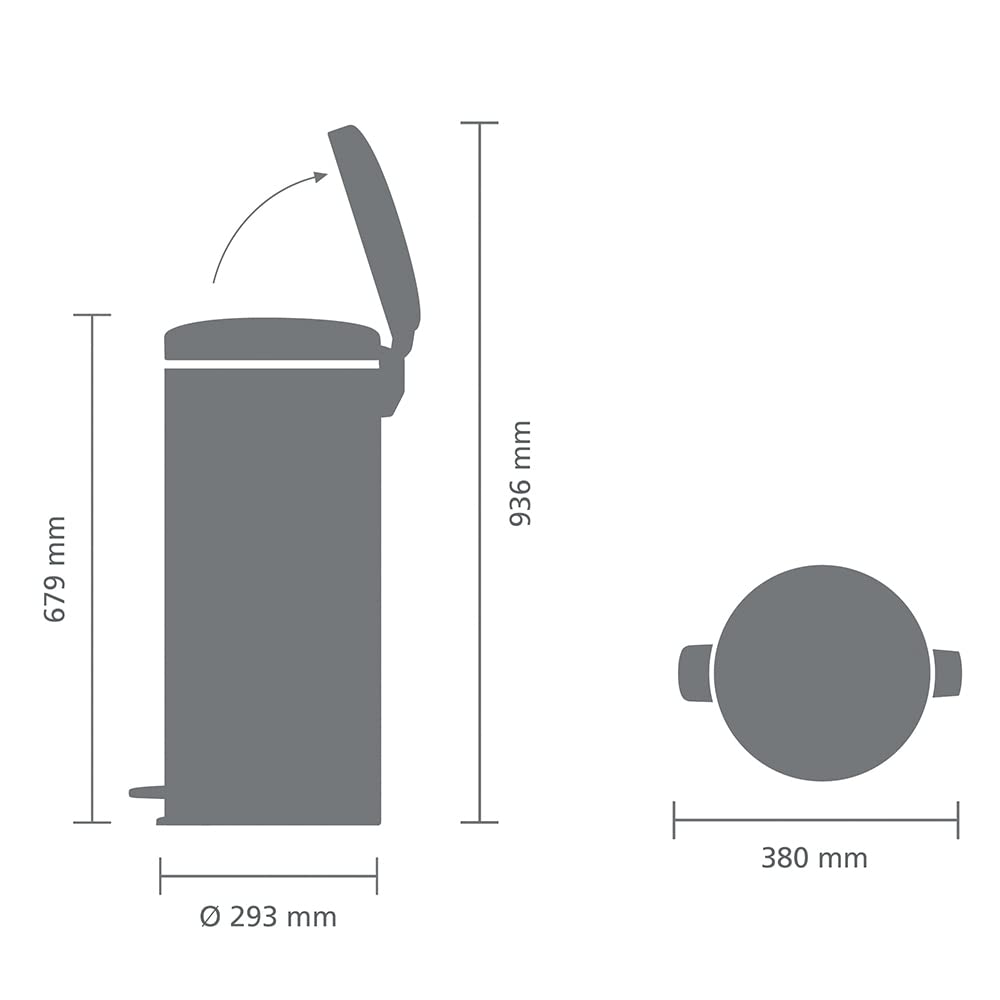
Figure 7.1: Product dimensions diagram.
8. Warranty
The Brabantia newIcon Pedal Bin 114762 comes with a 10-year Brabantia guarantee. This guarantee covers defects in materials and workmanship under normal household use. For full terms and conditions, please refer to the official Brabantia website or contact customer support.
9. Support
For further assistance, questions, or to report any issues with your Brabantia newIcon Pedal Bin, please contact Brabantia customer support. Visit the official Brabantia website for contact information and frequently asked questions.


