
1. Introduction
The Carepeutic Deluxe Vibration Massage Mat with Heat (Model KH257) is designed to provide a full-body vibration massage with an optional heat function. It features ten vibration motors, five massage modes, and three intensity levels to target various body zones including the neck, back, lumbar, and legs. This manual provides instructions for the safe and effective use of your massage mat.

Image 1.1: The Carepeutic Deluxe Vibration Massage Mat positioned on a sofa, ready for use in a home environment.
2. Safety Information
Please read all safety instructions carefully before using the massage mat. Failure to follow these instructions may result in injury or damage to the product.
- Always use the massager on soft surfaces such as a sofa or bed. Do not use on hard or uneven surfaces.
- Follow the product's design and intended use for proper body positioning.
- If you have any medical conditions, consult a doctor before use.
- Keep the massager clean and dry to prevent electrical hazards.
- Do not use if the cord is damaged or if the massager shows signs of wear and tear.
3. Product Components
The package includes the following items:
- Carepeutic Deluxe Vibration Massage Mat
- Handheld Controller (attached)
- Integrated Power Adapter
4. Setup
Follow these steps to set up your massage mat:
- Unpack the massage mat and its components from the packaging.
- Place the massage mat on a soft, flat surface such as a sofa or bed. Ensure the mat is fully extended and lies flat.
- Connect the power adapter to a standard electrical outlet.
- Ensure the handheld controller is easily accessible for operation.

Image 4.1: The massage mat unfolded and placed on a bed, illustrating a typical setup for use.
5. Operating Instructions
The massage mat is operated using the attached handheld controller. Familiarize yourself with the controller buttons for optimal use.

Image 5.1: The handheld controller, displaying all control buttons for the massage mat.
5.1 Power On/Off
- Press the ON/OFF button to turn the unit on or off.
5.2 Selecting Massage Zones
- The controller features dedicated buttons for specific body zones: NECK, BACK, LUMBAR, and LEG.
- Press the desired zone button to activate vibration in that specific area. Multiple zones can be selected simultaneously.
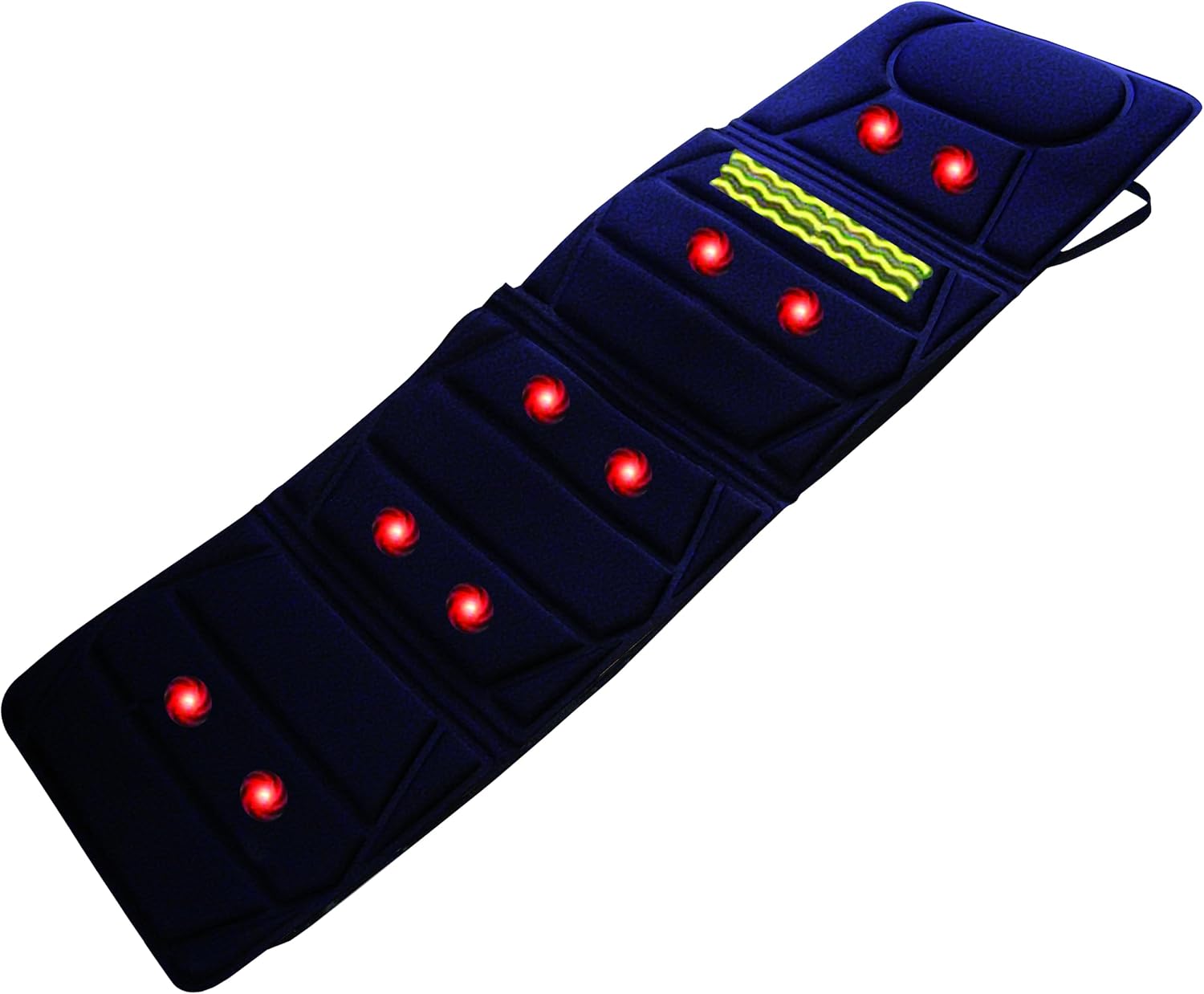
Image 5.2: The massage mat highlighting the placement of the ten vibration motors.
5.3 Choosing Massage Modes
- Press the MODE F1-F5 button to cycle through the five pre-programmed massage modes (F1, F2, F3, F4, F5). Each mode offers a different vibration pattern.
5.4 Adjusting Intensity
- Press the INTENSITY button to cycle through three intensity levels: Low (L), Medium (M), and High (H).
5.5 Activating Heat Function
- Press the HEAT button to activate the soothing heat function, primarily located in the lumbar area. Press again to turn off the heat.
5.6 Automatic Shut-off
- For safety and energy conservation, the massage mat is equipped with a 15-minute auto shut-off timer. The unit will automatically power off after 15 minutes of continuous use.
6. Care and Maintenance
- Cleaning: Disconnect the power cord before cleaning. Wipe the surface of the massage mat with a soft, damp cloth. Do not use abrasive cleaners or immerse the mat in water.
- Storage: When not in use, store the mat in a cool, dry place. Avoid placing heavy objects on the mat. The mat can be folded for compact storage.

Image 6.1: The massage mat folded, demonstrating its compact design for easy storage.
7. Troubleshooting
If you encounter any issues with your massage mat, refer to the following troubleshooting guide:
- Unit does not power on:
- Ensure the power adapter is securely plugged into both the mat and a working electrical outlet.
- Check for any visible damage to the power cord or controller.
- Vibration is weak or inconsistent:
- Adjust the intensity setting using the INTENSITY button.
- Ensure the mat is placed on a soft, even surface.
- Heat function is not working:
- Ensure the HEAT button has been pressed and the indicator light is on.
- Note that the heat function is designed to be soothing and may not feel intensely hot.
- Controller buttons are unresponsive:
- Turn the unit off and then on again.
- Ensure the controller cable is securely connected to the mat.
- Unexpected mode changes:
- If the unit exhibits unexpected behavior, power it off and restart. If the issue persists, contact customer support.
8. Specifications
| Model Number | KH257 |
| Product Dimensions | 68"L x 23"W x 2"H |
| Item Weight | 4 Pounds |
| Power Source | Corded Electric |
| Massage Technique | Vibration |
| Number of Vibration Motors | 10 |
| Massage Modes | 5 |
| Intensity Levels | 3 (Low, Medium, High) |
| Heat Function | Yes (Lumbar area) |
| Auto Shut-off Timer | 15 minutes |
| Material | Polyester |
| Manufacturer | Unipride |
9. Warranty Information
The Carepeutic Deluxe Vibration Massage Mat (Model KH257) comes with a 60-day manufacturer warranty. Please retain your proof of purchase for warranty claims. The warranty covers defects in materials and workmanship under normal use.
10. Customer Support
For technical assistance, warranty claims, or product inquiries, please contact Carepeutic customer support. Refer to the contact information provided with your product packaging or visit the official Carepeutic website for further assistance.