
1. Introduction
This manual provides essential information for the safe and efficient operation, installation, and maintenance of your Samsung DW80K5050US Electronic Touch Sensor Dishwasher. Please read this manual thoroughly before using the appliance and retain it for future reference.
2. Safety Information
To reduce the risk of fire, electric shock, or injury when using your dishwasher, follow these basic precautions:
- Read all instructions before using the dishwasher.
- Use the dishwasher only for its intended function.
- Connect to a properly rated, protected, and sized power supply circuit.
- Do not operate the dishwasher if it is damaged or malfunctioning.
- Keep children away from the dishwasher, especially when it is operating.
- Always use detergents and rinse agents specifically designed for dishwashers.
- Do not store or use flammable materials near the dishwasher.
3. Product Overview
3.1. Exterior Design
The Samsung DW80K5050US features a sleek stainless steel design with an integrated electronic touch control panel located on the top edge of the door. This design provides a clean, modern aesthetic for your kitchen.

Figure 1: Front view of the Samsung DW80K5050US Dishwasher with the door slightly open, revealing the electronic touch control panel and the top rack.
3.2. Interior Layout
The dishwasher interior is designed for efficient loading and thorough cleaning. It includes multiple racks and a dedicated utensil basket to accommodate various dish sizes and types.
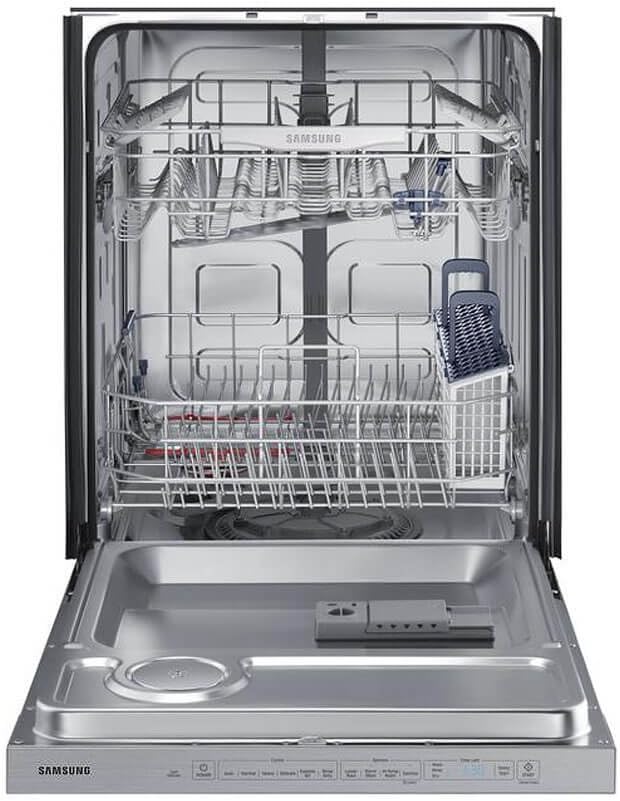
Figure 2: Interior view of the Samsung DW80K5050US Dishwasher, showcasing the spacious racks, utensil basket, and lower spray arm.
3.3. StormWash Feature
The StormWash™ heavy-duty wash system is designed to clean heavily soiled dishes, pots, and pans without pre-washing. An extra spray jet delivers powerful water streams from multiple angles for comprehensive cleaning.

Figure 3: Detailed view of the StormWash™ system in operation, illustrating the powerful water jets targeting dishes for intensive cleaning.
4. Installation
The Samsung DW80K5050US is a built-in dishwasher designed for permanent installation. Professional installation is recommended. Ensure proper water supply, drainage, and electrical connections are established according to local codes and the detailed instructions provided in the full installation guide.
- Electrical Requirements: 120 Volts.
- Product Dimensions: 34"D x 25"W x 24"H.
- Weight: 94.8 Pounds.
5. Operating Instructions
5.1. Loading the Dishwasher
Proper loading ensures optimal cleaning performance. Place larger items in the lower rack and smaller items, glasses, and cups in the upper rack. Utensils should be placed in the designated basket, handles up for forks and spoons, and handles down for knives.
5.2. Adding Detergent and Rinse Aid
Fill the detergent dispenser with the recommended amount of dishwasher detergent. Add rinse aid to the rinse aid dispenser to improve drying performance and prevent water spots.
5.3. Selecting a Wash Cycle
The electronic touch control panel offers various wash cycles. Press the POWER button to activate the display, then select your desired cycle:
- Auto: Automatically detects soil level and adjusts wash time and temperature.
- Normal: For everyday dishes with normal soil.
- Heavy: For heavily soiled pots, pans, and dishes.
- Delicate: For lightly soiled or delicate items.
- Express 60: A quick wash cycle for lightly soiled dishes.
- Rinse Only: For rinsing dishes that will be washed later.
5.4. Selecting Wash Options
Customize your wash cycle with additional options:
- Lower Rack: Focuses washing power on the lower rack.
- Storm Wash: Provides an intensive wash for heavily soiled items.
- Hi-Temp Wash: Increases water temperature for enhanced cleaning.
- Sanitize: Uses high temperature to sanitize dishes.
- Rinse Dry: Enhances drying performance.
5.5. Starting a Cycle
After selecting your cycle and options, press the START button to begin the wash cycle. Close the dishwasher door firmly.
6. Maintenance
6.1. Cleaning the Exterior
Wipe the exterior surfaces, including the stainless steel door and control panel, with a soft, damp cloth and mild detergent. Avoid abrasive cleaners or scouring pads.
6.2. Cleaning the Filters
Regularly clean the filters located at the bottom of the dishwasher tub to ensure optimal performance and prevent odors. Refer to the full manual for detailed instructions on removing and cleaning the filter assembly.
6.3. Preventing Odors
To prevent odors, run a hot wash cycle regularly, clean the filters, and ensure the dishwasher is not left with dirty dishes for extended periods. Occasionally run a dishwasher cleaning product.
7. Troubleshooting
If you encounter issues with your dishwasher, consult the following common troubleshooting tips before contacting service:
| Problem | Possible Cause | Solution |
|---|---|---|
| Dishes not clean | Improper loading, clogged spray arms, insufficient detergent, clogged filters. | Reload dishes correctly, clean spray arm nozzles, use appropriate detergent, clean filters. |
| Dishwasher not starting | Door not closed properly, power issue, cycle not selected. | Ensure door is latched, check power supply, select a wash cycle and press START. |
| Unpleasant odor | Food particles in filter, infrequent use, standing water. | Clean filters, run a hot wash cycle, ensure proper drainage. |
8. Specifications
- Brand: Samsung
- Model Name: DW80K5050US
- Installation Type: Built-In
- Product Dimensions (D x W x H): 34" x 25" x 24"
- Special Feature: Touchscreen
- Color: Silver
- Controls Type: Fully Integrated
- Material: Stainless Steel
- Noise Level: 48 Decibels
- Voltage: 120 Volts
- Item Weight: 94.8 Pounds
- UPC: 887276166391
9. Warranty and Support
For warranty information and technical support, please refer to the warranty card included with your product or visit the official Samsung website. Keep your purchase receipt as proof of purchase for warranty claims.