
MIRAC AC-1507B
Contents
Mirac Table Azan Clock User Manual
Model: AC-1507B | Brand: MIRAC
Introduction
Thank you for choosing the Mirac Table Azan Clock. This device is designed to assist you with daily prayer times and provide useful information such as world times, temperature, and calendar displays. It features automatic Azan calculations for over 1500 cities worldwide and offers various Azan accents. Please read this manual carefully to ensure proper use and to fully utilize all features of your new clock.
Safety Information
- Do not expose the device to extreme temperatures, direct sunlight, or high humidity.
- Avoid dropping or subjecting the device to strong impacts.
- Do not attempt to disassemble or repair the device yourself. Refer to qualified service personnel.
- Use only the specified power adapter (if applicable) or batteries. Batteries are not included.
- Keep out of reach of children.
Package Contents
Please check the package for the following items:
- Mirac Table Azan Clock (Model AC-1507B)
- User Manual
- (Batteries and power adapter are not included)

Image: Mirac Table Azan Clock alongside its product box, illustrating the typical contents of the package.
Product Overview
Familiarize yourself with the various parts and controls of your Mirac Azan Clock.

Image: Front view of the Mirac Table Azan Clock, showing the digital display with current time, date, city, temperature, and a list of prayer times (Imsak, Fajr, Shrooq, Zohr, Asr, Maghrib, Isha).

Image: Composite image showing different angles of the clock: front view with buttons, back view with speaker and power input, side view, and a close-up of the 'STOP/LIGHT' button on top.
Front Panel Controls:
- COUNTRY: Button to select country.
- CITY: Button to select city.
- SET: Button for entering settings mode.
- ▲ / ▼: Navigation buttons for adjusting values.
- TEMP: Button to switch temperature display (°C/°F).
- DST: Button for Daylight Saving Time adjustment.
- DAILY ALM: Button for daily alarm settings.
- AUTO ALM: Button for automatic alarm settings.
- AZAN ON/OFF: Button to toggle Azan sound.
- VOICE: Button for voice playback (e.g., Azan Dua).
- EXIT: Button to exit current menu or setting.
Rear Panel:
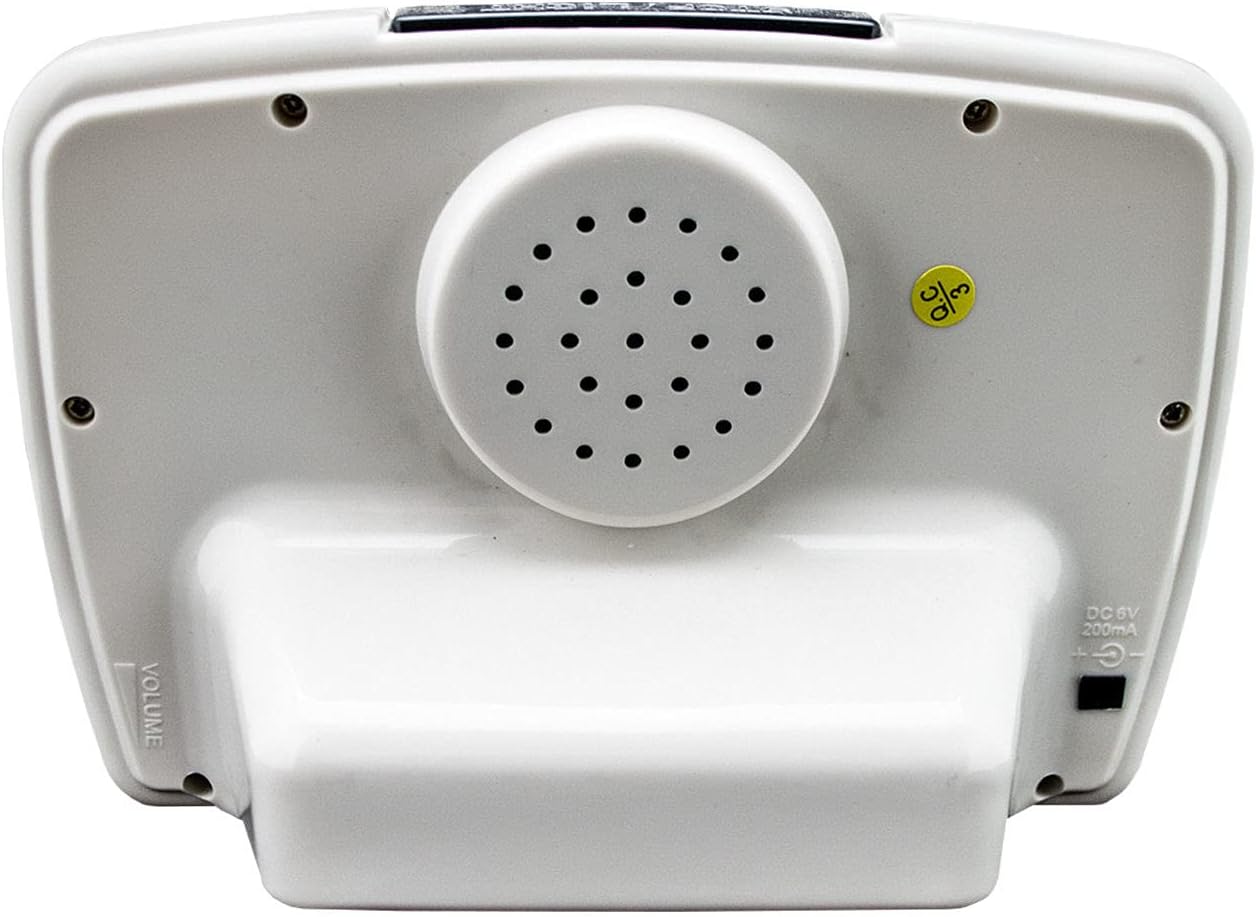
Image: Rear view of the Mirac Table Azan Clock, highlighting the speaker grille and the DC 5V 200mA power input port.
- Speaker: For Azan and voice playback.
- DC 5V 200mA Input: Power input port.
- VOLUME: Volume control switch (typically on the side or back).
Side Panel:

Image: Side view of the Mirac Table Azan Clock, showing the volume slider control.
- Volume Slider: Adjusts the sound output level.
Setup
1. Powering the Device:
Insert appropriate batteries (not included) into the battery compartment, or connect a DC 5V 200mA power adapter (not included) to the power input port on the back of the clock.
2. Initial Time and Date Setting:
- Press the SET button to enter the settings menu.
- Use the ▲ and ▼ buttons to navigate through the settings (Year, Month, Day, Hour, Minute).
- Press SET again to confirm each setting and move to the next.
- Once all time and date settings are complete, press EXIT to save and return to the main display.
3. Selecting Country and City:
The clock supports Azan times for over 1500 cities. Accurate Azan times depend on correct city selection.
- Press the COUNTRY button to select your country. Use ▲ and ▼ to scroll through the list.
- Once the country is selected, press the CITY button.
- Use ▲ and ▼ to find and select your specific city.
- Press SET to confirm your city selection. The clock will automatically calculate prayer times for the chosen location.
Operating Instructions
1. Azan Time Display and Calculation:
The clock displays 5 daily prayer times (Fajr, Dhuhr, Asr, Maghrib, Isha) along with Imsak and Shrooq. These are automatically calculated based on your selected city.
- Azan Accents: The clock features 11 different Azan accents, including Mecca, Madina, Egypt, Al-Aqsa, Turkish, Indonesian, and Moroccan. These can typically be selected within the settings menu (refer to SET button options).
- Azan ON/OFF: Press the AZAN ON/OFF button to enable or disable the automatic Azan sound for prayer times.
- Azan Dua: Press the VOICE button to hear the Azan Dua (prayer after Azan).
2. Qibla Direction:
The clock can display the Qibla direction relative to your selected city. This feature is usually accessed via a specific mode or setting. Consult the display for the Qibla arrow or numerical direction.
3. Calendar Display:
The clock simultaneously displays both the Gregorian and Hijri calendars. You can switch between them or view both on the main screen.
4. Temperature Display:
Press the TEMP button to toggle the temperature display between Celsius (°C) and Fahrenheit (°F).
5. Alarm Functions:
- Daily Alarm: Set a regular daily alarm for any specific time. Press DAILY ALM to set the alarm time using ▲ and ▼.
- Automatic Alarm: This alarm can be set to ring relative to a prayer time (e.g., 15 minutes before Fajr). Press AUTO ALM to configure.
- Snooze Function: When an alarm sounds, press the STOP/LIGHT button on top of the clock to activate the snooze function. The alarm will sound again after a few minutes.
6. Daylight Saving Time (DST):
Press the DST button to enable or disable Daylight Saving Time adjustment. This will automatically shift the clock by one hour forward or backward as needed.
7. Delta Function:
The Delta function allows for minor adjustments to prayer times (e.g., +5 minutes or -5 minutes) if local prayer times slightly differ from the clock's automatic calculation. This is typically found within the SET menu.
8. Volume Control:
Adjust the volume of the Azan and other sounds using the volume control switch located on the side or back of the device.
Maintenance
- Clean the clock with a soft, dry cloth. Do not use abrasive cleaners or solvents.
- If not using the clock for an extended period, remove the batteries to prevent leakage.
- Store the clock in a cool, dry place.
Troubleshooting
| Problem | Possible Cause | Solution |
|---|---|---|
| Clock does not turn on. | No power or dead batteries. | Ensure batteries are correctly inserted or replace them. Check power adapter connection if using. |
| Azan sound is not audible. | Volume is too low or Azan is disabled. | Adjust the volume slider. Press AZAN ON/OFF to enable Azan. |
| Incorrect prayer times. | Incorrect city/country selected or time zone issue. | Verify and re-select your country and city. Check DST setting. Use Delta function for minor adjustments if needed. |
| Display is dim or blank. | Low battery or power issue. | Replace batteries or ensure stable power supply. |
Specifications
| Feature | Detail |
|---|---|
| Brand | MIRAC |
| Model Number | AC-1507B |
| Color | White |
| Product Dimensions | 7 x 18 x 14 cm |
| Product Weight | 284 grams |
| Material | Acrylonitrile Butadiene Styrene (ABS) |
| Display Type | Digital |
| Special Features | Snooze Function, 1500 City Azan Times, 11 Azan Accents, Qibla Direction, Hijri/Gregorian Calendar, Temperature Display (°C/°F), Daily Alarm, Automatic Alarm, DST, Delta Function, Volume Control. |
| Power Input | DC 5V 200mA (Batteries not included) |
Warranty and Support
For warranty information and technical support, please refer to the documentation provided with your purchase or contact your retailer. Keep your proof of purchase for any warranty claims.
Ask a question about this manual
Ask about setup, troubleshooting, compatibility, parts, safety, or missing instructions. Manuals+ will review the question and use this page’s manual context to help answer it.