1. Introduction
The NAD C 338 is a versatile Hybrid Digital DAC Amplifier designed to deliver high-fidelity audio performance with modern connectivity options. It combines NAD's renowned amplification technology with a high-resolution Digital-to-Analog Converter (DAC) and integrated Chromecast built-in, allowing for seamless streaming of music from various sources. This manual provides detailed instructions for setting up, operating, maintaining, and troubleshooting your C 338 amplifier.

Figure 1.1: Front view of the NAD C 338 Hybrid Digital DAC Amplifier.
This image shows the front panel of the NAD C 338, featuring the display, input selection buttons, headphone jack, and volume knob.
2. Key Features
- High-Performance DAC: Equipped with a 24-bit/192kHz Texas Instruments PCM1796 DAC for exceptional audio clarity and reduced distortion.
- HybridDigital Amplification: Features efficient Hypex UCD power supply output stage, delivering 50 watts into 8 or 4 Ohms, and up to 200 watts IHF Dynamic Power into 8, 4, or 2 Ohms.
- Integrated Chromecast: Effortlessly stream music, podcasts, and playlists from your phone, tablet, or laptop to your stereo system.
- Wireless Connectivity: Includes Spotify Connect and Bluetooth for expanded music streaming options.
- Moving Magnet Phono Stage: Built-in phono input for direct connection of turntables, preserving the authentic sound of vinyl records.
- Versatile Inputs/Outputs: Offers a dedicated headphone amplifier, subwoofer output, optical, coaxial, and analog inputs to cater to diverse audio needs.
3. Setup and Connections
Before connecting your NAD C 338, ensure the unit is powered off and unplugged from the mains. Place the amplifier on a stable, level surface with adequate ventilation.
3.1 Rear Panel Overview
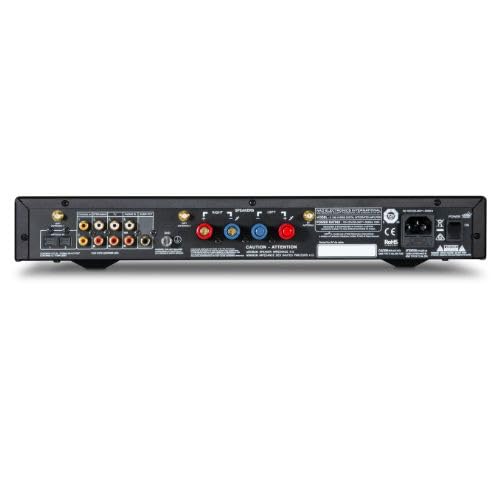
Figure 3.1: Rear panel connections of the NAD C 338.
This image illustrates the various input and output ports on the rear of the amplifier, including speaker terminals, analog inputs, digital inputs, and the phono stage.
3.2 Speaker Connections
- Identify the left and right speaker terminals on the rear panel.
- Connect your speakers using high-quality speaker cables. Ensure correct polarity: connect the positive (+) terminal on the amplifier to the positive (+) terminal on the speaker, and the negative (-) terminal on the amplifier to the negative (-) terminal on the speaker.
- Tighten the binding posts securely to ensure a good connection.
3.3 Source Connections
- Analog Sources (CD Player, Tuner): Connect RCA cables from the analog outputs of your source components to the "ANALOG IN" jacks on the C 338.
- Turntable (Phono): Connect your turntable's RCA cables to the "PHONO IN" jacks. Ensure your turntable has a Moving Magnet (MM) cartridge. Connect the turntable's ground wire to the C 338's ground terminal if available.
- Digital Sources (TV, Blu-ray Player): Connect optical (TOSLINK) cables to the "OPTICAL IN" jacks or coaxial cables to the "COAXIAL IN" jacks.
- Subwoofer: If using an active subwoofer, connect an RCA cable from the "SUBWOOFER OUT" jack on the C 338 to the line-level input on your subwoofer.
3.4 Network Setup (Chromecast Built-in)
The NAD C 338 connects to your home network via Wi-Fi for Chromecast functionality.
- Ensure your C 338 is powered on.
- Download the Google Home app on your smartphone or tablet.
- Follow the in-app instructions to set up your C 338 as a new device on your Wi-Fi network.
- Once connected, the C 338 will appear as a cast device in compatible audio applications.
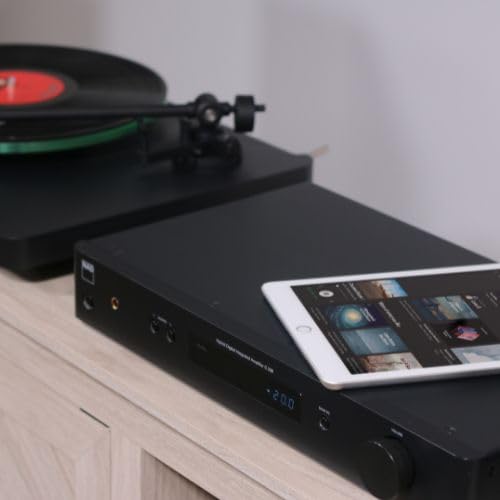
Figure 3.2: NAD C 338 with a tablet, illustrating wireless streaming capabilities.
This image shows the amplifier alongside a tablet, demonstrating how the device can be controlled and music streamed wirelessly via Chromecast or Bluetooth.
4. Operating Instructions
4.1 Power On/Off
Press the POWER button on the front panel or the remote control to turn the unit on or off.
4.2 Source Selection
Use the SOURCE buttons on the front panel or the remote control to cycle through the available input sources (e.g., Analog 1, Analog 2, Phono, Optical 1, Coaxial, Chromecast, Bluetooth). The selected source will be displayed on the front panel.
4.3 Volume Control
Rotate the large VOLUME knob on the front panel clockwise to increase volume and counter-clockwise to decrease it. Alternatively, use the VOLUME +/- buttons on the remote control.
4.4 Streaming with Chromecast Built-in
Once your C 338 is connected to your Wi-Fi network via the Google Home app, you can stream audio directly from Chromecast-enabled applications on your smartphone, tablet, or computer.
- Open a Chromecast-compatible app (e.g., Spotify, Google Play Music, Pandora).
- Look for the Cast icon within the app.
- Tap the Cast icon and select your NAD C 338 from the list of available devices.
- The audio will now play through your C 338.
4.5 Bluetooth Connectivity
To pair a Bluetooth device with your C 338:
- Select the Bluetooth input on the C 338.
- Enable Bluetooth on your mobile device and search for available devices.
- Select "NAD C 338" from the list to pair.
- Once paired, you can stream audio from your device to the amplifier.
4.6 Headphone Output
Connect your headphones to the 6.3mm (1/4") headphone jack on the front panel. When headphones are connected, speaker output will be muted.

Figure 4.1: User enjoying music via headphones connected to the C 338.
This image depicts a user utilizing the headphone output feature of the NAD C 338, highlighting its personal listening capability.
5. Maintenance
To ensure the longevity and optimal performance of your NAD C 338, follow these maintenance guidelines:
- Cleaning: Use a soft, dry cloth to wipe the exterior surfaces. Avoid using abrasive cleaners, solvents, or chemical sprays, as they may damage the finish.
- Ventilation: Ensure that the ventilation openings on the top and sides of the amplifier are not blocked. Proper airflow is crucial to prevent overheating.
- Power Cord: Periodically check the power cord for any signs of damage. If damaged, replace it with an approved cord.
- Storage: If storing the unit for an extended period, disconnect it from the power outlet and store it in a cool, dry place.
6. Troubleshooting
If you encounter issues with your NAD C 338, refer to the following common problems and solutions.
| Problem | Possible Cause | Solution |
|---|---|---|
| No sound from speakers. |
|
|
| Chromecast connectivity issues. |
|
|
| Bluetooth pairing failure. |
|
|
| Distorted sound at higher volumes. |
|
|
7. Specifications
| Feature | Detail |
|---|---|
| Model Number | C338 |
| Amplification Type | HybridDigital (Hypex UCD) |
| Power Output (Rated) | 50 Watts per channel into 8 or 4 Ohms |
| Dynamic Power (IHF) | Up to 200 Watts into 8, 4, or 2 Ohms |
| DAC | Texas Instruments PCM1796 (24-bit/192kHz) |
| Digital Inputs | Optical, Coaxial |
| Analog Inputs | Multiple RCA Stereo, Moving Magnet Phono |
| Wireless Connectivity | Chromecast Built-in, Bluetooth, Wi-Fi |
| Outputs | Speaker Terminals, Headphone (6.3mm), Subwoofer Out |
| Product Dimensions (L x W x H) | 11.22 x 17.13 x 2.76 inches |
| Item Weight | 10.69 Pounds |
| Manufacturer | NAD |
8. Warranty and Support
NAD products are designed and manufactured to the highest quality standards. For specific warranty information, please refer to the warranty card included with your product or visit the official NAD Electronics website.
For technical support, service, or further inquiries, please contact your authorized NAD dealer or visit the NAD Electronics support page online. Keep your purchase receipt as proof of purchase for warranty claims.
NAD Official Website: www.nadelectronics.com


