
Introduction
This manual provides essential information for setting up, operating, maintaining, and troubleshooting your ASUS FX502VM-AH51 Gaming Laptop. Please read this guide thoroughly to ensure optimal performance and longevity of your device.
1. Setup
1.1 Unboxing and Initial Inspection
Carefully remove all components from the packaging. Verify that the following items are included:
- ASUS FX502VM-AH51 Gaming Laptop
- Power Adapter and Power Cord
- Warranty Card
- Quick Manual (this document)
Inspect the laptop for any physical damage. If any components are missing or damaged, contact your retailer immediately.
1.2 Connecting the Power Adapter
Connect the power cord to the power adapter, then plug the adapter into a wall outlet. Insert the adapter's DC output plug into the power input port on the left side of your laptop. It is recommended to fully charge the battery before initial use.

Image: Side view of the ASUS FX502VM-AH51 laptop, illustrating the location of the power input port and other connectivity options.
1.3 Initial Power On and Windows Setup
Press the power button located on the top right of the keyboard to turn on your laptop. Follow the on-screen instructions to complete the Windows 10 operating system setup. This includes selecting your region, language, creating a user account, and connecting to a Wi-Fi network.
2. Operating Your Laptop
2.1 Keyboard and Touchpad
The ASUS FX502VM-AH51 features a full-size keyboard with a numeric keypad and a backlit function for improved visibility in low-light conditions. The touchpad supports multi-touch gestures for navigation.

Image: Close-up of the laptop's keyboard, highlighting the backlit keys and layout.
2.2 Display
Your laptop is equipped with a 15.6-inch Full HD (1920x1080) LCD display, providing clear visuals for both productivity and gaming.
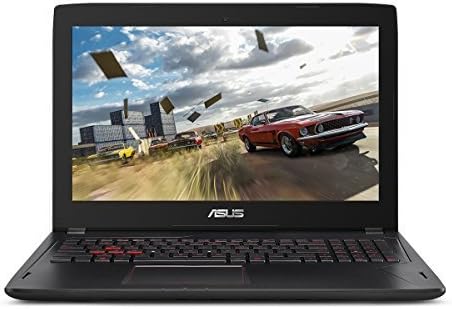
Image: Front view of the ASUS FX502VM-AH51 laptop, showcasing its 15.6-inch Full HD display.
2.3 Connectivity
The laptop offers extensive connectivity options:
- USB 3.0 Ports: For high-speed data transfer with compatible devices.
- HDMI Port: Connect to external monitors or TVs.
- Mini DisplayPort: For additional display output.
- RJ45 LAN Jack: For wired network connections.
- Headphone-out & Audio-in Combo Jack: For audio peripherals.
- SD Card Reader: For reading memory cards.
- Wireless Connectivity: Supports 802.11ac Wi-Fi and Bluetooth 4.1.
2.4 Gaming Performance
Equipped with an NVIDIA GeForce GTX 1060 3GB discrete graphics card and an Intel Core i5-6300HQ processor, this laptop is designed for demanding gaming and graphics applications.

Image: The ASUS FX502VM-AH51 laptop showcasing its gaming capabilities with the NVIDIA GeForce GTX 1060.
3. Maintenance
3.1 Cleaning Your Laptop
Use a soft, lint-free cloth to clean the screen and exterior surfaces. For stubborn smudges, dampen the cloth slightly with water or a screen-safe cleaner. Avoid harsh chemicals or abrasive materials. Keep vents clear of dust and debris to ensure proper airflow.
3.2 Battery Care
To prolong battery life, avoid fully discharging the battery frequently. If storing the laptop for an extended period, ensure the battery is charged to approximately 50-60% and store it in a cool, dry place.
3.3 Storage and RAM Management
Your laptop comes with a 1TB 7200RPM HDD and 16GB DDR4 RAM. Regularly back up important data. For optimal performance, ensure sufficient free space on your hard drive and manage background applications to conserve RAM.
3.4 Thermal Management
The laptop features an Intelligent Thermal Design with a Hyper Cool Duo-Copper cooling system to manage heat during intensive tasks. Ensure the laptop's vents are unobstructed and operate it on a hard, flat surface to facilitate proper cooling.

Image: Diagram illustrating the internal Hyper Cool Duo-Copper cooling system for efficient heat dissipation.
4. Troubleshooting
4.1 Common Issues and Solutions
- Laptop not powering on: Ensure the power adapter is securely connected and the battery has sufficient charge. Try a different power outlet.
- Overheating during use: Ensure vents are clear. Use the laptop on a hard, flat surface. Reduce demanding applications if necessary.
- Noisy fans: Fans may increase speed and noise during heavy load to maintain optimal temperature. This is normal operation. Ensure vents are clean.
- Display issues: Check external display connections if applicable. Adjust brightness settings.
- Connectivity problems: For Wi-Fi, ensure the wireless adapter is enabled and you are within range of a network. For wired connections, check the Ethernet cable.
4.2 System Recovery
Windows 10 includes recovery options to restore your system to an earlier state or reinstall the operating system. Refer to the Windows documentation for detailed instructions on these procedures.
5. Specifications
| Feature | Detail |
|---|---|
| Model Name | FX502VM-AH51 |
| Processor | Intel Core i5-6300HQ (2.3 GHz, Turbo to 3.2 GHz) |
| Graphics | NVIDIA GeForce GTX 1060 (3GB GDDR5 Dedicated) |
| Display | 15.6-inch Full HD (1920x1080) LCD |
| RAM | 16GB DDR4 |
| Storage | 1TB 7200RPM HDD |
| Operating System | Windows 10 |
| Connectivity | 802.11ac Wi-Fi, Bluetooth 4.1, HDMI, Mini DisplayPort, RJ45 LAN, USB 3.0 (x3), Headphone/Mic Combo Jack, SD Card Reader |
| Webcam | HD Webcam |
| Weight | 4.9 Pounds (approx. 2.22 kg) |
| Dimensions (Approx.) | 0.94 inches thin |
| Battery | Lithium Ion, 64 Watt Hours |
6. Warranty Information
Your ASUS FX502VM-AH51 Gaming Laptop comes with a 1-year limited warranty. Please refer to the included Warranty Card for detailed terms and conditions, including coverage, exclusions, and how to obtain service.
7. Support
For further assistance, technical support, or driver downloads, please visit the official ASUS support website. You can find contact information and additional resources there.
ASUS Official Website: www.asus.com


