
Introduction
This manual provides detailed instructions for the proper use, setup, and maintenance of your Zastone X6 Rechargeable Long Range Two-Way Radios. Please read this manual thoroughly before operating the devices to ensure optimal performance and safety.
What's in the Box
The Zastone X6 package includes the following components:
- 4 x Handheld Radios
- 4 x Rechargeable Batteries
- 4 x Chargers
- 4 x Earpieces with Microphones
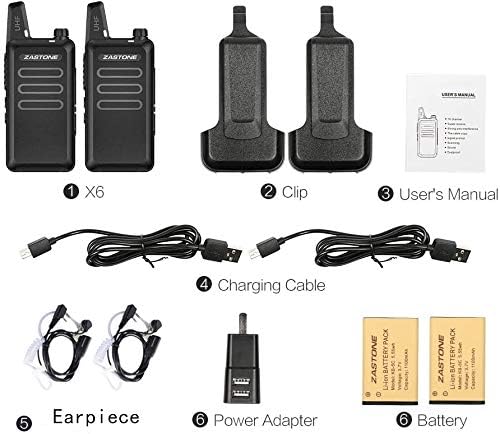
Figure 1: Package Contents - Zastone X6 Radios, Clips, User's Manual, Charging Cables, Earpieces, Power Adapters, Batteries.
Product Overview & Features
The Zastone X6 radios are designed for reliable long-range communication, featuring a compact and durable build. They are suitable for various applications, from commercial use to outdoor activities.

Figure 2: Zastone X6 Rechargeable Long Range Two-Way Radios (4-Pack).
Key Features:
- Compact and Convenient Size: Easily fits in hand, measuring 9.6 x 5.5 x 2.2 cm (3.7 x 2.1 x 0.8 inches) and weighing 113g (0.25lb). Solidly built and water-resistant.
- UHF Frequency Range: Operates on UHF 400-470MHz with 16 pre-programmed channels. Channels can be programmed with 50 CTCSS tones and 105 CDCSS tones.
- Long Battery Life: Each radio includes a 1100mAh rechargeable Li-ion battery, providing 2-5 days of standby time depending on transmission usage. Full charge takes approximately 3 hours.
- Clear Audio: High-quality built-in speaker delivers loud and crystal clear sound. Includes a single-earbud style earpiece with a built-in microphone and Push-to-Talk (PTT) button.
- VOX Function: Voice-activated transmission for hands-free operation.
- Durable Design: Falling-resistant from 1-3 meters.
- Extended Range: Tested transmission range up to 30 floors, with reduced range in congested areas.

Figure 3: Front View with Labeled Components.

Figure 4: Side View with Labeled Controls and Ports.

Figure 5: Compact and Portable Design.
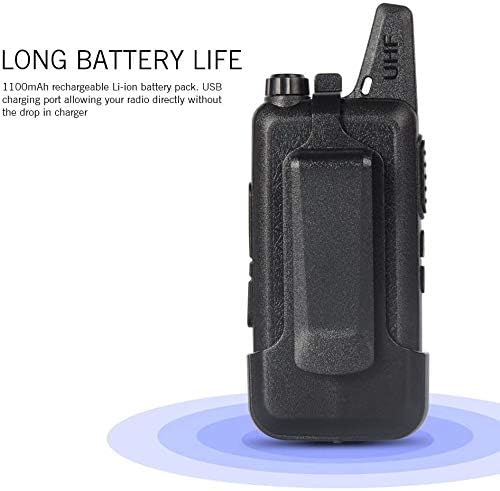
Figure 6: Long Battery Life Feature.
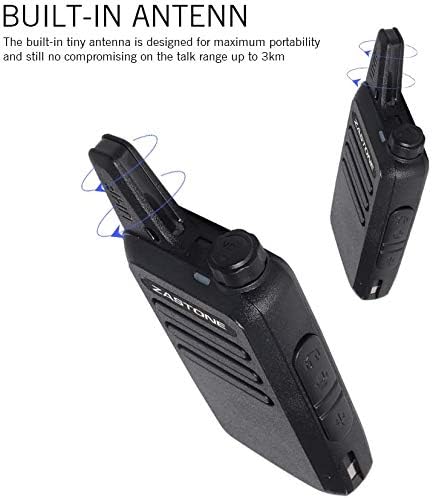
Figure 7: Built-in Antenna for Optimal Range.
Product Video:
Official product video showcasing the ZASTONE X6 Mini Walkie Talkie, highlighting its compact size, transmitting power, frequency range, body thickness, weight, integrated chip, communication distance, and included accessories like the 2-pole Covert Air Acoustic Tube Earpiece and USB Programming cable.
Setup Guide
1. Charging the Battery:
- Connect the charger to a power outlet.
- Insert the radio with its battery into the charging cradle.
- The charging indicator light will illuminate. Once fully charged (approx. 3 hours), the light will change color or turn off.
2. Attaching the Belt Clip:
- Align the belt clip with the screw holes on the back of the radio.
- Secure the clip using the provided screws.
3. Connecting the Earpiece:
- Locate the speaker/mic port on the side of the radio.
- Insert the earpiece plug firmly into the port. When the earpiece is connected, audio will be routed to the earpiece, and the radio's internal speaker will be muted.
Operating Instructions
1. Power On/Off and Volume Control:
- To power on the radio, rotate the Power/Voice Volume knob clockwise.
- Continue rotating clockwise to increase the volume.
- Rotate counter-clockwise to decrease the volume.
- To power off, rotate the knob fully counter-clockwise until it clicks.
2. Channel Selection:
- Use the Channel Selector Plus and Channel Selector Reduce buttons on the side of the radio to change channels.
- A synthesized voice will announce the channel number as you change it.
3. Transmitting (Push-to-Talk - PTT):
- To transmit, press and hold the PTT key on the side of the radio.
- Speak clearly into the microphone (either on the radio or the earpiece).
- Release the PTT key to stop transmitting and return to receive mode.
4. VOX Function:
- The radio supports VOX (Voice Operated Exchange), allowing hands-free transmission when enabled. Refer to the full user manual for detailed instructions on enabling and adjusting VOX sensitivity.
5. Monitor Function:
- Press the Monitor key to temporarily disable squelch and listen for weak signals on the current channel.
Maintenance
Battery Care:
- Fully charge batteries before first use.
- Avoid overcharging or completely draining the battery to prolong its lifespan.
- Store radios and batteries in a cool, dry place when not in use.
Cleaning:
- Wipe the radio's surface with a soft, damp cloth.
- Do not use harsh chemicals or abrasive cleaners.
- Ensure all ports are dry before charging or connecting accessories.
Troubleshooting
| Problem | Possible Cause | Solution |
|---|---|---|
| Radio does not power on | Battery is low or dead | Charge the battery fully. |
| No sound or low volume | Volume too low; Earpiece not fully inserted; Squelch level too high | Increase volume; Re-insert earpiece; Adjust squelch settings (refer to full manual). |
| Cannot communicate with other radios | Radios on different channels; Out of range; Battery low | Ensure all radios are on the same channel; Move closer to other radios; Charge batteries. |
| Short communication range | Obstructions (buildings, terrain); Low battery; Interference | Move to an open area; Charge battery; Avoid sources of interference. |
Specifications
| Feature | Detail |
|---|---|
| Brand | Zastone |
| Model Number | 4-X6+4E |
| Item Weight | 2.51 pounds (total package) |
| Product Dimensions | 0.8"D x 2.1"W x 9.6"H (per radio) |
| Batteries | 1 Lithium Ion batteries required (included) |
| Number of Channels | 16 |
| Frequency Range | 400 - 470 MHz (UHF) |
| Talking Range Maximum | 300 Meters (typical, varies by environment) |
| Voltage | 3.7 Volts |
| Water Resistance Level | Water Resistant |
Warranty and Support
Zastone products are manufactured to high-quality standards. For warranty information, technical support, or service inquiries, please refer to the contact information provided with your purchase or visit the official Zastone website. Keep your purchase receipt as proof of purchase for warranty claims.


