
Ghost Controls AXXV
Contents
Ghost Controls Vehicle Sensor (AXXV) Instruction Manual
Model: AXXV | Brand: Ghost Controls
1. Introduction
The Ghost Controls AXXV Wired Vehicle Sensor is designed to enhance the functionality of your automatic gate opener system. This sensor detects the presence of a moving vehicle and automatically triggers the gate to open, providing convenient exit from your property without the need for a remote control.
It is compatible with all Ghost Controls gate opener systems and can also work with many other brands that provide 10-16 Volt AC or DC Accessory Power.
2. Product Overview
The AXXV Wired Vehicle Sensor consists of a durable sensor unit and a 55-foot cable designed for underground installation. Its primary function is to detect large metallic objects, such as vehicles, to automate gate operation.

Figure 2.1: Ghost Controls AXXV Wired Vehicle Sensor with its 55-foot cable coiled.

Figure 2.2: The AXXV Wired Vehicle Sensor showing the sensor unit and the extended cable.
Key Features:
- Automatically triggers gate opening upon vehicle detection.
- Designed for underground installation (12-18 inches deep).
- Equipped with a 55-foot cable for flexible placement.
- Does not require a separate battery for operation.
- Compatible with Ghost Controls gate opener systems and other systems providing 10-16V AC/DC accessory power.
3. Setup and Installation
Proper installation is crucial for the optimal performance of your AXXV Wired Vehicle Sensor. Follow these steps carefully.
3.1 Physical Installation
- Location Selection: Choose a location for the sensor where vehicles will pass directly over it when exiting the property. Ensure the sensor is placed at least 20 feet from the gate itself to allow ample time for the gate to open.
- Trenching: Dig a trench 12-18 inches deep next to your driveway where the sensor will be buried. The trench should extend from the chosen sensor location to your gate opener's control panel.
- Sensor Placement: Place the sensor unit within the trench. Ensure it is level and securely positioned.
- Cable Routing: Route the 55-foot cable from the sensor unit through the trench to the gate opener's control panel. Ensure the cable is protected from damage during backfilling.
- Backfilling: Carefully backfill the trench, ensuring the sensor and cable remain at the specified depth.
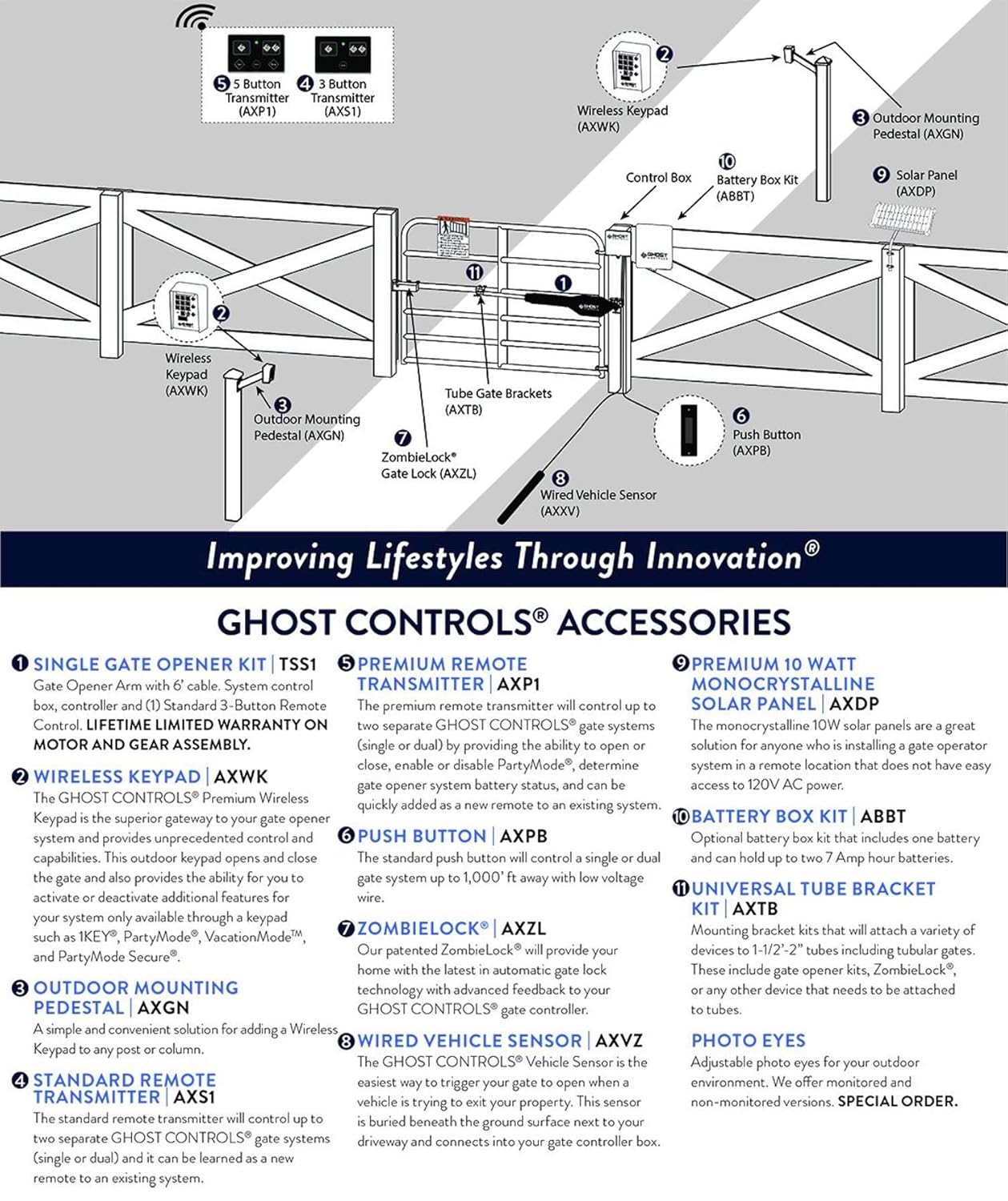
Figure 3.1: The AXXV Wired Vehicle Sensor installed underground next to a driveway.

Figure 3.2: Recommended placement of the wired vehicle sensor, at least 20 feet from the gate.
3.2 Electrical Connection
Connect the sensor's wires to the appropriate terminals on your gate opener's control board. Refer to your gate opener's manual for specific wiring diagrams. The AXXV sensor requires 10-16 Volt AC or DC Accessory Power.
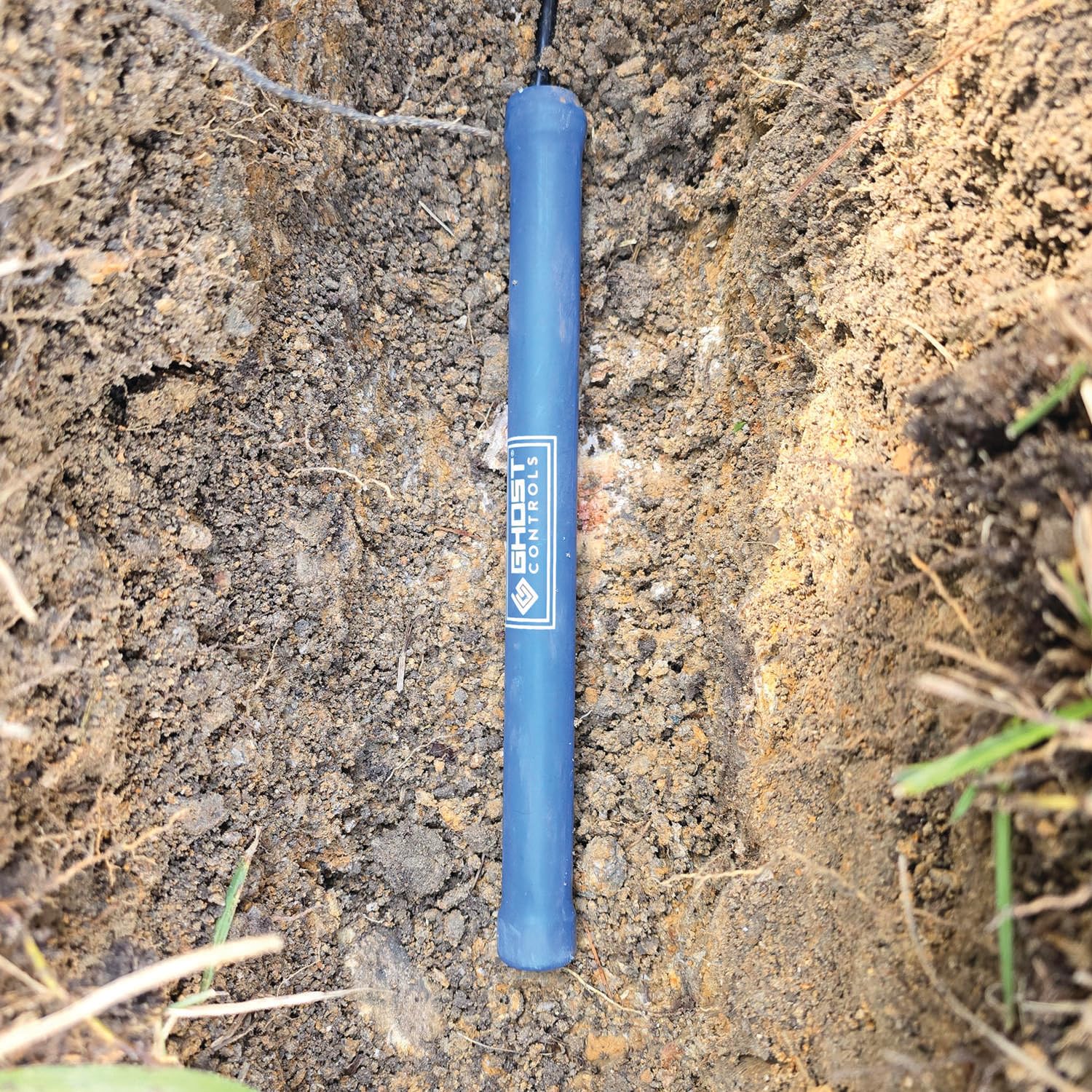
Figure 3.3: Overview of Ghost Controls accessories, showing the wired vehicle sensor (AXXV) connection point.
4. Operating Instructions
Once installed and connected, the AXXV Wired Vehicle Sensor operates automatically. When a vehicle passes over the buried sensor, it detects the metallic mass and sends a signal to the gate opener's control board, triggering the gate to open.
This feature provides a hands-free exit solution, eliminating the need to use a remote control or keypad when leaving your property.
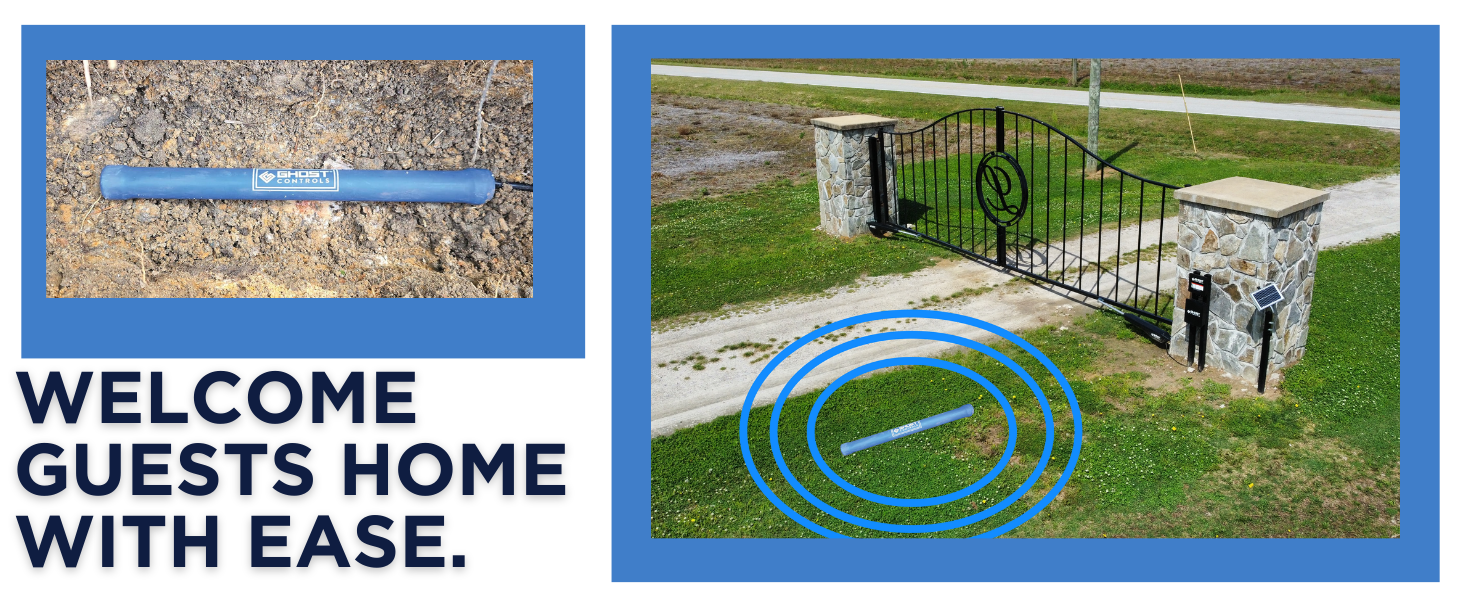
Figure 4.1: The vehicle sensor detects approaching vehicles, allowing for automatic gate opening.
5. Maintenance
The AXXV Wired Vehicle Sensor is designed for minimal maintenance. Since it is buried underground, it is largely protected from environmental elements.
- Regular Inspection: Periodically check the area above the sensor for any significant ground shifts or damage that might affect its operation.
- Cable Integrity: Ensure the cable remains undisturbed and protected from digging or other activities that could sever it.
- Cleanliness: Keep the area around the gate opener's control panel clean and free of debris to ensure proper connections.
6. Troubleshooting
If your AXXV Wired Vehicle Sensor is not functioning as expected, consider the following troubleshooting steps:
6.1 Sensor Not Triggering Gate
- Check Connections: Verify that the RED and WHITE wires from the sensor are securely connected to the correct terminals on your gate opener's control board.
- Vehicle Position: Ensure the vehicle passes directly over the buried sensor. The sensor detects metallic mass, so larger vehicles are more reliably detected.
- Recalibration: If the sensor is not triggering or is constantly triggering without a vehicle present, a full recalibration may be necessary.
Sensor Recalibration Procedure:
- Disconnect both the RED and WHITE wires of the vehicle sensor from the gate opener's control board.
- Wait approximately 15 minutes to allow any residual power to drain from the sensor.
- Reconnect only the WHITE wire to the control board.
- Wait an additional 15 minutes.
- Reconnect the RED wire.
- During this entire recalibration process, ensure there are no vehicles or any other large metal objects in the vicinity of the sensor. The sensor should also be placed approximately 20 feet from the fence and buried 10-12 inches into the ground for optimal performance.
6.2 Gate Remaining Open (False Trigger)
- This can indicate a constant signal from the sensor. Perform the recalibration procedure described above.
- Check for any metallic objects (e.g., tools, metal debris) that might be permanently located above or very near the buried sensor.
7. Specifications
| Attribute | Detail |
|---|---|
| Model Number | AXXV |
| Brand | Ghost Controls |
| Product Dimensions | 16.25 x 4.5 x 2.75 inches |
| Item Weight | 2.8 Pounds |
| Cable Length | 55 Feet |
| Power Source | Hardwired Electrical Connection (10-16V AC or DC) |
| Recommended Burial Depth | 12-18 inches |
| Date First Available | October 3, 2016 |
8. Warranty Information
Ghost Controls products are designed for durability and reliability. For specific warranty details regarding your AXXV Wired Vehicle Sensor, please refer to the warranty documentation included with your gate opener system or visit the official Ghost Controls website.
Generally, Ghost Controls offers a limited lifetime warranty on certain components. Please retain your proof of purchase for warranty claims.
9. Support
For technical assistance, troubleshooting, or any questions regarding your Ghost Controls AXXV Wired Vehicle Sensor, please contact Ghost Controls customer support.
- Online Support: Visit the Ghost Controls Support Page for FAQs, guides, and contact options.
- Email Support: Email Ghost Controls directly for assistance.
- Phone Support: Refer to the Ghost Controls website for current phone support hours and numbers.

Figure 9.1: Technical Support resources are available online.
Documents and downloads
Ask a question about this manual
Ask about setup, troubleshooting, compatibility, parts, safety, or missing instructions. Manuals+ will review the question and use this page’s manual context to help answer it.