
Zastone 2-X6+2E
Zastone X6 Rechargeable Two-Way Radios User Manual
Model: 2-X6+2E | Brand: Zastone
Introduction
This manual provides comprehensive instructions for the Zastone X6 Rechargeable Long Range Two-Way Radios. Designed for reliable communication, these compact and durable walkie-talkies are suitable for various applications, from commercial use to outdoor activities. Please read this manual thoroughly to ensure proper operation and maintenance of your device.

Image: The Zastone X6 Two-Way Radios with included earpieces.
What's in the Box
Upon opening your Zastone X6 package, please verify that all the following components are included:
- 2 x Zastone X6 Two-Way Radios
- 2 x Removable Belt Clips
- 2 x Chargers (USB charging cables and power adapters)
- 2 x Earpieces with Microphones and Push-to-Talk (PTT) buttons
- 2 x 1100mAh Rechargeable Li-ion Batteries (pre-installed or separate)
- 1 x User's Manual (this document)
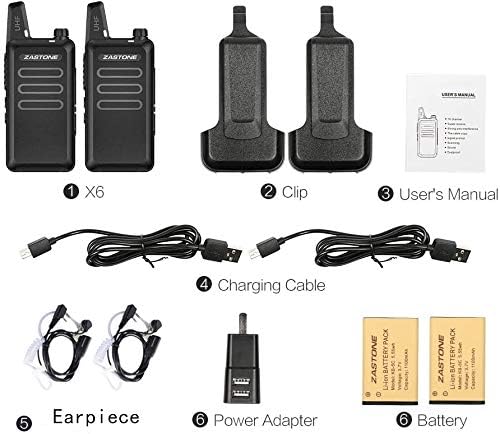
Image: A visual representation of all items included in the Zastone X6 package.
Product Features
- Compact and Portable Design: The Zastone X6 radios are small and convenient, measuring approximately 9.6 x 5.5 x 2.2 cm (3.7 x 2.1 x 0.8 inches) and weighing 113g (0.25lb). Their solid, water-resistant build makes them easy to operate for all ages. Each radio includes a removable belt clip for easy carrying.

Image: The compact size of the Zastone X6 radio, fitting comfortably in hand.
- UHF Frequency Range & Channels: Operates within the UHF 400-470MHz frequency range with 16 pre-programmed channels. All radios in a pack have identical frequencies on each channel out of the box. A 16-position mechanical rotary switch allows for channel selection, with a synthesized voice announcing the channel number. Channel frequencies are programmable within the specified range, supporting 50 CTCSS tones and 105 CDCSS tones per programmed channel.

Image: Front view of the Zastone X6 radio highlighting key components and controls.
- Long Battery Life: Each radio is powered by an 1100mAh rechargeable Li-ion battery. A full charge takes approximately 3 hours, providing 2-5 days of standby time depending on transmission usage.
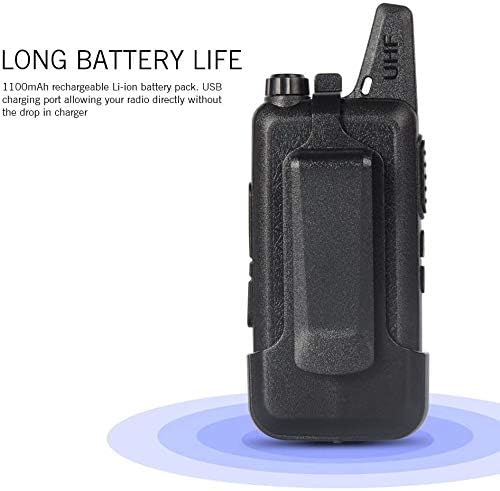
Image: Illustration emphasizing the long battery life of the Zastone X6 radio.
- Clear Audio & Earpiece Functionality: The built-in speaker delivers loud and clear sound. The radio features a Push-to-Talk (PTT) button and an integrated microphone. Each radio comes with a single-earbud style earpiece that includes a microphone and PTT button. When the earpiece is plugged in, audio is routed to the earpiece, silencing the radio's speaker. The radio also supports a VOX (Voice Operated Exchange) function for hands-free operation.
- Durable and Wide Application: Designed to be falling-resistant from 1-3 meters. Tested transmission range extends up to 30 floors in open areas, with reduced range in congested environments. These radios are well-suited for commercial construction, warehouses, factories, hotels, retail stores, security teams, maintenance teams, and various outdoor activities.
Video: An overview of the Zastone X6 Mini Rechargeable Long Range Two-Way Radios, highlighting key features and accessories.
Setup Guide
1. Charging the Battery
- Connect the USB charging cable to the radio's USB plug and the power adapter.
- Plug the power adapter into a standard electrical outlet.
- The charger light on the radio will indicate charging status (e.g., red for charging, green for fully charged).
- Allow approximately 3 hours for a full charge.
2. Attaching the Belt Clip
Align the belt clip with the designated slots on the back of the radio and slide it down until it clicks securely into place.
3. Connecting the Earpiece
Insert the earpiece's two-pin plug into the speaker/mic port on the side of the radio. Ensure it is firmly seated for proper connection.

Image: Side view of the Zastone X6 radio showing the location of the speaker/mic port and USB plug.
Operating Instructions
1. Powering On/Off and Volume Control
Rotate the Power/Voice Volume knob (top of the radio) clockwise to turn the radio on. Continue rotating to increase the volume. Rotate counter-clockwise to decrease volume and turn the radio off.
2. Channel Selection
Use the Channel Selector Plus and Channel Selector Reduce buttons on the side of the radio to cycle through the 16 available channels. A synthesized voice will announce the current channel number.
3. Push-to-Talk (PTT) Function
To transmit, press and hold the large PTT key on the side of the radio. Speak clearly into the microphone (either on the radio or the earpiece). Release the PTT key to stop transmitting and listen for a response.
4. VOX Function (Voice Operated Exchange)
The VOX function allows for hands-free transmission. When activated, the radio will automatically transmit when it detects your voice. Refer to the programming software for detailed VOX activation and sensitivity settings.
5. Programming Channels
While the radios come pre-programmed, advanced users can customize channel frequencies and tones (CTCSS/CDCSS) using compatible programming software (e.g., CHIRP) and a USB programming cable. This requires specific technical knowledge and a computer running a supported operating system (e.g., Windows XP/7).
Maintenance
1. Cleaning
Wipe the radio's surface with a soft, damp cloth. Do not use harsh chemicals or abrasive cleaners. Ensure the radio is dry before use or charging.
2. Battery Care
To prolong battery life, avoid fully discharging the battery frequently. Charge the battery regularly, even if the radio is not in active use. Store the radio and battery in a cool, dry place when not in use for extended periods.
3. Storage
Store the radios in a clean, dry environment away from extreme temperatures, direct sunlight, and corrosive materials. Remove batteries if storing for very long durations.
Troubleshooting
| Problem | Possible Cause | Solution |
|---|---|---|
| Radio does not power on. | Battery is low or depleted. | Charge the battery fully. |
| No sound or distorted sound. | Volume is too low; earpiece not fully inserted; radio on wrong channel. | Increase volume; re-insert earpiece firmly; switch to the correct channel. |
| Cannot communicate with other radios. | Radios are on different channels; out of range; battery low. | Ensure all radios are on the same channel; move closer to other radios; charge batteries. |
| Short transmission range. | Obstructions (buildings, terrain); low battery; interference. | Move to an open area; ensure battery is fully charged; avoid sources of strong electromagnetic interference. |
Specifications
| Feature | Detail |
|---|---|
| Brand | Zastone |
| Model Number | 2-X6+2E |
| Frequency Range | UHF 400-470MHz |
| Number of Channels | 16 |
| Power Output | 3W |
| Battery Type | 1100mAh Li-ion (included) |
| Item Weight | 113g (0.25lb) per radio |
| Product Dimensions (L x W x H) | 9.6 x 5.5 x 2.2 cm (3.7 x 2.1 x 0.8 inches) |
| Water Resistance Level | Water Resistant |
| Voltage | 3.7 Volts |
Warranty and Support
Zastone products are manufactured to high-quality standards. For warranty information, technical support, or service inquiries, please refer to the contact information provided with your purchase documentation or visit the official Zastone website. Keep your purchase receipt as proof of purchase for warranty claims.
Related documents2-X6+2E


Ask a question about this manual
Ask about setup, troubleshooting, compatibility, parts, safety, or missing instructions. Manuals+ will review the question and use this page’s manual context to help answer it.