
1. Introduction
The FEELWORLD FW759 is a compact and versatile 7-inch field monitor designed for DSLR cameras and camcorders. It features a high-definition IPS display with a resolution of 1280x800, offering a wide viewing angle and accurate color reproduction. This monitor supports 4K HDMI and AV input, making it compatible with a broad range of professional and consumer-grade video equipment. Its ultra-slim and lightweight design enhances portability, making it suitable for various filming scenarios, including use with stabilizers and gimbals. This manual provides detailed instructions for the setup, operation, and maintenance of your FW759 monitor.

Image 1.1: Front view of the FEELWORLD FW759 monitor with a vibrant display.
2. Package Contents
Please verify that all items listed below are included in your package. If any items are missing or damaged, please contact your retailer.
- 1x FEELWORLD FW759 Monitor
- 1x Mini HDMI Cable
- 1x Sunshade
- 1x Hot Shoe Mount
- 1x F970 Battery Plate (Note: Battery and power cord are not included)
- 1x HDMI Plug Lock
- 1x Operation Manual
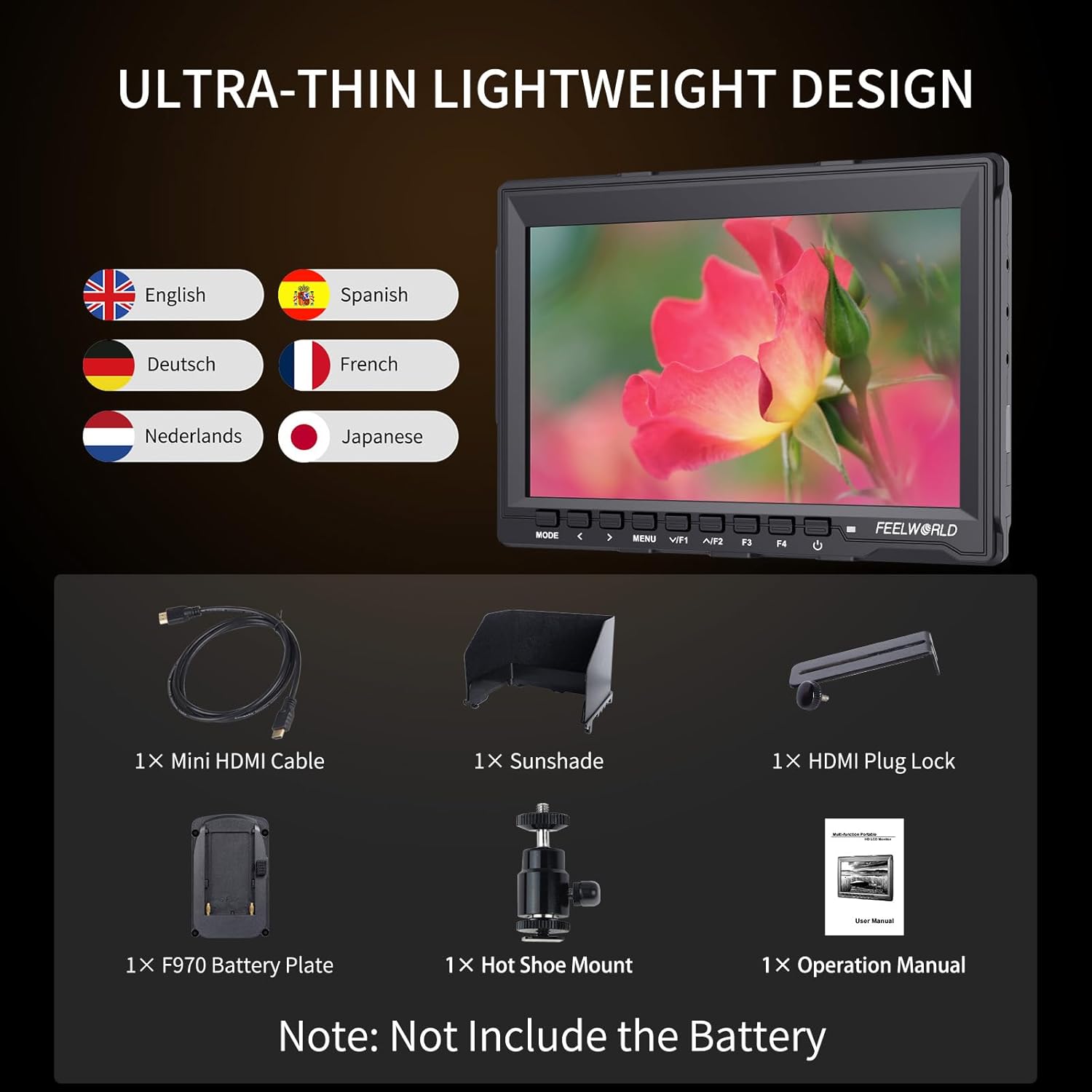
Image 2.1: Illustration of the items included in the FEELWORLD FW759 package.
3. Product Overview
3.1 Physical Features and Ports
The FW759 monitor is designed with user accessibility in mind. Key ports and control buttons are located on the sides and bottom for easy access.

Image 3.1: Rear view of the FW759 monitor highlighting the 4K HDMI input, AV input, DC 12V power input, and USB upgrade port.
- HDMI Input: Supports 4K UHD 3840×2160p (30/29.97/25/24/23.98Hz) and 4096×2160p (24Hz).
- AV Input: For connecting devices with analog video output.
- DC 12V Input: Power connection for the monitor.
- USB Upgrade: For firmware updates.
- F970 Battery Plate: For attaching compatible NP-F series batteries.
3.2 Control Buttons
The monitor features several buttons for navigation and function control:
- MODE: Cycles through input modes or custom functions.
- < / >: Navigation buttons for menu selection and value adjustment.
- MENU: Accesses the main menu.
- /F1, /F2, F3, F4: Customizable function buttons for quick access to features like peaking, false color, etc.
- Power Button: Turns the monitor on/off.
4. Setup
4.1 Power Connection
The FW759 monitor can be powered via a DC 12V adapter (not included) or a compatible NP-F series battery (not included) attached to the F970 battery plate.
- Using DC Power: Connect a 12V DC power adapter to the DC 12V input port on the monitor.
- Using Battery Power: Slide a charged NP-F series battery onto the F970 battery plate until it clicks into place.
4.2 Mounting the Monitor
Use the included hot shoe mount to attach the monitor to your camera's hot shoe or a compatible rig.
- Attach the hot shoe mount to the bottom of the monitor.
- Slide the hot shoe mount into your camera's hot shoe and tighten the locking mechanism.
Image 4.1: The FW759 monitor attached to a camera via the hot shoe mount.
4.3 Connecting to a Camera
Connect your camera to the monitor using the provided Mini HDMI cable.
- Connect one end of the Mini HDMI cable to your camera's HDMI output port.
- Connect the other end of the Mini HDMI cable to the HDMI input port on the FW759 monitor.
- Utilize the HDMI plug lock to secure the HDMI cable connection, preventing accidental disconnections during operation.
Image 4.2: The HDMI plug lock securing the HDMI cable to the monitor.
5. Operation
5.1 Basic Operation
- Power On/Off: Press and hold the Power button to turn the monitor on or off.
- Input Selection: Press the MODE button to cycle through available input sources (HDMI, AV).
- Menu Navigation: Press the MENU button to open the OSD (On-Screen Display) menu. Use the < and > buttons to navigate through menu options and adjust values. Press MENU again to confirm selections or exit the menu.
5.2 Display Features
The FW759 monitor provides a clear and accurate viewing experience:
- Resolution: 1280x800 native resolution.
- IPS Panel: Ensures consistent and accurate colors with a wide 178° viewing angle.
- Brightness: 400cd/m2 for clear visibility.
- Contrast Ratio: 800:1 for good distinction between light and dark areas.

Image 5.1: Demonstrating the wide 178-degree viewing angle of the FW759 IPS display.
5.3 Advanced Monitoring Functions
The FW759 includes several professional features to assist with accurate focus and exposure:

Image 5.2: Visual representation of various advanced monitoring features available on the FW759.
- Peaking Focus Assist: Highlights sharp edges to indicate in-focus areas.
- False Colors: Provides an objective way to set exposure by displaying different exposure levels as distinct colors.
- Exposure (Zebra): Overexposure warning indicated by zebra stripes.
- Histogram: Graphical representation of tonal distribution.
- Embedded Audio: Displays audio levels from the HDMI input.
- Anamorphic Mode: De-squeezes anamorphic footage.
- Nine Grid: Composition aid.
- Zoom-in: Magnifies a portion of the image for critical focus.
- Pixel-to-Pixel: Displays the image at its native resolution without scaling.
- Check Field: Helps calibrate the monitor.
- Image Flip: Flips the image horizontally or vertically.
- Image Freeze: Pauses the current frame.
These functions can typically be assigned to the customizable F1-F4 buttons for quick access. Refer to the OSD menu for detailed settings and assignments.
5.4 Sunshade Installation
The included sunshade helps reduce glare and reflections when operating in bright outdoor conditions.
- Align the sunshade with the grooves around the monitor's screen.
- Gently press the sunshade into place until it is securely attached.
Image 5.3: The sunshade attached to the FW759 monitor for improved outdoor visibility.
6. Maintenance
6.1 Cleaning the Monitor
- Use a soft, lint-free cloth to gently wipe the screen and body of the monitor.
- For stubborn smudges, lightly dampen the cloth with water or a screen-cleaning solution specifically designed for electronics.
- Avoid using harsh chemicals, abrasive cleaners, or solvents, as these can damage the screen and finish.
6.2 Storage
- When not in use, store the monitor in a dry, cool place away from direct sunlight and extreme temperatures.
- If storing for an extended period, remove the battery to prevent leakage.
- Consider using a protective case to prevent scratches and impacts.
7. Troubleshooting
If you encounter issues with your FEELWORLD FW759 monitor, please refer to the following common problems and solutions:
| Problem | Possible Cause | Solution |
|---|---|---|
| No signal displayed | Incorrect input selected, loose HDMI cable, camera output settings. | Ensure the correct input (HDMI/AV) is selected. Check HDMI cable connection and use the HDMI plug lock. Verify camera's HDMI output settings. |
| Monitor powers off unexpectedly | Low battery, power cable issue. | Replace or recharge the battery. Ensure DC power cable is securely connected. |
| HDMI cable frequently disconnects | Cable not secured. | Always use the provided HDMI plug lock to secure the cable. |
| Camera mode settings reset after power cycle | Specific camera compatibility or monitor setting. | Navigate to the monitor's OSD menu and re-enable the desired camera mode or display settings (e.g., 1080i for full screen). |
| Poor image quality / incorrect colors | Incorrect display settings, faulty cable. | Adjust brightness, contrast, and color settings in the OSD menu. Try a different HDMI cable. |
If the problem persists after trying these solutions, please contact FEELWORLD customer support.
8. Specifications
| Feature | Detail |
|---|---|
| Product Dimensions | 7.09 x 0.79 x 5.12 inches |
| Item Weight | 10.6 ounces |
| Item Model Number | FW759 |
| Display Size | 7 Inch |
| Resolution | 1280x800 |
| Panel Type | IPS |
| Viewing Angle | 178° |
| Brightness | 400cd/m² |
| Contrast Ratio | 800:1 |
| Input Ports | HDMI, AV |
| HDMI Support Format | 4K UHD 3840×2160p (30/29.97/25/24/23.98Hz), 4096×2160p (24Hz) |
| Power Input | DC 12V |
| Compatible Devices | DSLR Cameras, Camcorders |
| Color | Black |
| Manufacturer | Zhangzhou SEETEC Optoelectronics Technology Co.,Ltd |
9. Warranty and Support
9.1 Warranty Information
The FEELWORLD FW759 monitor comes with a 1-year warranty. FEELWORLD provides US local after-sales support for this product.
9.2 Further Assistance
For additional information, support, or to purchase compatible accessories, please visit the official FEELWORLD store or refer to the digital user manual:
- Official User Manual (PDF): Download PDF
- Visit the FEELWORLD Store: FEELWORLD on Amazon