
Introduction
Thank you for choosing the CLP Castle Office Chair. This manual provides essential information for the safe assembly, operation, and maintenance of your new office chair. Please read these instructions carefully before use and retain them for future reference.
Safety Information
For your safety, please observe the following guidelines:
- Do not use the chair if the user's weight exceeds 130 kg (286 lbs).
- Keep all small parts and packaging materials out of reach of children.
- Assemble the chair carefully to prevent injury.
- Ensure all screws and bolts are tightened securely before use. Periodically check and re-tighten if necessary.
For additional safety details, please refer to the official safety information document: Safety Information (PDF)
Setup and Assembly
The CLP Castle Office Chair requires assembly. An assembly kit with all necessary components and tools is included. Follow the step-by-step instructions provided in the included assembly sheet.
Assembly Tips:
- Assembly typically takes about 30 minutes and can be completed by one person.
- When attaching the armrests, gently align the screw holes with the holes in the chair body before tightening the bolts with the provided Allen key. Avoid forcing the armrests into place.
- When joining the backrest and seat, apply firm pressure to ensure the metal connecting piece is properly seated and aligned. The chair will be upside down during this step.

Image: Overview of chair dimensions and features, useful during assembly.
Operating Instructions
The CLP Castle Office Chair is designed for ergonomic comfort and adjustability.
Height Adjustment:
The seat height is continuously adjustable using the gas lift mechanism. Locate the lever under the seat on the right side. Pull the lever up to raise the seat (when no weight is applied) or lower the seat (while seated).

Image: Gas lift mechanism for seat height adjustment.
Recline Function and Footrest:
For comfortable breaks, the chair features a reclinable backrest and an extendable footrest. The backrest can be tilted backward to two positions. To extend the footrest, pull it out from under the seat.
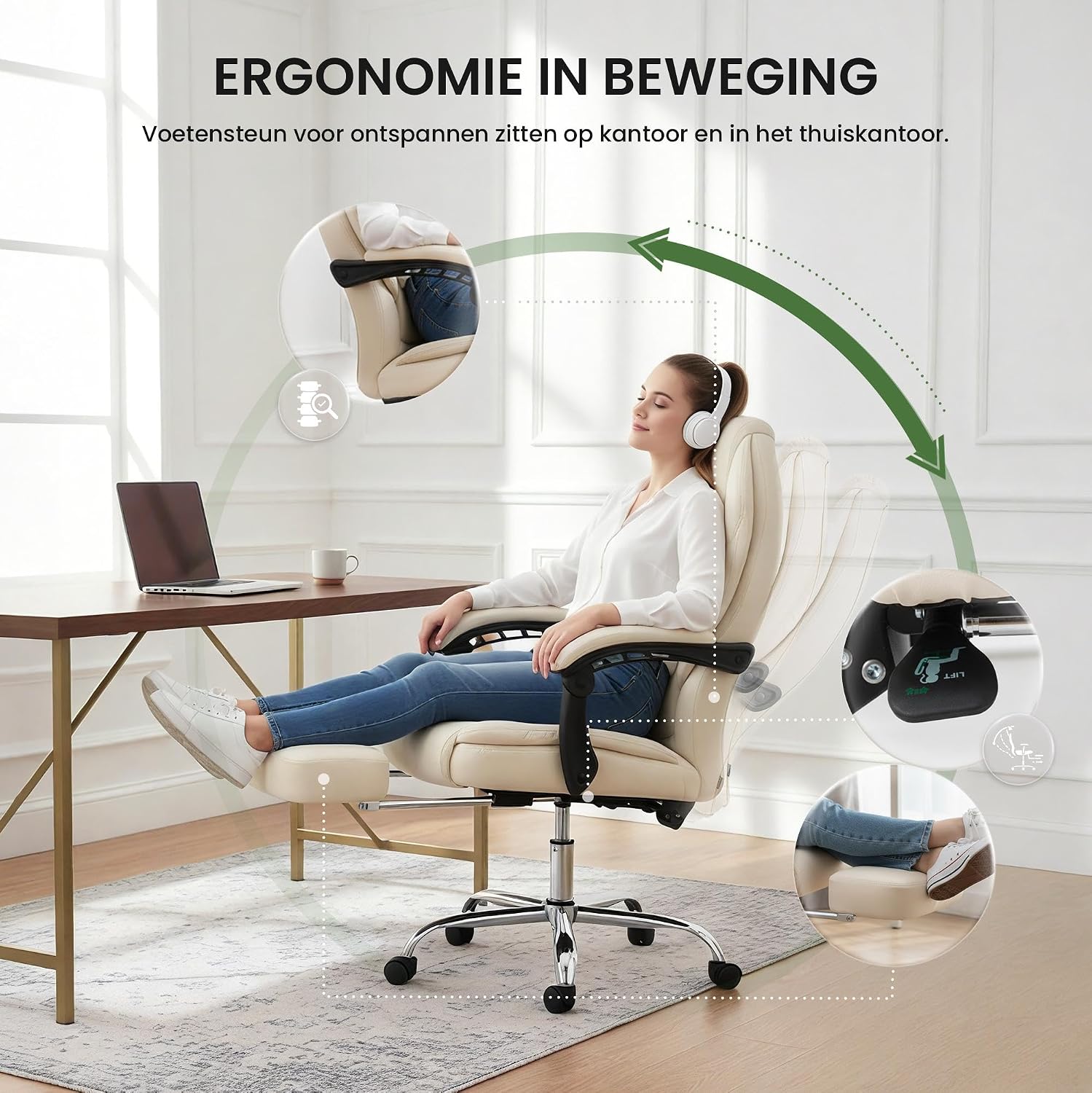
Image: Demonstrating the recline and footrest features for relaxation.
Swivel and Mobility:
The seat can rotate 360 degrees, providing flexibility and ease of movement. Five smooth-rolling PU wheels allow for effortless movement across various floor surfaces.

Image: Close-up of the chair's PU wheels for smooth mobility.
Maintenance
Proper care will extend the life and appearance of your CLP Castle Office Chair:
- Cleaning the Upholstery (Artificial Leather): Wipe with a damp cloth. For stubborn dirt, use a mild detergent solution. Avoid harsh chemicals or abrasive cleaners.
- Cleaning Metal Parts: Use a mild detergent for cleaning chrome-plated metal components. Dry thoroughly to prevent water spots.
- General Care: Periodically check all screws and connections to ensure they are tight. Re-tighten if necessary.
Troubleshooting
If you encounter any issues with your CLP Castle Office Chair, consider the following:
- Squeaking Noises: Check and tighten all assembly bolts. A small amount of silicone spray on moving parts (like the gas lift or wheel axles) may help, but avoid spraying on upholstery.
- Chair Not Adjusting Height: Ensure the gas lift lever is fully engaged. If the issue persists, the gas lift cylinder may need replacement.
- Wobbly Chair: Re-check all connections and ensure they are tightened evenly. Uneven tightening can cause instability.
- Missing or Damaged Parts: If you received incorrect or damaged parts during assembly, please contact CLP customer support for assistance.
Specifications
| Feature | Specification |
|---|---|
| Brand | CLP |
| Model Name | Castle |
| Material (Seat) | Artificial Leather (100% Polyurethane) |
| Frame Material | Metal (Chrome-plated finish) |
| Product Dimensions (D x W x H) | 64D x 67W x 114H cm |
| Item Weight | 17 kg |
| Maximum Weight Recommendation | 130 kg |
| Seat Height | Adjustable, up to 57 cm |
| Seat Depth | 52 cm |
| Backrest Height (Inner) | 77 cm |
| Armrest Height | 77 cm |
| Swivel | 360 degrees |
| Reclining Positions | 2 |
| Special Features | Armrests, Extendable Footrest |
| Assembly Required | Yes |

Image: Maximum weight capacity of 130 kg.
Warranty and Support
For any questions, concerns, or support needs regarding your CLP Castle Office Chair, please contact CLP customer service. While specific warranty details are not provided in this manual, please refer to your purchase documentation or the retailer's website for warranty information.
When contacting support, please have your model name (Castle) and ASIN (B01LWSN05F) available.
