
1. Product Overview
This manual provides instructions for the JustFine Replacement Remote Control, designed to be compatible with various Sony Home Theater Audio/Video Receiver AV Systems. This high-quality replacement remote is pre-programmed and requires no additional setup beyond battery installation.
Compatible Sony Models include:
- DAV-HDX576WF
- HCDHDX585
- DAVHDX279W
- 148057011
- HCD-HDX277WC
- HCDHDX589W
Key Features:
- Direct replacement for original Sony remotes.
- Pre-programmed for immediate use; no additional programming required.
- Durable construction for reliable performance.
2. Setup Guide
2.1 Battery Installation
The remote control requires two AAA batteries (not included). Follow these steps to install the batteries:
- Locate the battery compartment cover on the back of the remote control.
- Press down on the tab and slide the cover off.
- Insert two AAA batteries, ensuring the positive (+) and negative (-) terminals align correctly with the markings inside the compartment.
- Slide the battery compartment cover back into place until it clicks securely.

Figure 2.1: Rear view of the remote control, highlighting the battery compartment. Ensure correct battery polarity when inserting.
2.2 Initial Use
This replacement remote control is pre-programmed and ready for use with compatible Sony Home Theater Audio/Video Receiver AV Systems immediately after battery installation. No additional programming or setup is required.
3. Operating Instructions
The remote control provides full functionality for your compatible Sony Home Theater Audio/Video Receiver AV System. Point the remote directly at the system's infrared receiver for optimal performance.
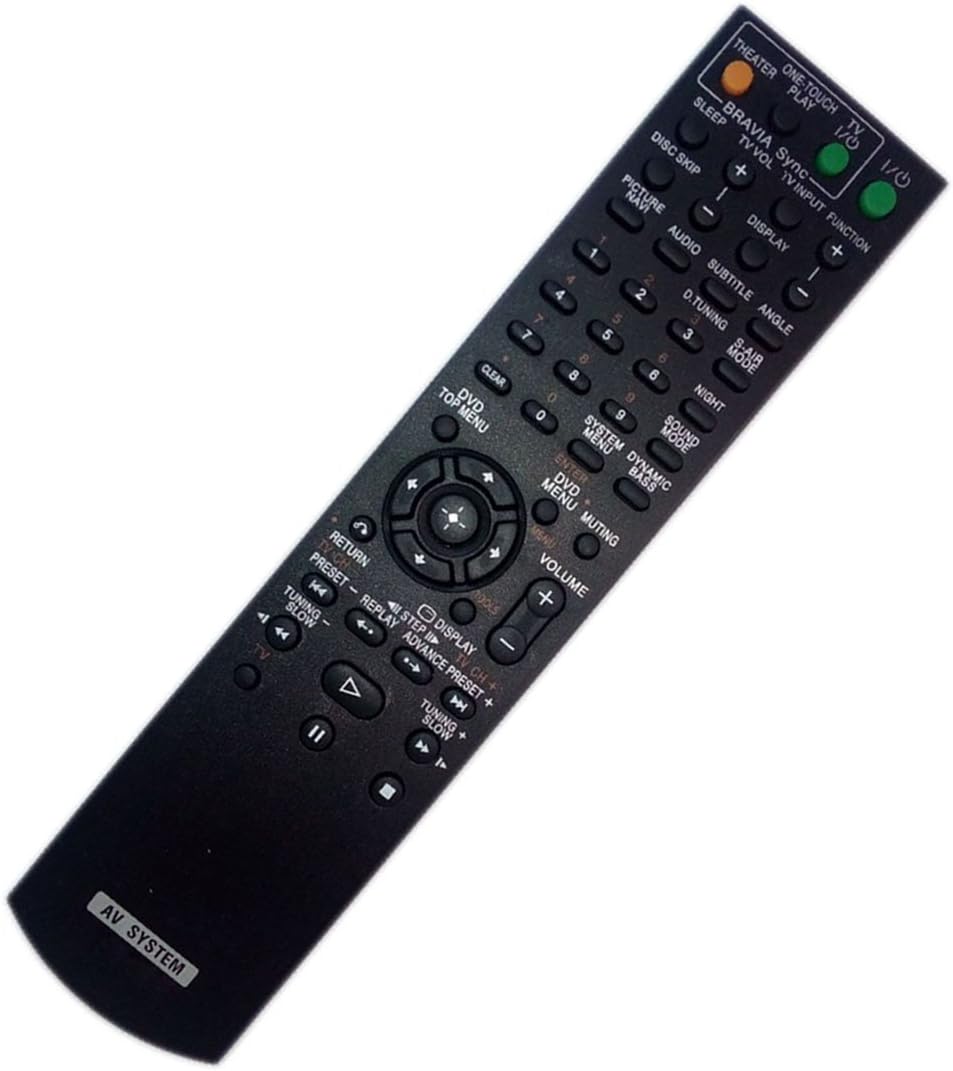
Figure 3.1: Front view of the remote control, displaying all functional buttons.
3.1 Common Button Functions
| Button | Function |
|---|---|
| Power (I/O) | Turns the system on or off. |
| Volume (+/-) | Adjusts the audio volume level. |
| Muting | Mutes or unmutes the audio output. |
| Input Selector (e.g., TV, DVD, Audio) | Switches between different audio/video input sources. |
| Navigation (Up, Down, Left, Right, Enter) | Used to navigate menus and confirm selections. |
| Playback Controls (Play, Pause, Stop, Fast Forward, Rewind, Skip) | Controls media playback functions for connected devices (e.g., DVD player). |
| Display | Toggles on-screen display information. |
| Numeric Keypad (0-9) | Direct input for track numbers, radio frequencies, or other numerical selections. |
For specific functions related to your Sony Home Theater Audio/Video Receiver AV System, please refer to the original manual of your Sony device.
4. Maintenance
4.1 Battery Replacement
Replace batteries when the remote's response becomes sluggish or stops working. Always replace both batteries at the same time with new AAA batteries. Do not mix old and new batteries, or different types of batteries.
4.2 Cleaning
To clean the remote control, wipe it gently with a soft, dry cloth. Do not use liquid cleaners, sprays, or abrasive materials, as these may damage the remote's surface or internal components.
4.3 Storage
When not in use for extended periods, it is recommended to remove the batteries to prevent leakage, which could damage the remote control.
5. Troubleshooting
If you experience issues with your replacement remote control, please refer to the following common problems and solutions:
| Problem | Possible Cause | Solution |
|---|---|---|
| Remote not working or unresponsive. | Dead or incorrectly installed batteries. | Check battery polarity. Replace batteries with new ones. |
| Remote works intermittently. | Weak batteries or obstruction between remote and receiver. | Replace batteries. Ensure clear line of sight to the AV system's infrared receiver. |
| Certain buttons do not function. | Button stuck or internal issue. | Gently press the button multiple times. If issue persists, contact support. |
| Remote does not control the AV system. | Incompatibility or system not powered on. | Verify your AV system model is listed as compatible. Ensure the AV system is powered on. |
If you continue to experience problems after attempting these solutions, please contact customer support for further assistance.
6. Product Specifications
- Brand: JustFine
- Model Number: 4330952821
- Product Dimensions: 5.31 x 1.97 x 1.18 inches
- Item Weight: 3.04 ounces
- Color: Black
- Special Feature: Ergonomic design
- Max Number of Supported Devices: 1 (specific Sony Home Theater AV System)
- Compatible Devices: Sony Home Theater Audio/Video Receiver AV Systems (specific models listed in Overview)
- Manufacturer: JustFine
- Date First Available: September 15, 2016
7. Warranty & Support
7.1 Warranty Information
This product is sold with a 30-day quality warranty. It also includes a money-back guarantee and hassle-free return policy.
7.2 Customer Support
For any problems, questions, or assistance with your JustFine Replacement Remote Control, please kindly email us. Our support team is available to help you with troubleshooting and product inquiries.
Please note: Batteries and a physical manual are not included with the product.