Introduction
This manual provides comprehensive instructions for the assembly, operation, and maintenance of your Suptek Dual LED LCD Monitor Stand, model ML6802. This free-standing desk mount is designed to support two screens up to 32 inches and 22 lbs each, featuring a 31.5-inch extra tall pole for vertical array configurations. It offers heavy-duty construction and full adjustability to optimize your workspace.

Figure 1: Suptek Dual LED LCD Monitor Stand (ML6802) with two monitors.
Safety Information
- Ensure all components are securely fastened before placing monitors on the stand.
- Do not exceed the maximum weight capacity of 22 lbs (10 kg) per monitor.
- Do not exceed the maximum screen size of 32 inches per monitor.
- Keep children and pets away from the assembly area.
- Use appropriate personal protective equipment during assembly if necessary.
- If any parts are missing or damaged, do not proceed with assembly. Contact customer support.
- Periodically check all connections to ensure they remain tight and secure.
Package Contents
Verify that all parts are present and undamaged before beginning assembly.

Figure 2: Included components for the Suptek ML6802 monitor stand.
| Part | Description | Quantity |
|---|---|---|
| Main Pole | Two 40cm poles that connect to form the main vertical support. | 2 |
| Free Standing Base | Sturdy base for desktop placement. | 1 |
| Grommet Base | Alternative base for through-desk mounting (optional). | 1 |
| VESA Plates | Mounting plates for attaching monitors (75x75mm and 100x100mm compatible). | 2 |
| Plate Connection Parts | Components for attaching VESA plates to the main pole. | 2 sets |
| Hardware Kit | Includes screws, washers, spacers, and tools for assembly. | 1 set |
| User Manual | Printed instruction guide. | 1 |
Setup and Installation
Follow these steps for a hassle-free installation. An organized hardware kit is provided.
Assemble the Pole
Connect the two 40cm pole sections by screwing them together firmly. Ensure the connection is secure.
Attach the Base
Attach the assembled pole to the free-standing base using the provided screws and tools. Ensure the base is stable on your desk surface.
Install VESA Plates to Monitors
Carefully attach the VESA plates to the back of your monitors using the appropriate screws from the hardware kit. The plates support both 75x75mm and 100x100mm VESA patterns. Use spacers if your monitor has an uneven back surface or recessed mounting holes.
Mount Monitors to the Stand
Slide the monitors (with VESA plates attached) onto the mounting arms on the main pole. Adjust the height of each monitor along the pole as desired. Secure the monitors in place by tightening the locking mechanisms on the mounting arms.
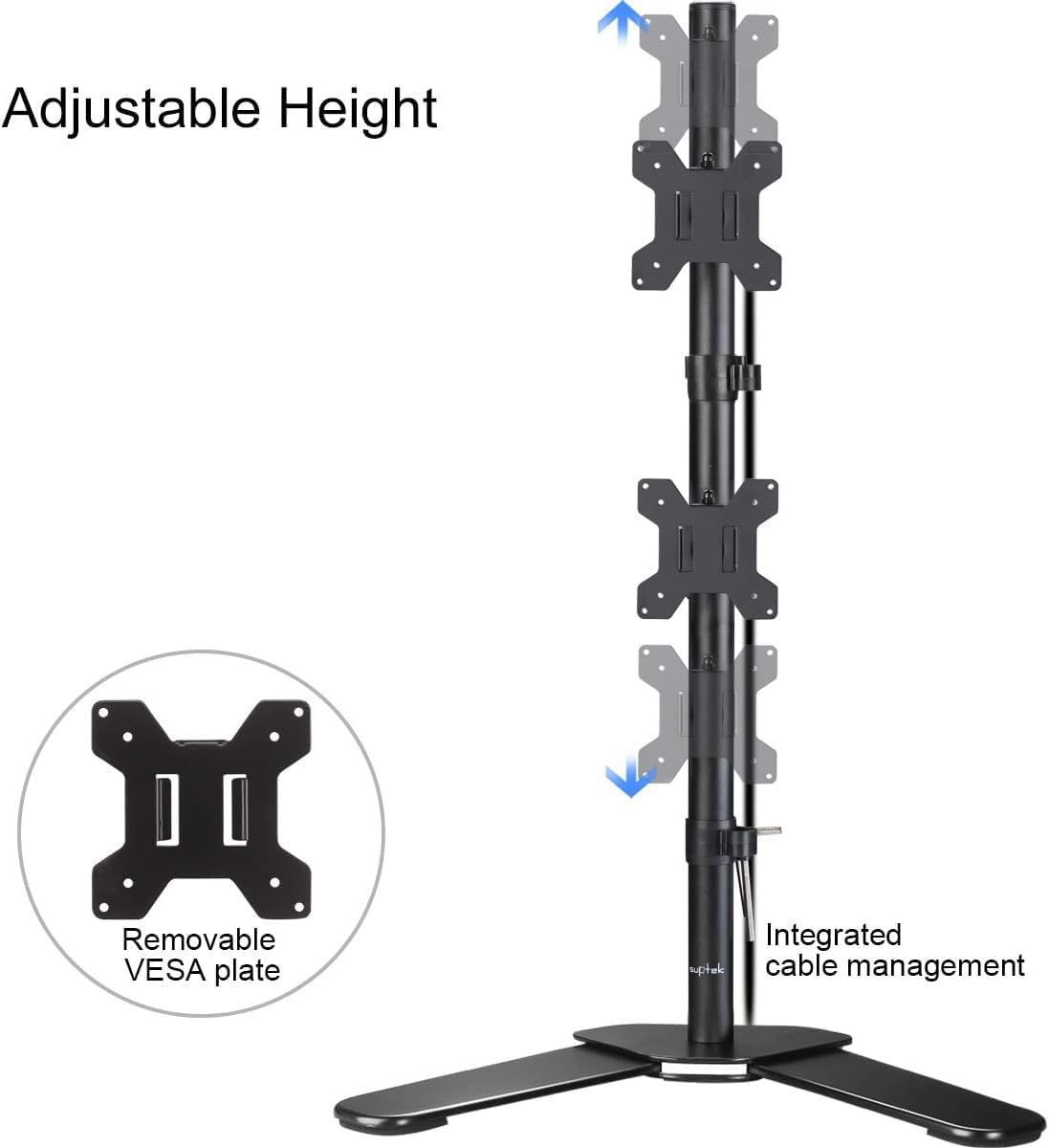
Figure 3: Adjustable height and removable VESA plate for easy monitor attachment.
Cable Management
Utilize the integrated cable management clips along the pole to route and organize your power and AV cables. This helps maintain a tidy and clean workspace.

Figure 4: Integrated cable management system.
Operating Instructions
The Suptek ML6802 offers extensive adjustability for optimal viewing comfort.
Height Adjustment
Monitors can be adjusted vertically along the 31.5-inch pole. Loosen the locking mechanism on the mounting arm, slide the monitor to the desired height, and then re-tighten to secure.
Tilt Adjustment
Each monitor can be tilted ±45° (up and down). Loosen the tilt knob or screw on the VESA plate, adjust the monitor to your preferred angle, and then tighten to fix its position.
Swivel Adjustment
Monitors can swivel ±45° (left and right) at the mounting arm. Gently rotate the monitor to achieve the desired horizontal viewing angle.
Rotation
The VESA plates allow for 360° rotation, enabling you to switch between landscape and portrait orientations for your monitors. Simply rotate the monitor to the desired orientation.

Figure 5: Articulation capabilities: Tilt, Swivel, and Rotation.
Ergonomic Considerations
Proper monitor placement is crucial for ergonomic comfort and reducing strain. Position your monitors so that the top of the screen is at or slightly below eye level when you are seated comfortably. Ensure your arms are relaxed and your wrists are straight when typing. The vertical array design of this stand can help optimize space and viewing angles for dual monitor setups.

Figure 6: Correct ergonomic setup for monitor viewing.
Maintenance
Regular maintenance ensures the longevity and safe operation of your monitor stand.
- Cleaning: Wipe the stand with a soft, damp cloth. Avoid abrasive cleaners or solvents that could damage the finish.
- Tightness Check: Periodically (e.g., every 3-6 months) check all screws and bolts to ensure they are securely tightened. Loose connections can lead to instability.
- Lubrication: No lubrication is typically required for this stand. If any joints become stiff, contact customer support for advice.
Troubleshooting
This section addresses common issues you might encounter.
| Problem | Possible Cause | Solution |
|---|---|---|
| Stand is wobbly or unstable. | Loose connections; uneven desk surface; weight imbalance. | Ensure all screws and bolts are tightened. Place the stand on a flat, stable surface. Distribute monitor weight evenly if possible. |
| Monitors sag or do not hold position. | Mounting arm or tilt mechanism not tightened sufficiently; monitor weight exceeds capacity. | Re-tighten the locking mechanisms on the mounting arms and the tilt adjustment screws. Verify monitor weight is within the 22 lbs (10 kg) limit per arm. |
| Difficulty adjusting monitor height. | Locking mechanism is too tight. | Loosen the height adjustment knob/lever before attempting to move the monitor. |
| Cables are not neatly managed. | Cables not routed through clips. | Utilize the integrated cable management clips along the pole to secure and hide cables. |
Specifications
| Feature | Detail |
|---|---|
| Model Number | ML6802 z |
| Brand | suptek |
| Monitor Compatibility | 13" - 32" screens |
| Weight Capacity | Up to 22 lbs (10 kg) per monitor |
| VESA Compatibility | 75x75mm, 100x100mm |
| Pole Height | 31.5 inches (800mm) |
| Tilt Angle | ±45° |
| Swivel Angle | ±45° |
| Rotation | 360° |
| Mounting Type | Free-standing base (grommet option included) |
| Material | Alloy Steel |
| Product Dimensions | 17.32 x 5.51 x 3.94 inches (packaged) |
| Item Weight | 11 pounds |

Figure 7: Detailed product dimensions and specifications.
Warranty and Support
Suptek products are manufactured to high quality standards. For warranty information or technical support, please refer to the contact details provided with your purchase or visit the official Suptek website.
For additional assistance, you may also refer to the official user manual PDF available online: Suptek ML6802 User Manual PDF.


