
EARTEC ULDM-HD
EARTEC ULDM-HD Ultralite HD Dual Ear Replacement Main Headset User Manual
Model: ULDM-HD | Brand: EARTEC
Introduction
The EARTEC ULDM-HD Ultralite HD Dual Ear Replacement Main Headset is engineered for seamless, full duplex wireless communication. This headset provides clear, hands-free audio, making it ideal for professional environments requiring constant team coordination. As a main unit, it is specifically designed for compatibility with existing UltraLite HD systems, enabling the expansion of your communication network.
This manual provides essential information for setting up, operating, maintaining, and troubleshooting your ULDM-HD headset to ensure optimal performance and longevity.
Product Overview

Main Headset View: The EARTEC ULDM-HD Ultralite HD Dual Ear Replacement Main Headset, featuring its integrated controls and microphone boom. This headset is designed for comfortable, extended use.

Compatibility Check: Visual guide illustrating the difference between UltraLite HD (right, compatible) and UltraLite Classic (left, incompatible) models. Ensure your existing system is UltraLite HD for proper function.

Integrated Design: The headset features an "All-in-One" design with the compact radio built directly into the earcup, eliminating the need for a separate beltpack.
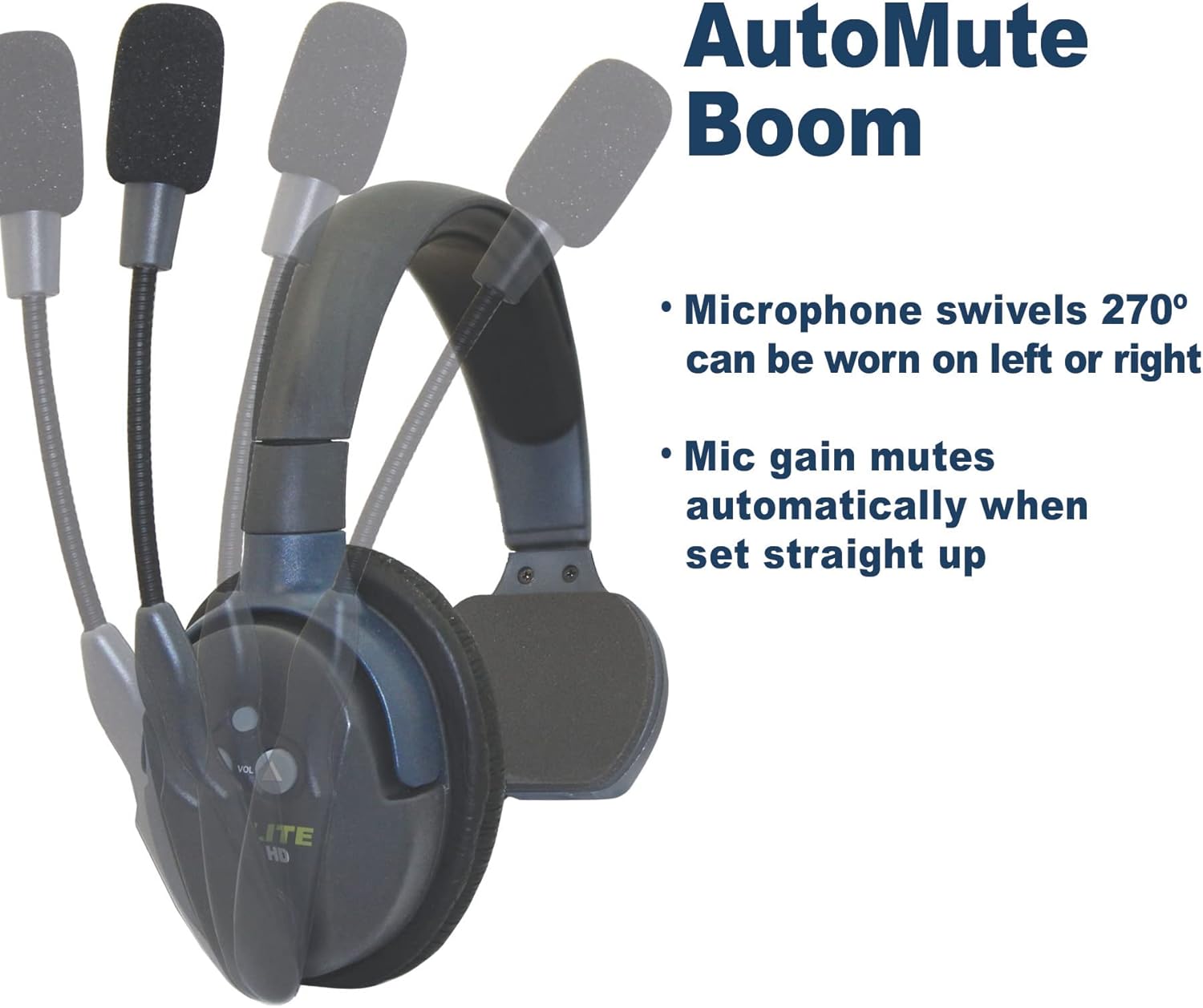
AutoMute Microphone: The microphone boom swivels 270 degrees, allowing the headset to be worn on either the left or right side. The mic gain automatically mutes when the boom is pivoted upwards.

System Expandability: An illustration showing how the UltraLite HD system can be expanded. Headsets are "Field Programmable," allowing you to add up to 5 users (1 Main and 4 Remote units) for simultaneous communication.
Setup
1. Initial Charging
Before first use, fully charge the included rechargeable battery. The headset provides up to 6 hours of talk time on a single charge. A full charge typically takes approximately 6 hours.
2. Compatibility Verification
This ULDM-HD Main headset is only compatible with the HD version of UltraLite systems. It is not compatible with UltraLite Classic models. Visually inspect your existing headsets to ensure they are UltraLite HD.
3. System Configuration
Each Main headset can support up to four Remote units. Only one Main headset can be used in a single UltraLite HD system. Main headsets are not compatible with HUB-based systems. For detailed pairing instructions, refer to the comprehensive Instructions for Use (IFU) PDF.
Operating Instructions
1. Power On/Off
Locate the power button on the earcup. Press and hold to power the headset on or off. An indicator light will confirm the power status.

Power Indicator (Red): A red light typically indicates the headset is powered on and actively transmitting or receiving.

Power Indicator (Blue): A blue light may indicate a different operational status, such as standby or charging complete, depending on the specific model's behavior.
2. Volume Control
Use the volume up and down buttons located on the earcup to adjust the listening volume to a comfortable level.
3. Microphone Usage (AutoMute Boom)
The microphone boom can pivot 270 degrees, allowing you to wear the headset on either your left or right ear. For optimal voice clarity, position the microphone approximately one inch from your mouth. The noise-cancelling microphone automatically mutes when the boom is pivoted upwards, providing privacy when not speaking.
4. Wireless Range
The headset offers an exceptional wireless range of up to 1,000 feet Line of Sight (LOS). Performance may vary based on environmental factors and obstructions.
Maintenance
1. Battery Care
- Always use the provided charger for the rechargeable Lithium battery.
- Avoid overcharging or completely draining the battery to prolong its lifespan.
- If storing the headset for an extended period, ensure the battery is partially charged (around 50%) and store in a cool, dry place.
2. Cleaning
- Wipe the headset surfaces with a soft, damp cloth. Avoid using harsh chemicals or abrasive cleaners.
- Ensure no liquid enters the earcup or microphone openings.
- Clean the microphone foam cover regularly to maintain audio clarity.
3. Storage
Store the headset in a protective case or a clean, dry environment when not in use to prevent dust accumulation and physical damage.
Troubleshooting
| Problem | Possible Cause | Solution |
|---|---|---|
| No power/Headset not turning on | Low or depleted battery. | Charge the headset battery for at least 6 hours. |
| No audio or poor audio quality |
|
|
| Headset not connecting to other units |
|
|
For more complex issues or if troubleshooting steps do not resolve the problem, please contact EARTEC customer support.
Specifications
| Feature | Detail |
|---|---|
| Model Name | ULDM-HD |
| Brand | EARTEC |
| Wireless Communication Technology | RF |
| Connectivity Technology | Wireless |
| Compatible Devices | HD version of UltraLite systems |
| Included Components | Headset, rechargeable battery |
| Battery Life | 6 Hours (talk time) |
| Charging Time | 6 Hours |
| Control Type | Button Control |
| Microphone Feature | Noise-cancelling, AutoMute Boom (pivoting) |
| Wireless Range | Up to 1,000 ft Line of Sight (LOS) |
| Form Factor | On Ear |
| Earpiece Shape | Oval |
| Item Weight | 9.6 ounces (0.6 Pounds) |
| Product Dimensions | 15 x 6 x 10 inches |
| Water Resistance Level | Water Resistant |
| UPC | 642892764471 |
| Manufacturer | Eartec |
Support
For further assistance, detailed product information, or to explore other EARTEC products, please visit the official EARTEC resources:
- Official Instructions for Use (IFU) PDF: A comprehensive guide for your headset.
- Visit the EARTEC Store on Amazon: Explore the full range of EARTEC communication solutions.
For direct customer service inquiries, please refer to the contact information provided on the official EARTEC website or your product packaging.
Related documentsULDM-HD

Ask a question about this manual
Ask about setup, troubleshooting, compatibility, parts, safety, or missing instructions. Manuals+ will review the question and use this page’s manual context to help answer it.