
1. Introduction
This manual provides detailed instructions for the proper use, setup, and maintenance of your Tamron SP 150-600mm F/5-6.3 Di VC USD G2 telephoto zoom lens. Please read this manual thoroughly before using the lens to ensure optimal performance and longevity. Keep this manual in a safe place for future reference.
2. Product Overview
2.1 Key Features
- FLEX ZOOM LOCK Mechanism: Allows locking the zoom ring at any focal length position to prevent unintended zoom creep.
- Fluorine Coating: Applied to the front element for enhanced water and oil repellency, making cleaning easier.
- Improved Moisture-Resistant Construction: Provides protection against environmental elements.
- Lightweight Tripod Mount: Compatible with Arca-Swiss style quick release plates for secure and stable mounting.
- Faster Autofocus (AF) Speed: Enhanced responsiveness for tracking moving subjects.
- Vibration Compensation (VC) Performance: Offers 4.5 stops of stabilization (VC mode 3) with three optimized modes for various shooting scenarios.
2.2 Lens Components
Familiarize yourself with the various parts of your lens and its accessories.

Figure 1: Front view of the Tamron SP 150-600mm G2 lens with its lens hood and tripod collar. This image displays the overall design and primary controls.

Figure 2: Detailed view of the control switches on the lens barrel, including AF/MF, VC ON/OFF, VC MODE, and Focus Limiter switches.

Figure 3: The detachable tripod mount, designed for compatibility with Arca-Swiss style quick release plates, providing stable support for the lens.

Figure 4: The petal-shaped lens hood, designed to reduce flare and protect the front element.

Figure 5: The Tamron branded front lens cap, used to protect the front optical element when not in use.
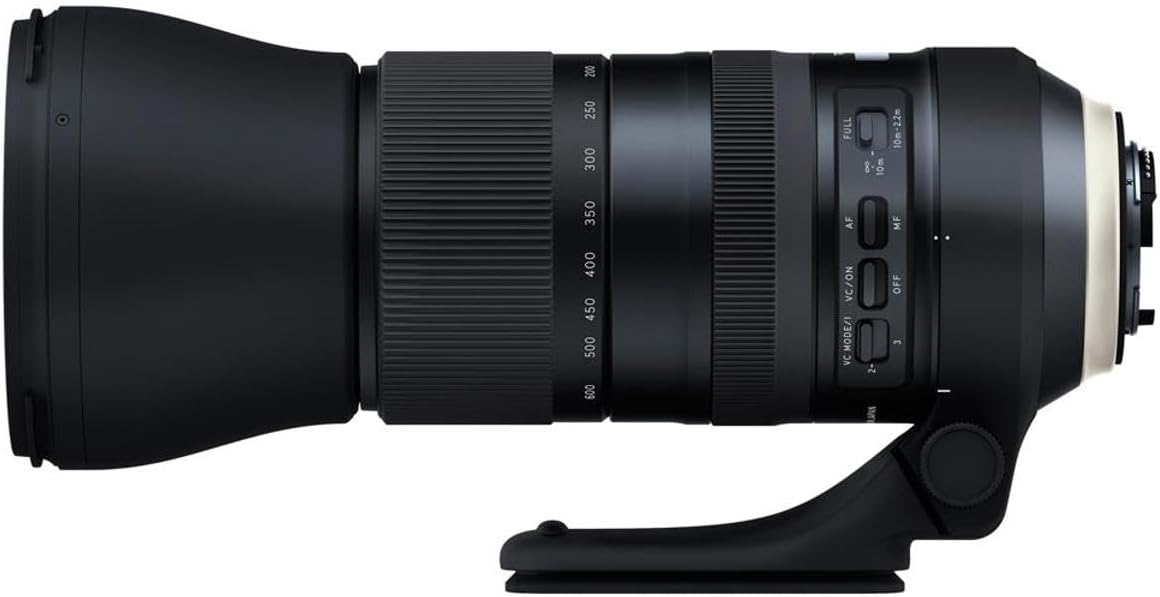
Figure 6: The Tamron branded rear lens cap, used to protect the rear optical element and camera mount when the lens is detached from the camera.

Figure 7: The Tamron SP 150-600mm G2 lens shown alongside its included soft carrying bag and lens hood.
3. Setup
3.1 Attaching the Lens to the Camera
- Remove the rear lens cap from the lens and the body cap from your Nikon Digital SLR camera.
- Align the mounting index on the lens barrel with the mounting index on your camera body.
- Insert the lens into the camera mount and rotate it clockwise until it clicks securely into place.
3.2 Attaching the Lens Hood
- Align the lens hood with the front of the lens barrel.
- Rotate the hood clockwise until it locks into position. Ensure it is securely attached to prevent it from falling off.
- For storage, the lens hood can be reversed and mounted onto the lens.
3.3 Using the Tripod Mount
The lens includes a detachable tripod mount for stable support, especially recommended for longer exposures or when using the lens for extended periods. The mount is compatible with Arca-Swiss style quick release plates.
- Loosen the locking knob on the tripod collar.
- Rotate the lens within the collar to achieve the desired orientation (landscape or portrait).
- Tighten the locking knob to secure the lens in position.
- Attach the tripod mount directly to an Arca-Swiss compatible tripod head or use a standard tripod plate by screwing it into the 1/4-20 UNC thread on the base of the mount.
4. Operating Instructions
4.1 FLEX ZOOM LOCK Mechanism
The FLEX ZOOM LOCK mechanism allows you to lock the zoom ring at any desired focal length. This prevents accidental zoom creep, especially when carrying the camera or shooting at an upward or downward angle.
- To lock: Slide the FLEX ZOOM LOCK switch towards the 'LOCK' position.
- To unlock: Slide the FLEX ZOOM LOCK switch towards the 'FREE' position.
4.2 Autofocus (AF) / Manual Focus (MF) Switch
This switch controls the focus mode of the lens.
- AF (Autofocus): The camera automatically focuses on the subject. This mode is generally recommended for most shooting situations.
- MF (Manual Focus): Allows you to manually adjust the focus by rotating the focus ring on the lens. Use this for precise focusing or in situations where autofocus struggles.
4.3 Vibration Compensation (VC) System
The VC system helps reduce camera shake, allowing for sharper images, especially in low light or at longer focal lengths. The G2 lens offers three VC modes:
- VC Mode 1: Standard mode, balancing viewfinder stability and compensation effects. Suitable for general photography.
- VC Mode 2: Exclusively for panning shots. Compensates for vertical camera shake while allowing horizontal movement.
- VC Mode 3: Prioritizes stabilization of the captured image, providing maximum compensation for static subjects. Viewfinder stability may be less pronounced than Mode 1.
To activate or deactivate VC, use the VC ON/OFF switch. Select the desired mode using the VC MODE switch.
4.4 Focus Limiter Switch
The focus limiter switch restricts the autofocus range, which can improve autofocus speed and prevent the lens from hunting for focus across its entire range.
- FULL: The lens will focus across its entire range, from minimum focusing distance to infinity.
- 10m - ∞: Limits the focus range to subjects 10 meters (approximately 33 feet) and further. Useful for distant subjects like wildlife or sports.
- 2.2m - 10m: Limits the focus range to subjects between 2.2 meters (approximately 7.2 feet) and 10 meters. Useful for closer subjects within this range.
5. Maintenance and Care
5.1 Cleaning the Lens
The front element features a Fluorine Coating, which repels water and oil, making it easier to clean. Use a soft, clean microfiber cloth specifically designed for optical surfaces. For stubborn smudges, a small amount of lens cleaning solution can be applied to the cloth, not directly to the lens.
- Avoid touching the lens elements with bare hands.
- Use a blower brush to remove dust and loose particles before wiping.
- Never use abrasive materials or harsh chemicals.
5.2 Moisture-Resistant Construction
The lens is designed with improved moisture-resistant construction to protect against light rain and dust. However, it is not waterproof. Avoid exposing the lens to heavy rain or submerging it in water.
- If the lens gets wet, wipe it dry immediately with a clean, soft cloth.
- Allow the lens to air dry completely before storing it in a sealed container.
5.3 Storage
When not in use, store the lens with both front and rear caps attached, preferably in a dry, cool place away from direct sunlight and extreme temperatures. Using a desiccant can help prevent mold growth in humid environments.
6. Troubleshooting
If you encounter issues with your lens, refer to the following common problems and solutions:
- Autofocus is slow or hunts excessively:
- Ensure the AF/MF switch is set to AF.
- Check the Focus Limiter switch. If shooting distant subjects, set it to '10m - ∞'. If shooting closer subjects, set it to '2.2m - 10m'.
- In low light conditions or with low-contrast subjects, autofocus may naturally be slower. Consider switching to manual focus (MF) if necessary.
- Ensure your camera's autofocus settings are appropriate for the shooting situation.
- Images are blurry or not sharp:
- Verify that the VC (Vibration Compensation) is ON, especially when hand-holding the lens. Select the appropriate VC mode for your shooting scenario.
- Check your shutter speed. For telephoto lenses, a faster shutter speed is often required to prevent motion blur.
- Ensure the lens and camera are securely mounted if using a tripod.
- Clean the front and rear elements of the lens.
- Lens not recognized by camera:
- Ensure the lens is securely attached to the camera body. Remove and reattach the lens.
- Clean the electrical contacts on both the lens mount and the camera body with a clean, dry cloth.
- Turn the camera off and then on again.
If problems persist, consult a qualified service technician or contact Tamron customer support.
7. Specifications
| Feature | Specification |
|---|---|
| Model Number | AFA022N700 |
| Focal Length | 150-600mm |
| Maximum Aperture | F/5-6.3 |
| Optical Construction | 21 elements in 13 groups |
| Lens Type | Telephoto Zoom |
| Compatible Mountings | Nikon F (FX) |
| Vibration Compensation (VC) | Yes (4.5 stops, 3 modes) |
| Autofocus Motor | USD (Ultrasonic Silent Drive) |
| Product Dimensions | 10.2 x 5 x 5 inches (approximate) |
| Item Weight | 4.4 pounds (approximate) |
| Fluorine Coating | Yes |
| Moisture-Resistant Construction | Yes |
8. Warranty and Support
8.1 Warranty Information
The Tamron SP 150-600mm F/5-6.3 Di VC USD G2 lens typically comes with a 6-Year Limited USA Warranty when purchased from an authorized dealer within the United States. Warranty terms and conditions may vary by region.
It is important to verify the warranty status of your lens at the time of purchase. Lenses acquired through unauthorized channels or as 'gray market' imports may not be eligible for warranty service or repair by Tamron USA. Always check for official Tamron holograms or documentation to confirm product authenticity and warranty coverage.
8.2 Customer Support
For technical assistance, service, or further inquiries regarding your Tamron lens, please visit the official Tamron website for your region or contact their customer support directly. Contact information can usually be found on the Tamron website or in the packaging materials.


