Introduction
This manual provides instructions for the VINABTY NS-RC4NA-16 replacement remote control. This remote is designed to function as a direct replacement for original Insignia TV remotes, requiring no programming for compatible models. Please read this manual thoroughly to ensure proper use and maintenance of your remote control.
Setup
1. Battery Installation
The remote control requires two AAA batteries (not included) for operation. Follow these steps to install the batteries:
- Locate the battery compartment on the back of the remote control.
- Press down on the latch and slide the battery cover off.
- Insert two AAA batteries, ensuring the positive (+) and negative (-) terminals align correctly with the markings inside the compartment.
- Slide the battery cover back into place until it clicks securely.

Image: Back of the remote control with the battery compartment open, illustrating correct battery insertion.
2. Initial Use
This remote control is pre-programmed and ready to use with compatible Insignia TV models. No additional programming or code entry is required. Simply install the batteries, point the remote at your television, and begin operation.
Operating Instructions
The NS-RC4NA-16 remote control provides full functionality for your Insignia TV. Below is a general overview of the main buttons and their functions:
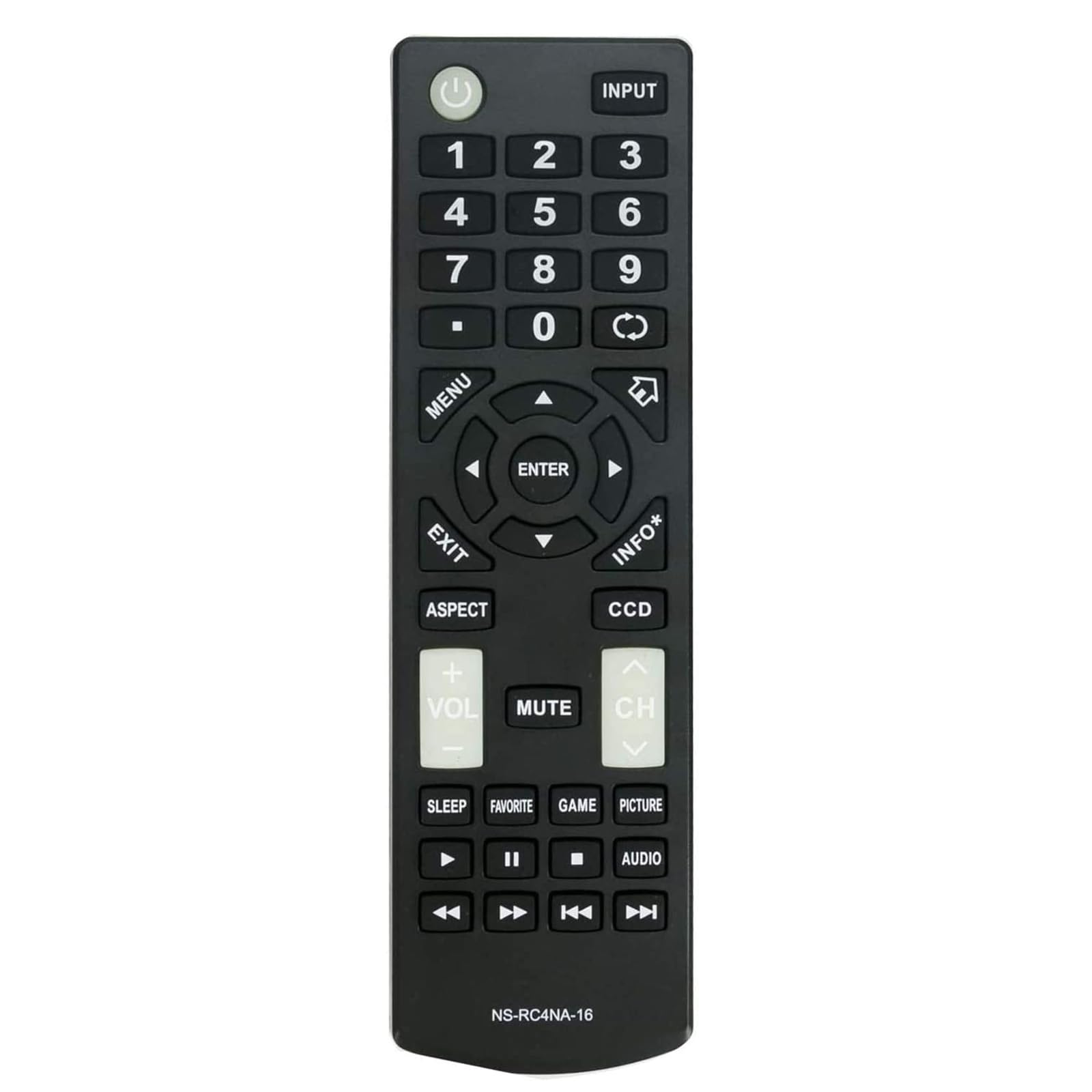
Image: Front view of the remote control, highlighting the button layout.
- POWER (⑁): Turns the TV on or off.
- INPUT: Selects the input source (HDMI, AV, Component, etc.).
- Number Buttons (0-9): Directly selects channels.
- MENU: Accesses the TV's main menu.
- Navigation Pad (Up, Down, Left, Right, ENTER): Navigates through menus and confirms selections.
- EXIT: Exits the current menu or on-screen display.
- INFO*: Displays information about the current program or input.
- ASPECT: Changes the screen aspect ratio.
- CCD: Activates or deactivates Closed Captioning.
- VOL (+/-): Adjusts the volume level.
- MUTE: Mutes or unmutes the TV audio.
- CH (Up/Down): Changes channels.
- SLEEP: Sets the sleep timer.
- FAVORITE: Accesses favorite channels.
- GAME: Switches to Game picture mode (if available).
- PICTURE: Cycles through picture modes.
- AUDIO: Selects audio tracks or modes.
- Playback Controls (Play, Pause, Stop, Rewind, Fast Forward, Skip): Controls media playback on connected devices or TV's built-in media player.
Image: User operating the remote control with an Insignia TV.
Maintenance
Cleaning the Remote
To clean the remote control, use a soft, dry cloth. For stubborn dirt, slightly dampen the cloth with water or a mild cleaning solution. Do not use harsh chemicals or abrasive cleaners, as these can damage the remote's surface or internal components.
Battery Replacement
Replace batteries when the remote's response becomes sluggish or stops working. Always replace both batteries at the same time with new AAA batteries. Do not mix old and new batteries, or different types of batteries, as this can lead to leakage or malfunction. Dispose of used batteries according to local regulations.
Troubleshooting
- Remote not responding:
- Ensure the batteries are inserted correctly with the correct polarity.
- Replace old batteries with new ones.
- Ensure there are no obstructions between the remote control and the TV's infrared sensor.
- Point the remote directly at the TV's sensor.
- Some buttons not working:
- This may indicate low battery power; try replacing the batteries.
- Clean the remote's surface, especially around the buttons, to remove any debris that might be obstructing them.
- Remote works intermittently:
- Check for strong light sources (like direct sunlight or bright fluorescent lights) that might interfere with the infrared signal.
- Ensure the remote is within the effective operating range of the TV.
Specifications
| Model Number | NS-RC4NA-16 |
| Brand | VINABTY |
| Dimensions | 5 x 1.9 x 0.5 inches (12.7 x 4.8 x 1.3 cm) |
| Item Weight | 2.08 ounces (59 grams) |
| Power Source | 2 x AAA Batteries (not included) |
| Compatible TV Brands | Insignia |
| Compatible Insignia TV Models | NS-19D220MX16, NS19D220MX16, NS-19D220NA16, NS19D220NA16, NS-24D220MX16, NS24D220MX16, NS-24D220NA16, NS24D220NA16, NS24D420NA16, NS-24D420NA16, NS28D220NA16, NS-28D220NA16, NS32D220NA16, NS-32D220NA16, NS32D420NA16, NS-32D420NA16, NS-32D421NA16, NS-32DD220NA16C, NS39D220NA16, NS-39D220NA16, NS40D420MX16, NS-40D420MX16, NS40D420NA16, NS-40D420NA16, NS43D420NA16, NS-43D420NA16, NS48D420NA16, NS-48D420NA16, NS50D420MX16, NS-50D420MX16, NS50D420NA16, NS-50D420NA16, NS50D421NA16, NS-50D421NA16, NS55D420NA16, NS-55D420NA16, NS55D421NA16 |

Image: Remote control with a list of compatible Insignia TV models.
Warranty Information
This VINABTY remote control is typically covered by a standard manufacturer's warranty against defects in materials and workmanship. Please refer to the product packaging or contact your retailer for specific warranty terms and duration. Keep your purchase receipt as proof of purchase for any warranty claims.
Support
For further assistance or inquiries regarding your VINABTY NS-RC4NA-16 remote control, please contact your retailer or the manufacturer's customer support. Contact information can usually be found on the product packaging or the manufacturer's official website.


