1. Introduction
The TOUCHBeauty Facial Cleansing & Exfoliator Brush Set is designed to provide a deep and effective facial cleanse, promoting smoother, more radiant skin. Its 360° rotating cleansing technology helps remove dirt, oils, and makeup more effectively than manual cleansing. This device is suitable for various skin types due to its interchangeable brush heads and dual-speed settings.
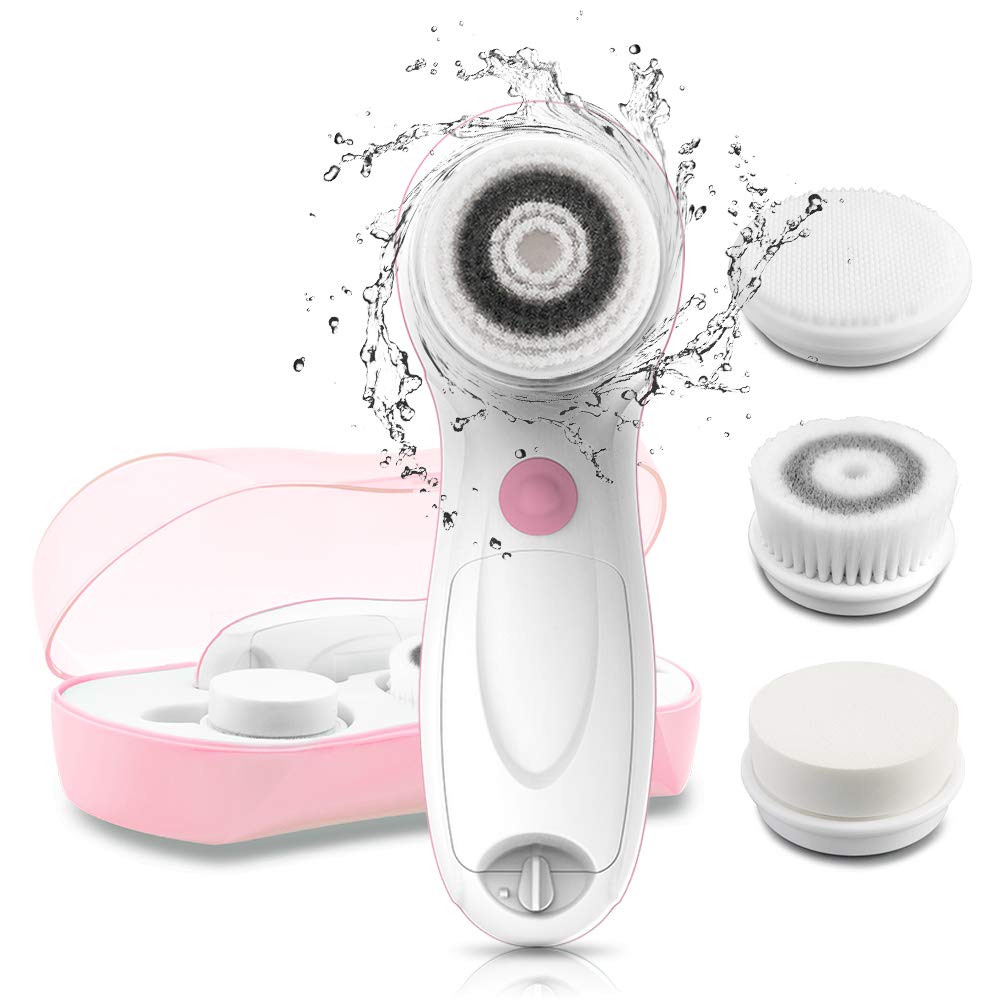
Image 1.1: The TOUCHBeauty Facial Cleansing & Exfoliator Brush Set, including the main unit, three brush heads, and a travel case.
2. Safety Information
- Remove accessories such as earrings or necklaces before use to prevent entanglement and potential injuries.
- Do not immerse the facial brush in water. Clean the surface with water and dry with a cloth.
- Ensure the battery compartment is dry to increase the lifespan of the device.
3. Package Contents
The TOUCHBeauty Facial Cleansing & Exfoliator Brush Set includes:
- 1 x Main Facial Cleansing Device
- 1 x Deep Cleansing Brush Head (for oily/combination skin)
- 1 x Silicone Cleansing Brush Head (for sensitive skin)
- 1 x Skin Refreshing Brush Head (for exfoliation)
- 1 x Travel Case

Image 3.1: The three professional brush heads: Deep Cleansing, Skin Refreshing, and Silicone Cleansing.
4. Setup
4.1 Battery Installation
- Locate the battery compartment at the bottom of the device.
- Twist the battery buckle counter-clockwise to open the compartment.
- Insert 2 AA batteries (not included), ensuring correct polarity (+/-).
- Close the compartment by twisting the buckle clockwise until secure.
4.2 Attaching a Brush Head
- Select the desired brush head based on your skin type and cleansing needs.
- Align the brush head with the rotating shaft on the device.
- Gently push the brush head onto the shaft until it clicks into place.
Video 4.1: Demonstration of attaching and detaching brush heads on the TOUCHBeauty Facial Cleansing Brush.
5. Operation
5.1 Preparation
- Wet your face and the attached brush head with warm water.
- Apply your favorite facial cleanser directly onto the brush head.
5.2 Using the Device
- Press the On/Off button to turn on the device.
- Select your desired speed setting:
- Low Speed (460 rpm/min): Ideal for gentle cleansing and facial massaging, suitable for morning use.
- High Speed (660 rpm/min): Provides deep cleansing to effectively remove makeup and excess oil, suitable for night use.
- Gently move the brush in circular motions over your face, avoiding the eye area.
- Recommended cleansing times for different facial areas:
- Cheeks: 15 seconds each (left and right)
- T-Zone (forehead, nose, chin): 20 seconds
- Neck: 30 seconds
- After cleansing, rinse your face thoroughly with water and pat dry.

Image 5.1: Visual guide for the three-step cleansing process: wet face, apply cleanser to brush, and cleanse in circular motions.

Image 5.2: Illustration of the dual-speed settings: Low speed for gentle morning cleansing and High speed for deep night cleansing.
Video 5.3: Demonstration of the facial cleansing brush in use, showing application of cleanser and circular motions on the face.
6. Maintenance & Care
6.1 Cleaning the Device and Brush Heads
- After each use, remove the brush head from the device.
- Rinse the brush head thoroughly under running water to remove any cleanser residue.
- Clean the surface of the main device with a damp cloth and dry it immediately. Do not immerse the device in water.
- Allow brush heads to air dry completely before storing.
6.2 Storage
- Store the device and brush heads in the provided travel case when not in use to protect them from dust and damage.
- Ensure the battery compartment is dry before storing the device for extended periods.
6.3 Brush Head Replacement
For optimal cleansing performance and hygiene, it is recommended to replace brush heads every 3 months.

Image 6.1: The device is water-resistant for use in the shower or near a faucet, but should not be fully submerged.
7. Troubleshooting
- Device not turning on: Check if the batteries are inserted correctly with the right polarity. Ensure the batteries are not depleted and replace them if necessary.
- Reduced performance: The brush head may be worn out. Replace it with a new one. Ensure the brush head is securely attached.
- Unusual noise: Ensure the brush head is properly attached and not obstructed. If the issue persists, discontinue use and contact customer support.
8. Specifications
| Brand | TOUCHBeauty |
| Model Name | AS-0759A |
| Power Source | Battery Powered (2 AA batteries required) |
| Product Dimensions | 6.53 x 2.79 x 2.24 inches |
| Weight | 8 ounces |
| Material | Plastic |
9. Warranty & Support
TOUCHBeauty is committed to optimizing product quality. If you encounter any issues during use, please do not hesitate to contact TOUCHBeauty customer support for assistance. Specific warranty details may vary; please refer to your purchase documentation or the official TOUCHBeauty website for comprehensive warranty information.


