1. Introduction
This manual provides detailed instructions for the safe and efficient operation of your ONKYO X-U6(B) CD Receiver System. Please read this manual thoroughly before using the product and retain it for future reference.
The ONKYO X-U6(B) is a versatile CD receiver system featuring NFC-compatible Bluetooth for easy wireless audio streaming from smartphones and tablets. It includes a USB terminal for digital connection with iPod/iPhone/iPad, ensuring high-quality playback with minimal signal degradation. The system also supports MP3 file playback from USB memory devices and offers a PC IN (USB Type-B) terminal for high-quality audio playback from your computer. An integrated FM tuner with Wide FM support (up to 95.0MHz) and a LINE IN terminal for external devices further enhance its media compatibility.
2. Important Safety Information
- Power Source: Connect the unit only to the specified power supply.
- Ventilation: Ensure adequate ventilation. Do not block ventilation openings.
- Water and Moisture: Do not expose the unit to rain or moisture. Do not place objects filled with liquids on the unit.
- Heat: Keep the unit away from heat sources such as radiators, heat registers, stoves, or other apparatus that produce heat.
- Cleaning: Unplug the unit from the wall outlet before cleaning. Use a dry cloth for cleaning.
- Servicing: Do not attempt to service this product yourself. Refer all servicing to qualified service personnel.
3. Package Contents
Verify that all items are included in the package:
- ONKYO X-U6(B) CD Receiver System (Main Unit)
- Speakers (2 units)
- Remote Control (RC-893S)
- Power Cord
- FM Antenna
- Speaker Cables
- User Manual (this document)
4. Setup
4.1 Unpacking and Placement
Carefully remove all components from the packaging. Place the main unit and speakers on a stable, flat surface. Ensure there is sufficient space around the unit for proper ventilation.

Figure 1: ONKYO X-U6(B) CD Receiver System (Main Unit and Speakers)
4.2 Connecting the Speakers
Connect the speaker cables to the corresponding speaker terminals on the main unit and the speakers. Ensure correct polarity (red to red, black to black) for optimal sound quality.
4.3 Connecting the FM Antenna
Connect the supplied FM antenna to the FM antenna terminal on the rear of the main unit for radio reception.
4.4 Power Connection
Connect the power cord to the AC inlet on the rear of the main unit, then plug the other end into a wall outlet.
4.5 General Setup Guide (Video)
Video 1: General setup guide for a micro CD stereo system. While not specific to the ONKYO X-U6(B), it demonstrates common connection procedures for similar devices.
5. Operating Instructions
5.1 Remote Control Overview
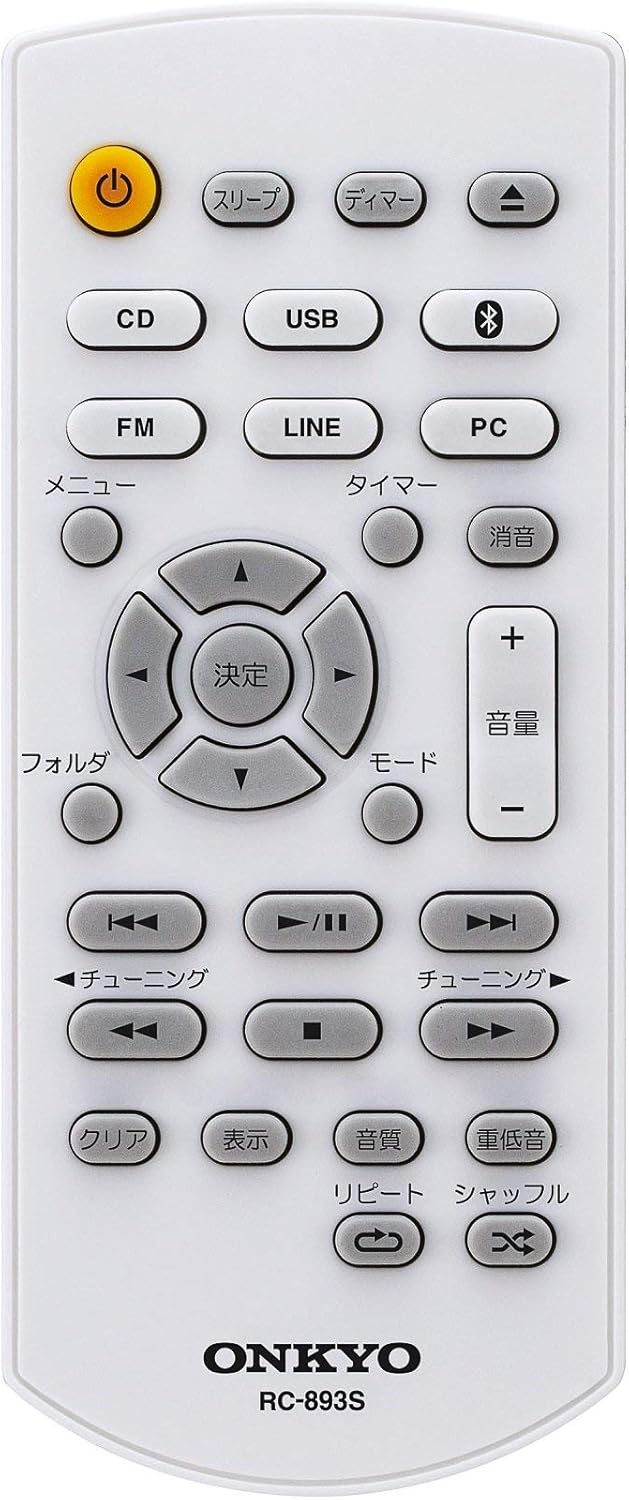
Figure 2: ONKYO RC-893S Remote Control
The remote control (RC-893S) provides full functionality for your CD Receiver System. Below is a description of its buttons:
- Power (ن): Turns the unit on or off.
- Sleep (スリープ): Sets the sleep timer.
- Dimmer (ディマー): Adjusts display brightness.
- CD: Selects CD input mode.
- USB: Selects USB input mode.
- Bluetooth (Bluetooth icon): Selects Bluetooth input mode.
- FM: Selects FM tuner mode.
- LINE: Selects LINE IN input mode.
- PC: Selects PC IN (USB DAC) input mode.
- Menu (メニュー): Accesses menu options.
- Timer (タイマー): Sets the timer function.
- Mute (消音): Mutes or unmutes the audio.
- Volume (+/- 音量): Adjusts the volume level.
- Directional Buttons (決定): Navigation and selection within menus.
- Folder (フォルダ): Navigates folders during USB/CD MP3 playback.
- Mode (モード): Changes playback mode.
- Tuning (チューニング): Adjusts radio frequency or track skipping.
- Play/Pause (▶/II): Starts or pauses playback.
- Stop (■): Stops playback.
- Clear (クリア): Clears settings or selections.
- Display (表示): Changes display information.
- Sound Quality (音質): Adjusts sound settings.
- Bass (重低音): Enhances bass output.
- Repeat (リピート): Repeats current track or album.
- Shuffle (シャッフル): Plays tracks in random order.
5.2 Basic Operations
- Power On/Off: Press the Power button on the remote or the main unit.
- Volume Adjustment: Use the Volume + or Volume - buttons on the remote or the volume knob on the main unit.
- Source Selection: Press the corresponding source button (CD, USB, Bluetooth, FM, LINE, PC) on the remote or the main unit.
5.3 CD Playback
- Press the CD button to select CD mode.
- Open the CD tray (if applicable, or insert disc into slot).
- Place a CD (or CD-R/RW with MP3 files) onto the tray with the label side up.
- Close the CD tray. Playback will start automatically or by pressing Play/Pause.
5.4 USB Playback
- Insert a USB memory device into the USB port on the front panel.
- Press the USB button to select USB mode.
- The system will read the files. Use the directional buttons and Enter to navigate and select MP3 files for playback.
5.5 Bluetooth Connection (NFC)
- Press the Bluetooth button to select Bluetooth mode. The display will show "PAIRING".
- On your smartphone or tablet, enable Bluetooth and search for available devices. Select "ONKYO X-U6" from the list.
- For NFC-compatible devices, simply touch your device to the NFC logo on the ONKYO X-U6(B) to establish a connection.
- Once connected, you can stream audio wirelessly from your device.
5.6 PC IN (USB DAC)
- Connect your computer to the PC IN (USB Type-B) terminal on the rear of the main unit using a USB cable.
- Press the PC button to select PC IN mode.
- On your computer, select the ONKYO X-U6(B) as the audio output device.
- Play audio from your computer, and it will be output through the system.
5.7 FM Tuner
- Press the FM button to select FM tuner mode.
- Use the Tuning buttons to manually tune to a station or perform an auto-scan.
- The system supports Wide FM up to 95.0MHz.
5.8 LINE IN
- Connect an external audio device (e.g., TV, portable music player) to the LINE IN terminals on the rear of the main unit using an appropriate audio cable.
- Press the LINE button to select LINE IN mode.
- Play audio from the connected external device.
5.9 Reservation Timer Function
The system features a reservation timer function that automatically starts playback at a set time. Refer to the detailed instructions in the full manual for setting up the timer.
6. Maintenance
6.1 Cleaning the Unit
Wipe the exterior of the unit with a soft, dry cloth. Do not use abrasive cleaners, waxes, or solvents as they may damage the finish.
6.2 Speaker Care
Keep the speaker cones free from dust. Avoid touching the speaker cones directly.
7. Troubleshooting
If you experience issues with your ONKYO X-U6(B) system, please refer to the following common solutions:
- No Power: Ensure the power cord is securely connected to both the unit and the wall outlet. Check if the outlet is functioning.
- No Sound: Check volume levels on both the system and the connected source device. Ensure speakers are correctly connected. Verify the correct input source is selected.
- Bluetooth Connection Issues: Ensure Bluetooth is enabled on your device and the system is in pairing mode. Try unpairing and re-pairing the device.
- CD Not Playing: Ensure the CD is clean and inserted correctly. Try a different CD.
- Poor FM Reception: Adjust the position of the FM antenna. Check for local interference.
For more complex issues, please contact customer support.
8. Specifications
| Feature | Specification |
|---|---|
| Brand | Onkyo |
| Model Number | X-U6(B) |
| Color | Black |
| Tuner Type | Wide FM |
| Total USB Ports | 2 |
| Number of Speakers (ch) | 2 |
| Audio Output | 15 Watts |
| Wireless Compatibility | Bluetooth |
| Accessories | Remote Control |
| Release Year | 2016 |
| Network | Wired |
| Power Consumption | 32 W |
| Product Dimensions (LxWxH) | 27.3 x 21.5 x 9.9 cm |
| Item Weight | 1.9 kg |
| Product Features | Simple Design |
9. Warranty and Support
9.1 Warranty Information
This product comes with a standard manufacturer's warranty. Please refer to the warranty card included in your package for specific terms and conditions, including warranty period and coverage details.
9.2 Customer Support
If you require further assistance or encounter issues not covered in this manual, please contact Onkyo customer support. Contact information can typically be found on the official Onkyo website or on the product packaging.


