
Introduction
The Movo WMIC80 UHF Wireless Lavalier Microphone System is designed to enhance audio quality for DSLR cameras and camcorders. This system provides a reliable wireless solution for capturing clear sound in various professional and semi-professional settings, including ENG, EFP, weddings, and performances. With its robust features and extensive operating range, it ensures high-quality audio capture for your video productions.
Key features include a wide UHF frequency range, multiple selectable channels for interference-free operation, and a substantial operating range in both open and obstructed environments. The system is engineered to deliver superior audio performance compared to built-in camera microphones.
What's in the Box
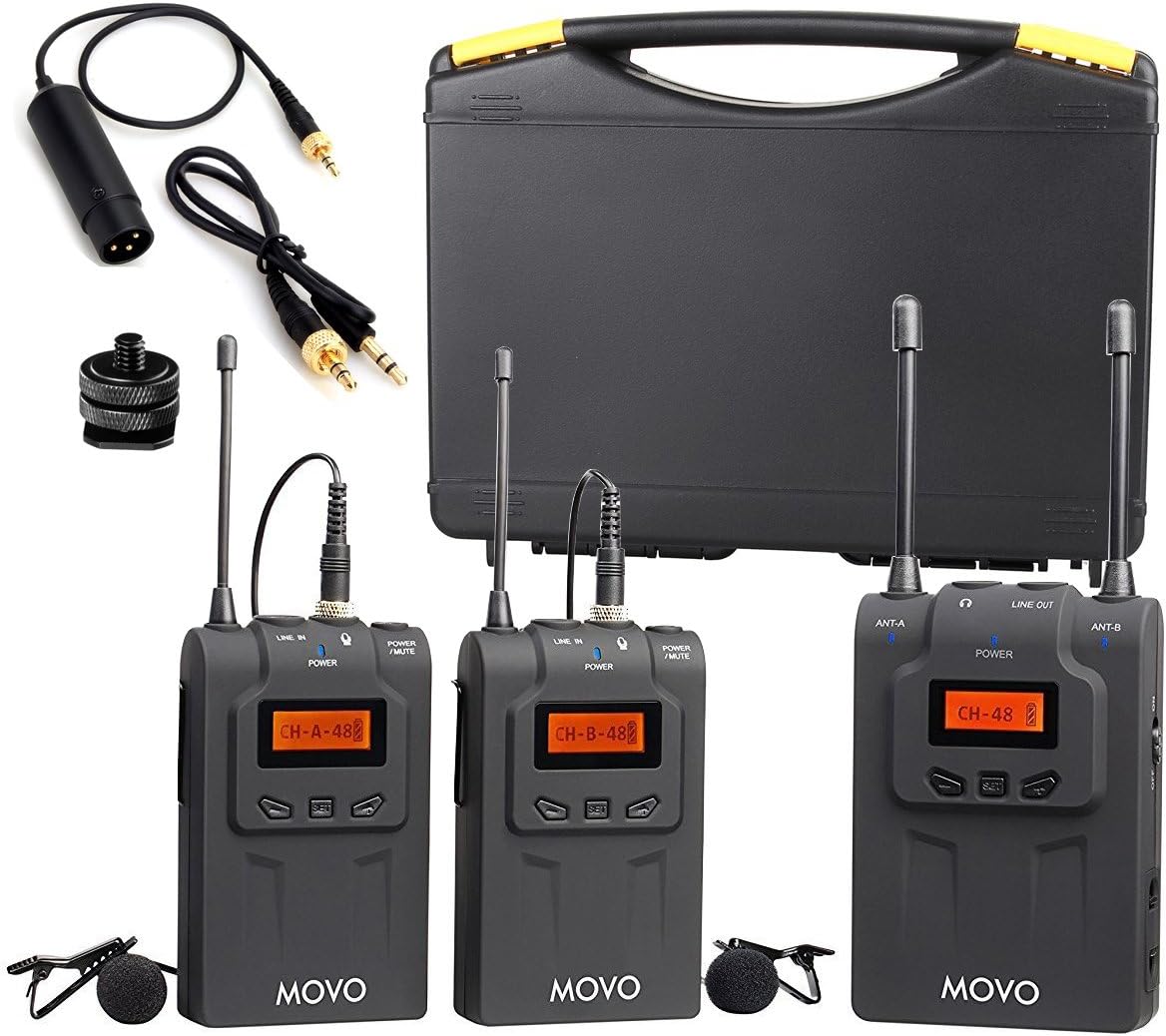
Your Movo WMIC80 system includes the following components:
- 2 Wireless Bodypack Transmitters with Belt Clips
- 2 Lavalier Microphones with Lapel Clips & Windscreens
- 1 Wireless Receiver with Removable Camera Shoe Mount
- 1 Stereo 3.5mm Output Cable
- 1 XLR Output Cable
- 1 System Carrying Case
- User Manual
- Warranty Card
Setup
Follow these steps to set up your Movo WMIC80 system:
- Install Batteries: Insert 2 AAA batteries into each Bodypack Transmitter and the Wireless Receiver.
- Attach Lavalier Microphones: Connect the lavalier microphones to the LINE IN ports on the Bodypack Transmitters. Secure the microphone to the subject's clothing using the lapel clip. Attach the windscreens for outdoor use to reduce noise.
- Mount Receiver: Attach the Wireless Receiver to your DSLR camera's hot shoe using the removable camera shoe mount.
- Connect Receiver to Camera: Use the provided Stereo 3.5mm Output Cable or XLR Output Cable to connect the LINE OUT port on the receiver to your camera's audio input.
- Power On: Turn on both Bodypack Transmitters and the Wireless Receiver. The backlit LCD displays on the units will illuminate.
- Pairing: The units should automatically pair. Verify successful pairing by checking the signal indicators on the receiver's LCD screen.


Operating
The Movo WMIC80 system operates within a UHF frequency range of 584 MHz-607.4 MHz, offering 2 groups of 48 selectable channels (96 unique frequency selections) to minimize interference. The operating range is over 330 feet (100m) in open areas and approximately 200 feet (60m) with obstacles.
- Channel Selection: Use the controls on the transmitters and receiver to select appropriate channels. Ensure both transmitters are active for optimal performance and to avoid noise.
- Audio Monitoring: The receiver supports active headphone monitoring via a 3.5mm headphone output, allowing real-time audio verification during recording.
- LCD Display: The backlit LCD display on each unit provides essential information such as battery level, channel selection, and audio levels.


Video: A hands-on look at the Movo WMIC80 Wireless Microphone System, demonstrating its components and basic functionality.
Maintenance
To ensure the longevity and optimal performance of your Movo WMIC80 system, follow these maintenance guidelines:
- Battery Care: The units consume batteries. Always replace with fresh batteries when needed. Remove batteries if the system will not be used for an extended period to prevent leakage.
- Cleaning: Use a soft, dry cloth to clean the units. Avoid using liquid cleaners or solvents.
- Storage: Store the system in its provided carrying case in a cool, dry place away from direct sunlight and extreme temperatures.
- Cable Management: Handle cables with care to prevent kinks or damage. The locking sleeves on mic wires and output cables help prevent accidental disconnections.
Troubleshooting
If you encounter issues with your WMIC80 system, consider the following:
- Static or Crackling Audio: Ensure both transmitters are active. Some users have reported static or crackling if only one transmitter is on. Check for strong interference sources nearby.
- Poor Coverage/Signal Dropouts: Verify that the receiver's antenna is pointing directly towards the transmitter's antenna. Environmental factors like high altitudes or physical obstacles can affect range.
- Rubbing Noise from Lavalier Mics: Ensure lavalier microphones are securely attached and not rubbing against clothing or other surfaces, which can create unwanted noise.
- Muffled or Distorted Sound: Check audio levels on both the transmitter and receiver. Ensure the microphone is positioned correctly relative to the sound source.
Specifications
| Feature | Detail |
|---|---|
| Audio Sensitivity | 80 Decibels |
| Item Weight | 2.3 Pounds (System) / 2.31 pounds (Package) |
| Microphone Form Factor | Lavalier |
| Power Source | Battery Powered |
| Signal-to-Noise Ratio | 80 dB |
| Hardware Platform | Camera |
| Number of Channels | 48 (2 Groups of 48 Selectable Channels) |
| Frequency Response | 15 KHz |
| Digital Audio Protocol | UHF |
| Size | 2 TX / 1 RX System |
| Recommended Uses | Speech, Video Conference, Video Recording |
| Connectivity Technology | UHF |
| Connector Type | XLR, 3.5mm |
| Compatible Devices | Camera |
| Polar Pattern | Omnidirectional |
| Operating Range | Over 330-feet (100m) in open areas or 200-feet (60m) with obstacles |
Warranty and Support
The Movo WMIC80 system comes with a 1 Year Movo Warranty. Movo provides fast and friendly support based in the U.S.A. For any inquiries or assistance, please refer to the contact information provided in your warranty card or visit the official Movo website.
