
Product Overview
The VELEX Marine Digital Media Receiver (Model VX110) is designed to bring high-quality audio to your boat, power sports vehicle, or hot tub. This weather-proof unit supports Bluetooth audio streaming, AM/FM radio, USB, and auxiliary inputs, providing versatile entertainment options. Its compact design allows it to fit standard 3-inch tachometer gauge openings, making integration seamless. The unit features a crystal-clear LED display and intuitive controls for easy operation.
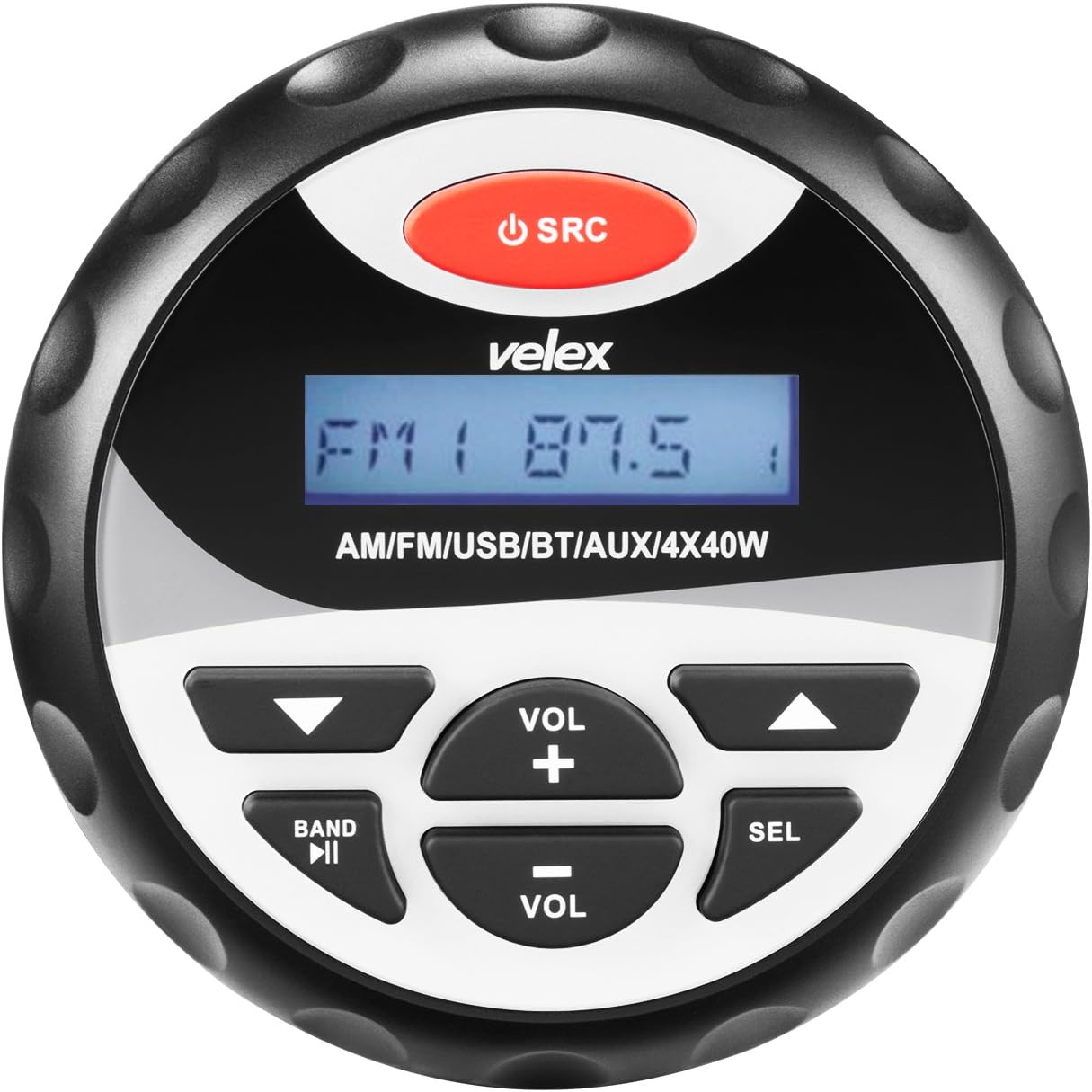
Figure 1: Front view of the VELEX Marine Stereo (Model VX110).
Setup and Installation
Proper installation is crucial for optimal performance and longevity of your VELEX Marine Stereo. All necessary wiring harnesses are included to facilitate the process.
Physical Installation
The VX110 is designed to fit into standard 3-inch (8 cm) tachometer gauge openings. Ensure sufficient space behind the mounting surface for the unit and its wiring. Mounting hardware is included.

Figure 2: Product dimensions for installation (Front: 4.09 inches / 104mm, Depth: 3.43 inches / 87mm, Mounting Depth: 3.15 inches / 80mm).

Figure 3: Rear view of the stereo with wiring connections.
Electrical Wiring
Connect the stereo to your vehicle's electrical system using the provided wiring harnesses. Refer to the diagram below for correct connections. It is strongly recommended to consult a professional for installation if you are unsure about electrical wiring.

Figure 4: Electrical wiring diagram.
Red wire: +12V Ignition On.
Yellow wire: +12V Battery Constant.
Black wire: -12V Negative / Ground.

Figure 5: Included input cables for USB and Aux connections.
Operating Instructions
Power On/Off
- To turn the unit ON, press the SRC button briefly.
- To turn the unit OFF, press and hold the SRC button for approximately 2 seconds.
Source Selection
- Press the SRC button repeatedly to cycle through available audio sources: Bluetooth (BT), Radio (AM/FM), Auxiliary Input (AUX IN), and USB.
Bluetooth Pairing and Audio
- Select the "BT" source. The display will show "BT ON".
- On your mobile device, search for "VELEX" in the Bluetooth settings and pair.
- Once paired, you can stream audio from your device.
- Use the VOL + and VOL - buttons to adjust the volume.
- Use the << and >> buttons to skip tracks forward or backward.
- Press the SEL button to pause or play music.
Radio Operation (AM/FM)
- Select the "RADIO" source.
- Press the BAND button to switch between FM1, FM2, FM3, AM1, and AM2 bands.
- Use the << and >> buttons to tune to the next/previous station. Hold these buttons for auto-seek.
- To save a preset, tune to the desired station, then press and hold one of the numbered preset buttons (if available, otherwise use SEL button for settings).
Sound Settings Adjustment
- Press the SEL button repeatedly to cycle through sound settings: BASS, TREBLE, BALANCE (BAL L/R), FADER (F/R), LOUDNESS (LOUD ON/OFF), and EQUALIZER (EQ ON/OFF).
- Once a setting is displayed, use the VOL + and VOL - buttons to adjust the value.
Maintenance and Care
- Cleaning: Use a soft, damp cloth to clean the unit's surface. Avoid abrasive cleaners or solvents.
- Water Protection: The unit has an IPx6 water splashing protection rating, meaning it can withstand powerful water jets. However, it is not designed for submersion. Ensure all connections are secure and sealed to maintain water resistance.
- UV Protection: The plastic components feature a UV coating for enhanced durability against sun exposure.
- Circuit Board: The circuit board is conformally coated for protection in marine environments.
Troubleshooting Guide
If you experience issues with your VELEX Marine Stereo, please refer to the table below for common problems and their solutions.
| Problem | Possible Cause | Solution |
|---|---|---|
| No Power / Unit Does Not Turn On | Incorrect wiring; Blown fuse; Loose power connection. | Check all power and ground connections. Verify fuse is intact and replace if necessary. Ensure ignition wire has power. |
| No Sound Output | Volume too low; Incorrect source selected; Speaker wires disconnected; Mute function active. | Increase volume. Press SRC to select correct input source. Check speaker wiring connections. Ensure unit is not muted. |
| Bluetooth Not Connecting or Disconnecting | Device not in pairing mode; Interference; Previously paired device connected. | Ensure stereo is in Bluetooth mode ("BT ON"). Make sure your device's Bluetooth is on and discoverable. Forget the device on your phone and re-pair. Move closer to the stereo. |
| Poor Radio Reception | Antenna not connected; Damaged antenna; Weak signal area. | Check antenna connection to the stereo. Inspect antenna for damage. Try tuning to stronger stations or relocate the antenna if possible. |
Product Specifications
- Model: VX110
- Product Dimensions: 3.95 x 3.95 x 3.5 inches (10.03 x 10.03 x 8.89 cm)
- Item Weight: 1.28 pounds (0.58 kg)
- Power Output: Peak 40W x 4 channels (160 watts total)
- Connectivity: Bluetooth (A2DP support), USB 2.0, Auxiliary Input (RCA output for external amplifier)
- Tuner: AM/FM
- Water Protection: IPx6 (Weather-Proof)
- Display: Crystal-clear LED display
- Controls: Silicone gel buttons
- Compatible Devices: Smartphone, Tablet, Speaker
Warranty and Customer Support
VELEX stands behind the quality of its products. The VELEX Marine Stereo (Model VX110) comes with a 1-Year Quality Promise.
For technical assistance, warranty claims, or any product-related inquiries, please contact VELEX customer support. Refer to your product packaging or the official VELEX website for the most current contact information.
Customer satisfaction is our highest priority.


