
1. Introduction and Overview
The Beurer BF 600 Glass Impedance Scale is an advanced body analysis scale designed to provide comprehensive insights into your body composition. It measures not only your weight but also calculates body fat, muscle mass, body water, bone mass, Basal Metabolic Rate (BMR), Active Metabolic Rate (AMR), and Body Mass Index (BMI). The scale connects seamlessly with the 'beurer HealthManager Pro' app via Bluetooth, allowing you to track your health data over time and visualize your progress with detailed graphs. Its sleek design with brushed stainless steel electrodes and a white backlit display makes it a functional and aesthetic addition to any bathroom.
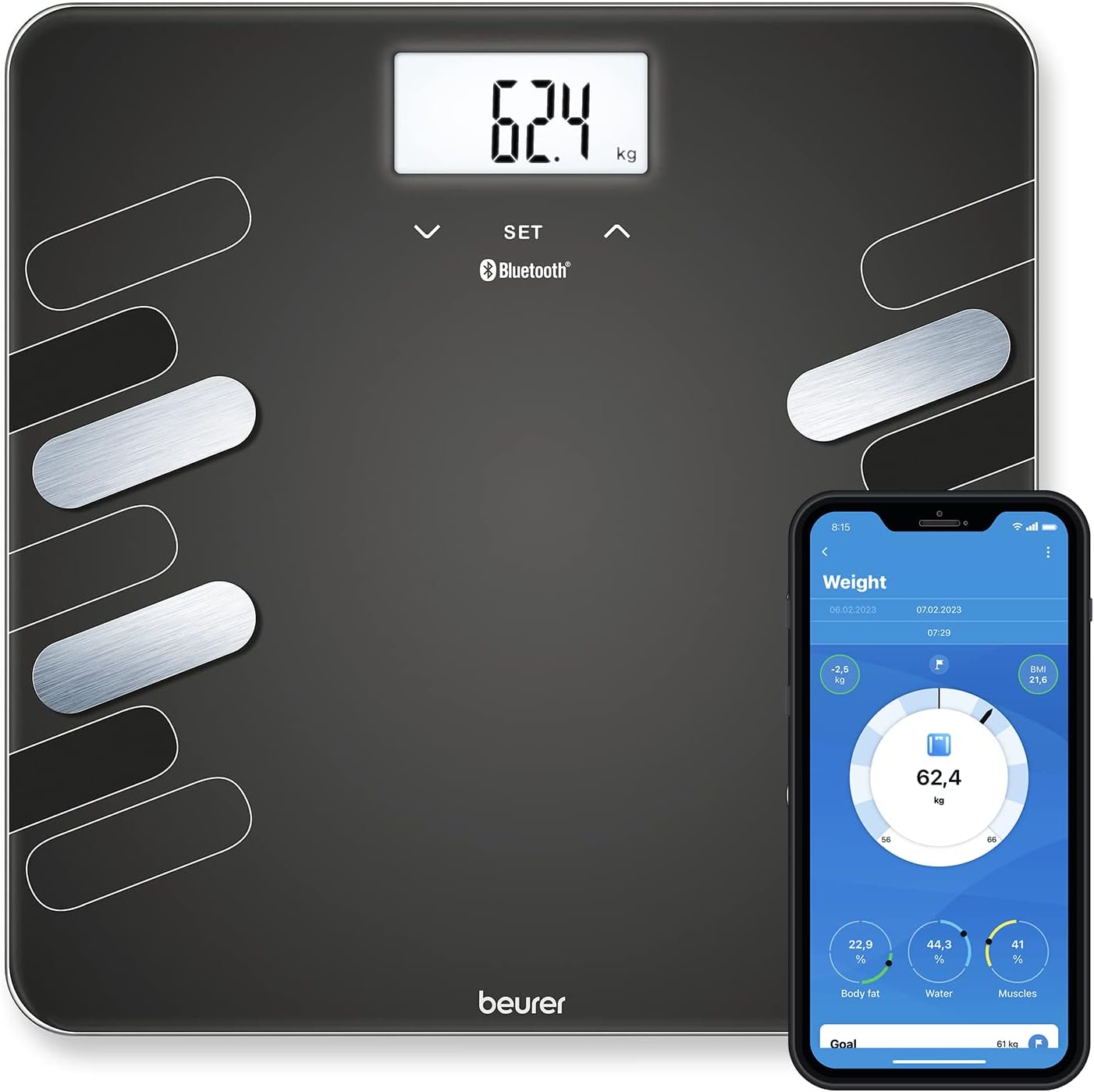
The Beurer BF 600 Glass Impedance Scale displayed with a smartphone showing the Beurer HealthManager Pro app interface, indicating a weight reading of 62.4 kg and various body composition metrics.

An infographic highlighting key features of the Beurer BF 600 scale, including a white illuminated display, 8 user memories, calorie display (AMR/BMR), BMI calculation, safety glass, and a 180 kg load capacity.
2. Setup
2.1 Battery Installation
Locate the battery compartment on the underside of the scale. Open the compartment cover and insert the required batteries (typically AAA or AA, refer to packaging for exact type and quantity) ensuring correct polarity (+/-). Close the battery compartment cover securely.
2.2 App Download and Pairing
- Download the 'beurer HealthManager Pro' app from your smartphone's app store (App Store for iOS or Google Play Store for Android).
- Ensure Bluetooth is enabled on your smartphone.
- Open the 'beurer HealthManager Pro' app and follow the on-screen instructions to create a user profile or log in.
- Within the app, navigate to the device pairing section and select the Beurer BF 600 scale.
- Step onto the scale briefly to activate it. The scale's display should show a pairing indicator.
- Confirm the pairing request on your smartphone. Once successfully paired, your measurements will automatically transfer to the app.
3. Operating the Scale
3.1 Taking a Measurement
- Place the scale on a firm, flat surface. Avoid carpets or uneven flooring, as this can affect accuracy.
- Step onto the scale barefoot, ensuring your feet are positioned correctly on the stainless steel electrodes.
- Stand still and distribute your weight evenly. For optimal conductivity, slightly moisten your feet if they are very dry.
- The scale will automatically turn on and display your weight. It will then proceed to measure your body composition metrics.
- Once the measurement is complete, your data will be displayed on the scale and automatically transferred to the 'beurer HealthManager Pro' app if paired.

A person standing correctly on the Beurer BF 600 scale, with overlaid text providing tips for accurate measurement: always weigh at the same time and place, stand straight without moving, distribute weight evenly, keep legs still during measurement, use on a firm surface, recalibrate if moved, and slightly moisten feet for better conductivity.
3.2 User Recognition
The Beurer BF 600 scale can automatically recognize up to eight users based on their weight and body composition data. Ensure each user has a profile set up in the 'beurer HealthManager Pro' app. When a measurement is taken, the scale will attempt to match the data to an existing user profile. If multiple profiles are similar, the scale may prompt you to select the correct user within the app.

A close-up of feet on the Beurer BF 600 scale, demonstrating proper placement on the electrodes. The image also shows a TÜV Rheinland certified badge, indicating data privacy and security.
4. Maintenance
4.1 Cleaning
To clean the scale, wipe it with a slightly damp cloth. Do not use abrasive cleaning agents or immerse the scale in water. Ensure the scale is completely dry before storage or next use.
4.2 Storage
Store the scale in a dry place, away from extreme temperatures and direct sunlight. Avoid placing heavy objects on the scale when not in use.
5. Troubleshooting
- Scale not turning on: Check if the batteries are inserted correctly and are not depleted. Replace batteries if necessary.
- Inaccurate readings: Ensure the scale is on a firm, flat surface. Avoid carpets. Make sure your feet are clean and properly positioned on the electrodes. Stand still during measurement. Recalibrate the scale by stepping on it briefly, then stepping off, and waiting for it to show '0.0' before taking a measurement.
- Bluetooth not connecting: Ensure Bluetooth is enabled on your smartphone and the scale is within range. Restart both the scale (by removing and reinserting batteries) and the app. Try re-pairing the device through the app's settings.
- No body composition data: Ensure you are stepping on the scale barefoot and your feet are making good contact with all four electrodes. Slightly moisten your feet if they are very dry.
6. Specifications

A top-down view of the Beurer BF 600 scale, showing its dimensions of 30cm by 30cm and a thickness of 2.1cm, with the white backlit LCD display visible.
| Feature | Value |
|---|---|
| Brand | Beurer |
| Color | Black (style) |
| Recommended Product Uses | Human |
| Special Feature | Precise measurement |
| Weight Limit | 180 Kilograms |
| Form Factor | Water content |
| Material | Stainless Steel |
| Item Weight | 1.55 Kilograms |
| Spare Parts Availability in EU | 1 Year |
| Manufacturer | Beurer |
7. Warranty and Support
The Beurer BF 600 scale comes with a specified spare parts availability of 1 year in the EU. For detailed warranty information, including terms and conditions, please refer to the warranty card included with your product or visit the official Beurer website.
If you encounter any issues or require technical assistance, please contact Beurer customer support. Contact details can typically be found on the Beurer website or in the product packaging.