
Pigeon Rapido Premium
Pigeon Rapido Premium 1800W Induction Cooktop User Manual
Model: Rapido Premium
Important Safety Instructions
Read all instructions carefully before using the appliance. Keep this manual for future reference.
- Electrical Safety: Ensure the power supply matches the appliance's rating. Do not immerse the appliance in water or any other liquid. Do not operate with a damaged cord or plug.
- Cookware Compatibility: Use only induction-compatible cookware. Non-compatible cookware will not heat.
- Hot Surface: The cooktop surface will remain hot for some time after use. Avoid touching it directly.
- Ventilation: Ensure adequate ventilation around the appliance. Do not block air vents.
- Children: Keep out of reach of children. This appliance is not intended for use by persons with reduced physical, sensory, or mental capabilities unless supervised.
- Placement: Place the cooktop on a stable, flat, heat-resistant surface. Do not place near gas stoves or other heat sources.
- Foreign Objects: Do not place metal objects like knives, forks, spoons, or lids on the induction cooktop as they can become hot.
Product Overview
The Pigeon Rapido Premium Induction Cooktop is a smart electric appliance designed for efficient cooking. It features an 1800 Watts heating element, a feather-touch control panel, eight preset cooking menus, and an automatic shut-off function for safety and convenience.
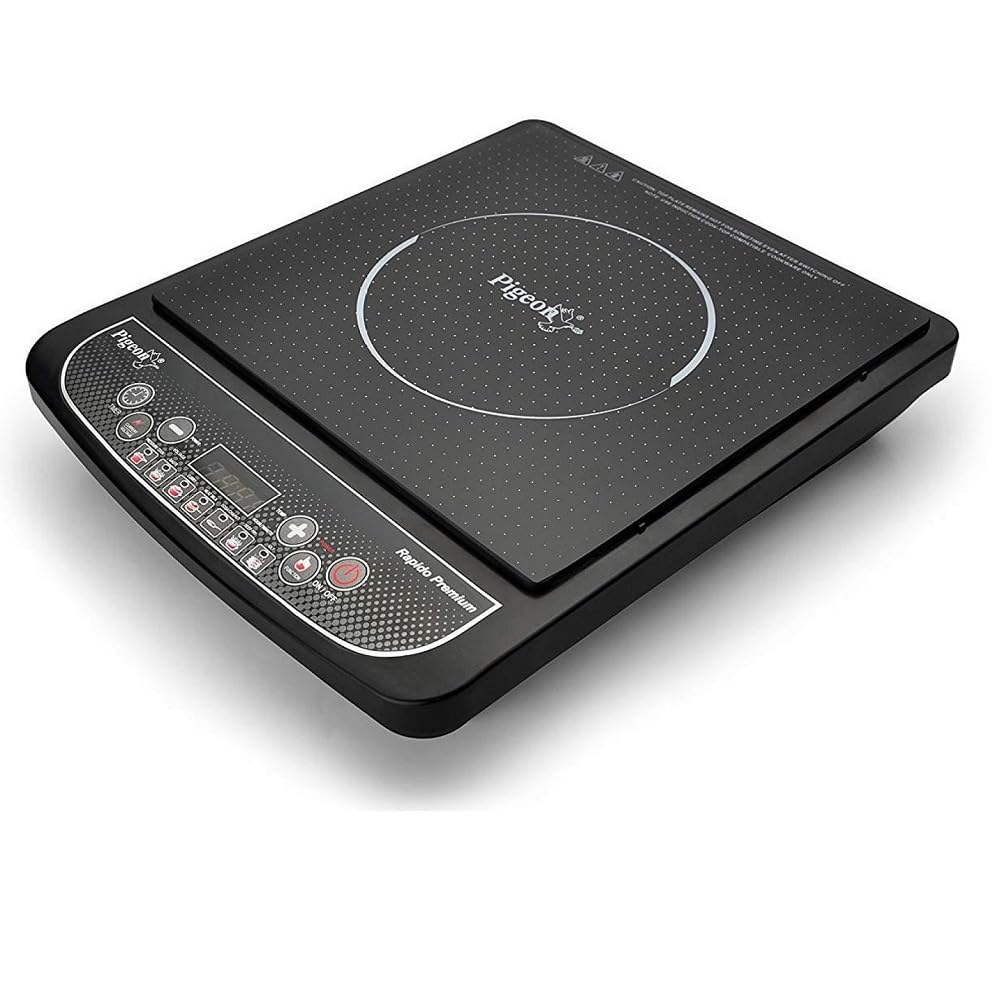
Figure 1: Top view of the Pigeon Rapido Premium Induction Cooktop, showing the cooking zone and control panel.
Key Features:
- 1800 Watts Power: Provides rapid heating for quick cooking.
- Feather Touch Controls: Easy-to-use and clean touch-sensitive buttons.
- Eight Preset Menus: Optimized settings for various cooking tasks.
- Automatic Shut-Off: Enhances safety by turning off the cooktop after a period of inactivity or if no compatible cookware is detected.
- Polycarbonate Body: Durable and easy to maintain.
Setup
- Unpacking: Carefully remove the induction cooktop from its packaging. Retain packaging materials for future transport or storage.
- Inspection: Inspect the appliance for any signs of damage. Do not use if damaged.
- Placement: Place the cooktop on a dry, stable, non-metallic, and heat-resistant surface. Ensure there is at least 10-15 cm of clear space around all sides for proper ventilation.
- Power Connection: Plug the power cord into a grounded electrical outlet. Ensure the outlet's voltage and current rating are compatible with the cooktop (1800W).
- Initial Cleaning: Wipe the cooktop surface with a soft, damp cloth before first use.
Operating Instructions
Control Panel Overview:

Figure 2: Angled view of the Pigeon Rapido Premium Induction Cooktop, highlighting the feather touch control panel.
The control panel features feather-touch buttons for various functions. A digital display shows power levels, temperature, or timer settings.
Basic Operation:
- Power On: Place induction-compatible cookware centrally on the cooking zone. Press the ON/OFF button. The cooktop will beep, and the display will light up.
- Select Function:
- Preset Menus: Press the desired preset menu button (e.g., "Curry," "Fry," "Milk," "Dosa," "Roti," "Boil," "Soup," "Keep Warm"). The cooktop will automatically adjust power and time settings.
- Manual Mode: If no preset is selected, the cooktop may default to a specific power level. Use the + and - buttons to adjust the power level or temperature.
- Timer Function: Press the TIMER button, then use + and - to set the desired cooking time. The cooktop will automatically shut off when the timer expires.
- Power Off: After cooking, press the ON/OFF button to turn off the cooktop. The fan may continue to run for a short period to cool down internal components.
Compatible Cookware:
For optimal performance, use cookware made of ferromagnetic materials such as cast iron, enamel iron, stainless steel (with a magnetic bottom), or induction-specific pots and pans. Cookware bottoms should be flat and have a diameter between 12 cm and 26 cm. Non-compatible materials include glass, ceramic, aluminum, copper, and non-magnetic stainless steel.
Maintenance and Cleaning
Regular cleaning and maintenance will ensure the longevity and optimal performance of your induction cooktop.
- Before Cleaning: Always unplug the cooktop from the power outlet and allow it to cool completely before cleaning.
- Cooktop Surface: Wipe the glass-ceramic surface with a soft, damp cloth and a mild detergent. For stubborn stains, use a non-abrasive cleaner specifically designed for induction cooktops. Dry thoroughly with a clean cloth.
- Control Panel: Wipe the feather-touch control panel with a soft, dry cloth. Avoid excessive moisture.
- Exterior: Clean the exterior body with a soft, damp cloth.
- Air Vents: Periodically check and clean the air intake and exhaust vents to prevent dust accumulation, which can affect performance. Use a soft brush or vacuum cleaner.
- Do Not: Do not use abrasive cleaners, scouring pads, or harsh chemicals. Do not immerse the cooktop in water.
Troubleshooting
If you encounter issues with your induction cooktop, refer to the following common problems and solutions:
| Problem | Possible Cause | Solution |
|---|---|---|
| Cooktop does not turn on. | No power supply; Power cord not properly plugged in; Main power switch off. | Check if the power cord is securely plugged into a working outlet. Ensure the main power supply is on. |
| Cooktop turns on but does not heat. | Non-compatible cookware; Cookware not centered; Cookware too small/large. | Use induction-compatible cookware. Ensure the cookware is centered on the cooking zone and has an appropriate diameter. |
| Display shows "E0" or similar error code. | No cookware detected; Incompatible cookware; Overheating. | Place compatible cookware on the cooktop. If already present, remove and re-center. If overheating, turn off and allow to cool before restarting. |
| Cooktop makes a humming noise. | Normal operation; Cookware type. | A slight humming sound is normal during induction cooking, especially with certain types of cookware. This is not a fault. |
If the problem persists after attempting these solutions, please contact customer support.
Specifications
| Feature | Detail |
|---|---|
| Model Number | Rapido Premium |
| Brand | Pigeon |
| Wattage | 1800 Watts |
| Controls Type | Touch (Feather Touch) |
| Material | Polycarbonate |
| Number of Heating Elements | 1 |
| Product Dimensions (D x W x H) | 33D x 42W x 10H Centimeters |
| Color | Black |
| Included Components | Only Induction Cooktop |

Figure 3: Dimensions of the Pigeon Rapido Premium Induction Cooktop.
Warranty and Support
Warranty Information:
This Pigeon Rapido Premium Induction Cooktop comes with a 1 Year Pigeon India Warranty from the date of purchase. Please retain your purchase receipt as proof of warranty. The warranty covers manufacturing defects under normal use conditions. It does not cover damage caused by misuse, accidents, unauthorized repairs, or normal wear and tear.
Customer Support:
For any queries, service requests, or technical assistance, please contact Pigeon customer support. Refer to the contact information provided in your product packaging or visit the official Pigeon India website for the most up-to-date support details.
Manufacturer: Stovekraft Limited
Related documentsRapido Premium

Ask a question about this manual
Ask about setup, troubleshooting, compatibility, parts, safety, or missing instructions. Manuals+ will review the question and use this page’s manual context to help answer it.