
Vertex Standard EVX-261-G6-5
Vertex Standard Digital Radio EVX-261 User Manual
Model: EVX-261-G6-5
Introduction
This manual provides comprehensive instructions for the operation and maintenance of your Vertex Standard EVX-261 Digital Radio. The EVX-261 is designed for reliable communication, operating in both analog and digital modes, making it suitable for diverse fleet environments. It features expanded interoperability with multiple signaling options, including MDC1200, DTMF, and 2-tone or 5-tone capabilities, alongside voice inversion encryption. In digital mode, the radio offers enhanced audio clarity through noise cancellation.

Figure 1: Front view of the EVX-261 Digital Radio, showing the speaker, microphone, and control knobs.
Setup
Before using your EVX-261 radio, please follow these steps to ensure proper setup.
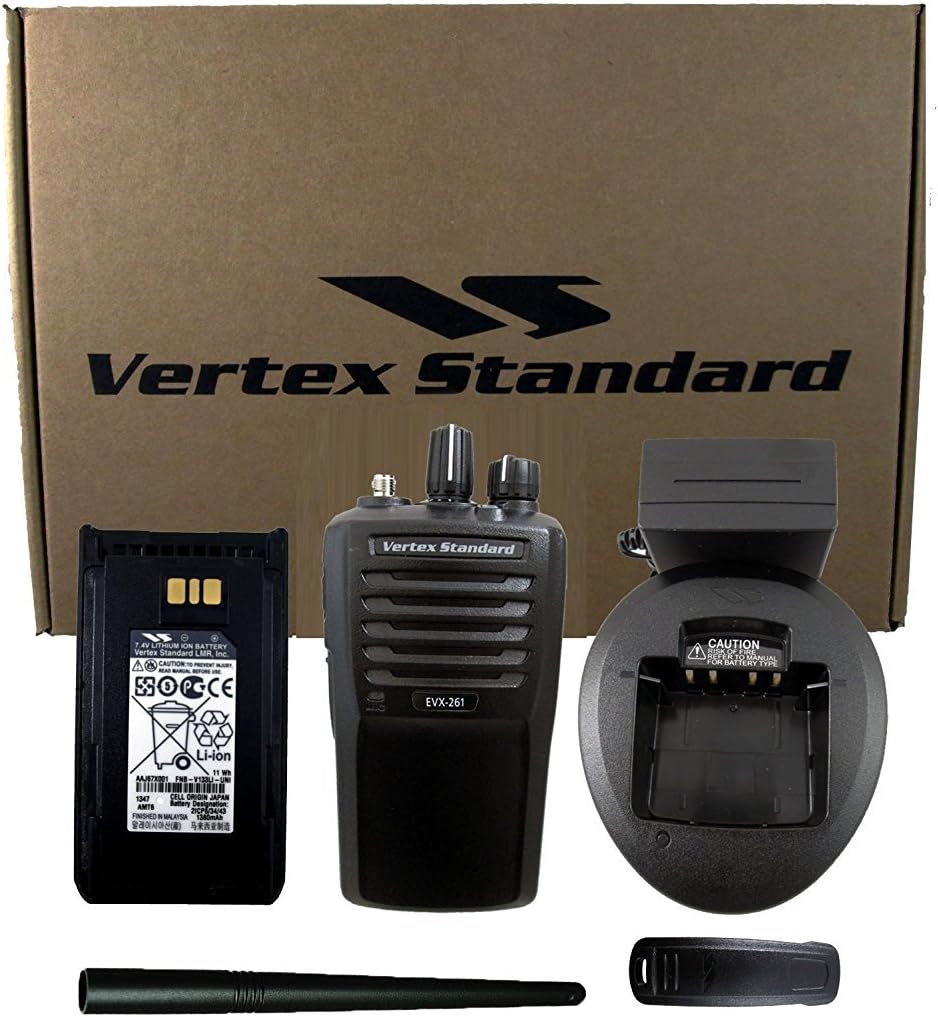
Figure 2: EVX-261 radio and its standard accessories, including the battery, desktop charger, antenna, and belt clip.
1. Battery Installation
- Align the battery pack with the grooves on the back of the radio.
- Slide the battery pack upwards until it clicks into place.
- Ensure the battery release latch is securely engaged.
2. Antenna Attachment
- Screw the antenna clockwise into the connector on the top of the radio until it is finger-tight. Do not overtighten.
3. Charging the Battery
- Connect the AC adapter to the desktop charger and plug it into a power outlet.
- Place the radio with the battery pack installed into the charging slot.
- The charger indicator light will typically show red during charging and green when fully charged.
4. Belt Clip Attachment
- Align the belt clip with the two screw holes on the back of the radio (above the battery).
- Secure the belt clip using the provided screws.
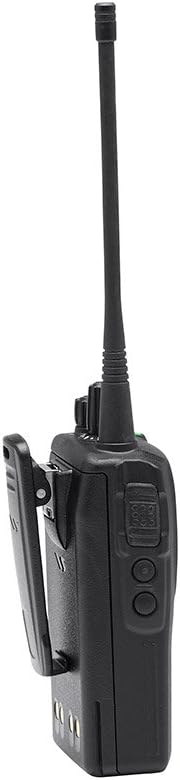
Figure 3: Side view of the EVX-261 radio, illustrating the attached belt clip.
Operating Instructions
1. Powering On/Off
- To power on, rotate the Power/Volume knob (top-left knob) clockwise until it clicks and the radio powers on.
- To power off, rotate the Power/Volume knob counter-clockwise until it clicks and the radio powers off.
2. Adjusting Volume
- Rotate the Power/Volume knob clockwise to increase volume and counter-clockwise to decrease volume.
3. Channel Selection
- Rotate the Channel Selector knob (top-right knob) to select the desired channel. The radio supports up to 16 channels.
4. Transmitting and Receiving
- Receiving: When a signal is received on the selected channel, the radio will automatically output the audio.
- Transmitting: Press and hold the Push-To-Talk (PTT) button on the side of the radio. Speak clearly into the microphone. Release the PTT button to listen.

Figure 4: Side view of the EVX-261 radio, highlighting the Push-To-Talk (PTT) button and accessory port.
5. Digital and Analog Modes
- The EVX-261 operates in both analog and digital modes. The mode is typically pre-programmed per channel. Consult your radio administrator for channel assignments.
- In digital mode, the radio utilizes noise cancellation technology for clearer audio.
6. Signaling Options
- The radio supports various signaling options including MDC1200, DTMF, and 2-tone or 5-tone capabilities. These features are typically configured by your radio administrator.
Maintenance
1. Cleaning the Radio
- Wipe the radio's surface with a soft, damp cloth. Do not use harsh chemicals or abrasive cleaners.
- Ensure the accessory jack cover is securely closed to prevent dust and moisture ingress.
2. Battery Care
- Charge the battery fully before initial use.
- Avoid overcharging or completely discharging the battery, as this can reduce its lifespan.
- If the radio will not be used for an extended period, remove the battery and store it in a cool, dry place.
3. Storage
- Store the radio in a dry environment, away from extreme temperatures and direct sunlight.
- Keep the radio away from strong magnetic fields.
Troubleshooting
| Problem | Possible Cause | Solution |
|---|---|---|
| Radio does not power on. | Battery is dead or not properly installed. | Charge the battery. Ensure battery is securely attached. |
| Cannot transmit or receive. | Incorrect channel selected, out of range, or antenna not attached. | Verify channel. Move closer to other radios. Check antenna connection. |
| Poor audio quality. | Volume too low, interference, or microphone/speaker obstruction. | Adjust volume. Move away from sources of interference. Check for obstructions. |
| Battery life is short. | Battery is old or not fully charged. | Ensure battery is fully charged. Consider replacing old batteries. |
Specifications
| Feature | Detail |
|---|---|
| Manufacturer | Vertex Standard |
| Model Number | EVX-261-G6-5 |
| Item Weight | 1.95 pounds |
| Package Dimensions | 10.2 x 9.5 x 3.4 inches |
| Special Features | UHF, Digital/Analog Operation, Noise Cancellation |
| Number of Channels | 16 |
| Frequency Range | 400-470 MHz |
| Tuner Technology | UHF |
| Water Resistance Level | Water Resistant |
Warranty and Support
For warranty information and technical support, it is recommended to contact the authorized Vertex Standard dealer from whom you purchased this product. They can provide specific details regarding warranty coverage and assist with any service needs.
Note: Vertex Standard recommends purchasing from an authorized dealer to ensure product authenticity and access to full support.
Official Product Videos
No official product videos from the seller were available for embedding at this time. Please refer to the text and images provided for comprehensive instructions.
Related Documents - EVX-261-G6-5
 |
Vertex Standard EVX-531 Operating Manual for Business Communications This operating manual provides detailed instructions for the Vertex Standard EVX-531 digital/analog transceiver, covering setup, operation, features, and safety guidelines for business communication users. |
 |
Vertex Standard VX-3R Technical Supplement: Servicing Guide This technical supplement provides detailed information for servicing the Vertex Standard VX-3R Ultra-Compact Dual-Band Transceiver, covering circuit descriptions, exploded views, and alignment procedures. |
 |
Vertex Standard MH-53A7A Noise-Canceling Microphone Service Manual Service manual for the Vertex Standard MH-53A7A noise-canceling microphone, detailing its specifications, circuit diagram, parts layout, and comprehensive parts list for maintenance and repair. |
 |
Vertex Standard VX-2100/VX-2200 Operating Manual This manual provides operating instructions and safety information for the Vertex Standard VX-2100 and VX-2200 series FM transceivers. It covers front and rear panel controls, basic operation, advanced features, and optional accessories. |
 |
Vertex Standard VX-410/-420: Инструкция по эксплуатации профессиональной радиостанции Полное руководство пользователя для профессиональных портативных VHF/UHF радиостанций Vertex Standard моделей VX-410 и VX-420. Описание функций, управления, технических характеристик и аксессуаров. |
 |
VX-8R/E VX-8DR/E Technical Supplement: Servicing Guide This technical supplement provides detailed information for servicing the Vertex Standard VX-8R/E and VX-8DR/E 50/144/430 MHz Triple-Band Heavy Duty Submersible Transceivers. It includes specifications, alignment procedures, and component details for qualified technicians. |