
1. Introduction
This manual provides essential instructions for the safe and effective use of your T-Power 12V AC/DC Adapter. This adapter is designed to supply power to compatible Huion Kamvas Pro graphic drawing tablets.
Important Note: This adapter is for power transfer ports only and will not directly charge the monitor. The HUION CB01 3-in-1 HDMI Cable is NOT included with this product.

Image: T-Power 12V AC/DC Adapter highlighting its safety features and reinforced power cord.
2. Setup and Compatibility
2.1 Package Contents
- 1 x T-Power 12V AC/DC Adapter
2.2 Connecting the Adapter
- Locate the power input port on your Huion Kamvas Pro graphic tablet.
- Connect the DC output plug of the T-Power adapter firmly into the tablet's power input port.
- Plug the AC input cable of the adapter into a standard wall electrical outlet (AC 100V - 240V).
- Ensure all connections are secure before powering on your tablet.
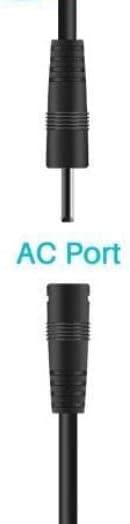
Image: Diagram illustrating the connection of the AC adapter's DC barrel connector to a device's power input.
2.3 Compatible Models
This T-Power 12V AC/DC Adapter is compatible with the following Huion Kamvas Pro graphic drawing tablets:
- Huion Kamvas GT-156
- Huion Kamvas GT-156HD V2 Pen Display Drawing Monitor
- Huion KAMVAS PRO 12
- Huion KAMVAS PRO 13
- Huion KAMVAS PRO 16
- Huion KAMVAS 16
- Huion KAMVAS PRO 12 GT-116 W58
Please double-check your tablet's model, series, version number, and power tip requirements to ensure compatibility before use.
3. Operating Instructions
Once properly connected, the T-Power 12V AC/DC Adapter will provide continuous power to your compatible Huion Kamvas Pro tablet. The adapter is designed for stable power delivery within its specified voltage and current range.
- Ensure the tablet is powered off before connecting or disconnecting the adapter to prevent potential damage to the device or adapter.
- Use only with compatible devices as listed in Section 2.3.
- Do not use the adapter if the cable or housing is damaged.
4. Maintenance and Safety
4.1 General Care
- Keep the adapter in a dry, well-ventilated environment.
- Avoid exposing the adapter to extreme temperatures, direct sunlight, or high humidity.
- Do not expose the adapter to water or other liquids.
- Clean the adapter with a soft, dry cloth. Do not use harsh chemicals or abrasive cleaners.
- Avoid bending or twisting the power cord excessively to prevent internal damage.

Image: Features of the T-Power adapter, including a longer bend lifespan, excellent material quality, and a durable power plug.
4.2 Safety Features
The T-Power adapter is designed with multiple safety protections:
- Short Circuit Protection: Prevents damage from electrical shorts.
- Overheating Protection: Safeguards against excessive temperature buildup.
- Overcurrent Protection: Protects against current surges.
- Electrostatic Protection: Minimizes risk from static discharge.
- Magnetic Field Protection: Shields against magnetic interference.
- Overvoltage Protection: Defends against voltage spikes.

Image: Visual representation of the T-Power adapter's safety protections, including short circuit, overheating, overcurrent, electrostatic, magnetic field, and overvoltage protection.
5. Troubleshooting
| Problem | Possible Cause | Solution |
|---|---|---|
| Tablet not receiving power |
|
|
| Adapter feels hot during use |
|
|
| Adapter tip does not fit |
|
|
6. Specifications
| Brand | T POWER |
| Model Number | TP-xp7-C7A |
| Input Voltage Range | AC 100V - 240V |
| Output Voltage | 12V DC |
| Output Current | 9.67 A |
| Wattage | 116 watts |
| Connector Type | DC Barrel Connector |
| Material | Plastic |
| Certifications | CE / FCC / RoHS |
| Item Weight | 4 ounces |
| UPC | 754970664822 |
7. Warranty and Support
7.1 Warranty Information
This T-Power adapter comes with a 1-Year Limited Manufacturer Warranty. This warranty covers quality-related issues and allows for easy exchange or replacement.
Additionally, a 30-Day Return for Any Reason policy is offered, allowing you to return undamaged products within 30 days of purchase for a full refund.
7.2 Technical Support
If you encounter any issues, such as receiving the wrong item or if the adapter tip does not fit your device, please contact T-Power customer support for assistance. They can help verify compatibility and provide solutions.
For more information or to contact support, please visit the T-Power Store on Amazon.