
1. Introduction
The JBL Professional 8124 is a 4-inch, full-range, cost-effective loudspeaker designed for commercial applications. It delivers high-fidelity performance in an easy-to-install package. The high-sensitivity drivers ensure maximum sound levels with minimal amplifier power. Featuring a contemporary grill design, 70V/100V taps, and an open-back design, the 8100 series provides an elegant and efficient solution for basic commercial sound systems or any application not requiring a backcan for installation.

Image 1.1: Front view of the JBL Professional 8124 4-inch In-Ceiling Loudspeaker. The speaker features a white circular grille with the JBL logo in the center.
2. Safety Information
Please read and understand all safety instructions before installing or operating this product. Failure to do so may result in injury or damage to the equipment.
- Read Instructions: Retain these instructions for future reference.
- Heed Warnings: Follow all warnings on the product and in the operating instructions.
- Water and Moisture: Do not use this apparatus near water or expose it to dripping or splashing.
- Cleaning: Clean only with a dry cloth.
- Ventilation: Do not block any ventilation openings. Install in accordance with the manufacturer's instructions.
- Heat: Do not install near any heat sources such as radiators, heat registers, stoves, or other apparatus (including amplifiers) that produce heat.
- Accessories: Only use attachments/accessories specified by the manufacturer.
- Servicing: Refer all servicing to qualified service personnel. Servicing is required when the apparatus has been damaged in any way, such as power-supply cord or plug is damaged, liquid has been spilled or objects have fallen into the apparatus, the apparatus has been exposed to rain or moisture, does not operate normally, or has been dropped.
3. What's in the Box
Your package should contain the following items:
- Four (4) JBL Professional 8124 4-inch In-Ceiling Loudspeakers
4. Setup and Installation
4.1 Planning Speaker Placement
For optimal sound distribution in commercial spaces, plan the placement of your 8124 loudspeakers to ensure even coverage. Consider the room's acoustics and the intended listening areas. The 8124 has a conical coverage of 130 degrees.
4.2 Mounting the Loudspeakers
The JBL 8124 loudspeakers are designed for easy blind-mount installations using their integrated 'dog-ears' mounting tabs. No separate backcan is required for installation.
- Prepare the Ceiling Opening: Cut a circular opening in the ceiling with a diameter appropriate for the speaker. The speaker's baffle diameter is 206 mm (8.1 inches). Ensure there is sufficient depth (89 mm or 3.75 inches from the back of the baffle) for the speaker body.
- Connect Wiring: Before inserting the speaker, connect the audio wiring to the speaker terminals. Refer to section 4.3 for wiring instructions.
- Insert Speaker: Carefully insert the speaker into the prepared ceiling opening.
- Secure with Dog-Ears: Tighten the mounting screws on the speaker baffle. This will cause the 'dog-ear' tabs to pivot outwards and clamp onto the ceiling material, securing the speaker in place. Do not overtighten.
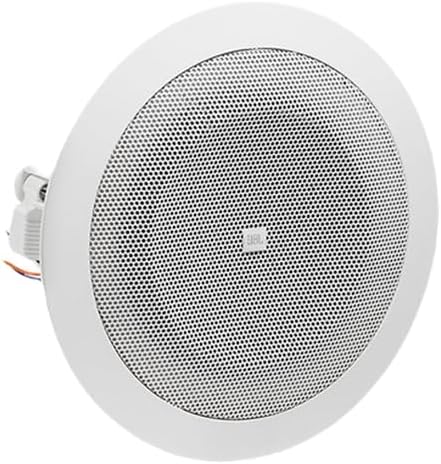
Image 4.1: Side view of the JBL Professional 8124 In-Ceiling Loudspeaker, showing the mounting tabs (dog-ears) and wiring connections.

Image 4.2: Example of JBL in-ceiling speakers installed in a commercial environment, demonstrating typical placement.
4.3 Wiring Connections (70V/100V Taps)
The 8124 loudspeakers are designed for 70V/100V constant voltage systems, featuring a 6W transformer with multiple taps. This allows for flexible power settings to match your amplifier and system requirements.
- Identify Amplifier Output: Ensure your amplifier is a 70V or 100V constant voltage type.
- Select Power Tap: The speaker has taps for different power levels (e.g., 6W, 3W, 1.5W). Select the appropriate tap based on your system design and desired volume levels. Connect the amplifier's positive (+) output to the selected tap terminal and the negative (-) output to the common terminal.
- Daisy-Chaining: Multiple 8124 speakers can be connected in parallel to a single 70V/100V amplifier output, provided the total wattage of all speakers does not exceed the amplifier's output capacity.
- Verify Connections: Double-check all wiring for correct polarity and secure connections before powering on the amplifier.
5. Operating Instructions
Once installed and wired correctly, operating the JBL 8124 loudspeakers is straightforward as they are passive devices.
- Power On Amplifier: Ensure your audio source is connected to your 70V/100V amplifier and the amplifier is powered on.
- Adjust Volume: Use the volume controls on your amplifier or audio mixer to set the desired sound level.
- Monitor Sound: Listen for clear, undistorted audio. If distortion occurs, reduce the volume or check your amplifier's output level.
6. Maintenance
The JBL 8124 loudspeakers require minimal maintenance to ensure long-term performance.
- Cleaning: Periodically wipe the speaker grille and baffle with a soft, dry cloth to remove dust. Do not use harsh chemicals or abrasive cleaners.
- Inspection: Occasionally inspect the speaker for any visible damage or loose connections.
- Environmental Conditions: Ensure the speakers are not exposed to extreme temperatures, high humidity, or direct water contact, as they are not waterproof.
7. Troubleshooting
If you encounter issues with your JBL 8124 loudspeakers, refer to the following common troubleshooting steps:
| Problem | Possible Cause | Solution |
|---|---|---|
| No sound from speaker(s) | Amplifier off or muted Loose or incorrect wiring Incorrect tap setting Faulty speaker | Ensure amplifier is on and not muted Check all wiring connections for security and correct polarity Verify the 70V/100V tap setting matches amplifier output Test with a known working speaker or amplifier |
| Distorted sound | Amplifier overdriven Incorrect tap setting Damaged speaker | Reduce amplifier volume or gain Ensure tap setting is appropriate for desired volume Inspect speaker for physical damage; if damaged, replace |
| Uneven sound distribution | Improper speaker placement Inconsistent tap settings across speakers | Review speaker placement for optimal coverage Ensure all speakers in a zone have consistent tap settings |
8. Specifications
| Feature | Detail |
|---|---|
| Model Number | 8124 |
| Speaker Type | Full-range In-Ceiling Loudspeaker |
| Speaker Size | 4 Inches |
| Woofer Diameter | 4 Inches |
| Frequency Range (-10 dB) | 60 Hz – 18 kHz |
| Coverage | 130° conical |
| Sensitivity (1W, 1m) | 93 dB |
| Input Voltage | 70V / 100V |
| Transformer Taps | 6W (70V/100V) and lower taps |
| Mounting Type | Ceiling Mount (Dog-ears for blind mount) |
| Material | Plastic Or Metal |
| Color | White |
| Product Dimensions (Diameter x Depth) | 206 mm (8.1 in) diameter x 89 mm (3.75 in) depth |
| Item Weight | 2.5 Pounds |
| Included Components | Pack of four JBL Professional 8124 speakers |
| UPC | 050036903974 |
8.1 Optional Accessories
- MTC-8124C C-ring
- MTC-RAIL tile rails
9. Warranty and Support
9.1 Limited Warranty
JBL Professional products are covered by a limited warranty. For specific warranty terms and conditions applicable to your region, please refer to the warranty card included with your product or visit the official JBL Professional website.
9.2 Customer Support
For technical assistance, service, or further information regarding your JBL Professional 8124 loudspeakers, please contact JBL Professional customer support or visit their official website. Contact details can typically be found on the product packaging or the JBL Professional website.


