
1. Introduction
The STEELMATE TP-90 is a Tire Pressure Monitoring System (TPMS) designed specifically for 12V motorcycles. This system continuously monitors the air pressure and temperature of your motorcycle tires, providing real-time data and alerts to enhance riding safety and tire longevity. Maintaining correct tire pressure is crucial for optimal fuel economy, handling, and preventing tire bursts.
This device is intended to notify you when tire pressure is reduced or abnormal conditions are detected; it is not designed to prevent or automatically adjust tire pressure.
2. Product Overview and Components
The STEELMATE TP-90 system includes a main monitor unit and two external tire pressure sensors. The monitor displays real-time tire pressure and temperature readings.

Image 2.1: STEELMATE TP-90 monitor display and two tire pressure sensors. The main monitor unit displays '2.20 Bar' and two external tire pressure sensors are labeled 'F' (Front) and 'R' (Rear). A hand is shown installing one of the sensors onto a tire valve stem.

Image 2.2: Contents of the STEELMATE TP-90 TPMS kit. The complete kit contents are displayed, including the main monitor unit, two tire pressure sensors, a wrench, mounting bracket, power cable, and various nuts and washers.
Key Features:
- Tire Pressure Monitoring: Continuously displays real-time tire pressure.
- Temperature Monitoring: Monitors tire temperature.
- Air Leakage Detection: Alerts you to slow or rapid air leaks.
- Automatic Measurement: Automatically measures air pressure and temperature.
- Digital Display: Clear LED display for accurate readings.
- Buzzer Alarm: Provides an audible alert for abnormal tire conditions.
- Wireless Communication: Sensors transmit data wirelessly to the monitor, requiring no wiring between sensors and monitor.
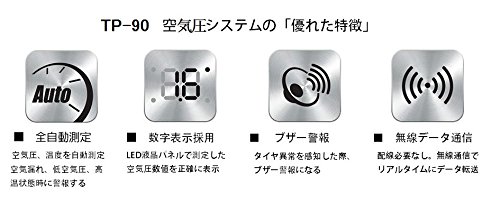
Image 2.3: Icons representing TP-90 features: automatic measurement, digital display, buzzer alarm, and wireless communication.
3. Installation Guide
The STEELMATE TP-90 is designed for easy installation. Follow these steps carefully:
3.1 Sensor Installation
- Remove Valve Cap: Unscrew and remove the existing valve cap from the tire valve stem.
- Attach Hexagonal Nut: Place the hexagonal anti-theft nut onto the valve stem.
- Insert Lock Washer: Slide the lock washer onto the valve stem, ensuring it sits correctly.
- Attach Sensor: Identify the correct sensor (F for front, R for rear) and screw it onto the valve stem. Ensure the sensor is securely seated.
- Tighten with Wrench: Use the provided wrench to tighten the hexagonal anti-theft nut against the sensor, securing it in place.
- Check for Air Leaks: Apply soapy water around the sensor and valve stem to check for any air leaks. If bubbles appear, re-tighten the sensor and nut.

Image 3.1: Six-step visual guide for installing the TP-90 tire pressure sensors.
3.2 Monitor Installation
Mount the monitor unit securely on your motorcycle's handlebar using the provided bracket. Connect the monitor to a 12V power source on your motorcycle. Once powered, the monitor will automatically begin receiving data from the sensors.

Image 3.2: STEELMATE TP-90 monitor mounted on a motorcycle handlebar, displaying tire pressure readings.
4. Operating Instructions
Once installed and powered on, the TP-90 monitor will automatically display the current tire pressure and temperature for both front and rear tires. The display will show readings in Bar for pressure and Celsius for temperature.
4.1 Interpreting Readings
- Pressure Display: Shows the current tire pressure in Bar.
- Temperature Display: Shows the current tire temperature in Celsius.
- Alerts: The system will provide a visual and audible alarm if tire pressure or temperature falls outside predefined safe ranges (e.g., low pressure, high pressure, high temperature, rapid air leak).
4.2 Setting Parameters (if applicable)
Refer to the detailed instruction manual provided with your product for specific steps on how to adjust alarm thresholds or switch display units, if these features are available on your model.
5. Maintenance
5.1 Sensor Battery Replacement
The tire pressure sensors use replaceable CR1632 batteries. The battery life is approximately 3 to 5 years (or around 50,000 kilometers), but this can vary depending on operating conditions. When a sensor battery is low, the monitor may display a low battery indicator for that specific sensor.
- Unscrew the sensor from the valve stem.
- Carefully open the sensor casing.
- Remove the old CR1632 battery.
- Insert a new CR1632 battery, ensuring correct polarity.
- Close the sensor casing securely and re-install the sensor on the tire valve stem following the installation steps in Section 3.1.
Note: As this product is a monitor battery, the service life may be shorter than the listed life. Battery life is not guaranteed and may vary depending on operating conditions.
5.2 Cleaning
Wipe the monitor and sensors with a soft, damp cloth. Do not use abrasive cleaners or solvents, as these can damage the device.
6. Troubleshooting
- No Display/Monitor Not Turning On: Ensure the monitor is correctly connected to a 12V power source and the motorcycle's ignition is on. Check power cable connections.
- No Sensor Readings:
- Ensure sensors are correctly installed and tightened.
- Check sensor battery levels. Replace batteries if necessary.
- Ensure the motorcycle is moving for a short period, as some systems activate sensors only when motion is detected.
- Inaccurate Readings:
- Verify tire pressure with a reliable manual gauge.
- Ensure sensors are correctly paired to their respective tire positions (Front/Rear).
- Frequent Alarms: Check actual tire pressure and temperature. If readings are consistently outside normal ranges, address the underlying tire issue. If readings are normal, refer to the full manual for alarm threshold adjustment.
7. Specifications
| Feature | Specification |
|---|---|
| Model Number | TP-90 |
| Compatibility | 12V Motorcycles |
| Sensor Operating Voltage | 2.0 V - 3.0 V |
| Monitor Operating Voltage | 9 V - 16 V |
| Sensor Operating Temperature Range | -20 °C to +60 °C |
| Monitor Operating Temperature Range | -40 °C to +85 °C |
| Operating Humidity | 0 - 100 % |
| Measurable Air Pressure Range | 0 - 3.5 Bar |
| Display Pressure Accuracy | ±0.1 Bar |
| Display Temperature Accuracy | ±1 °C |
| Frequency | 433.92 MHz |
| Sensor Battery Type | CR1632 (replaceable) |
| Estimated Sensor Battery Life | Approx. 3-5 years (50,000 km) |
| Product Dimensions (Packaging) | 15 x 12 x 6 cm |
| Product Weight (Packaging) | Approx. 295 g |
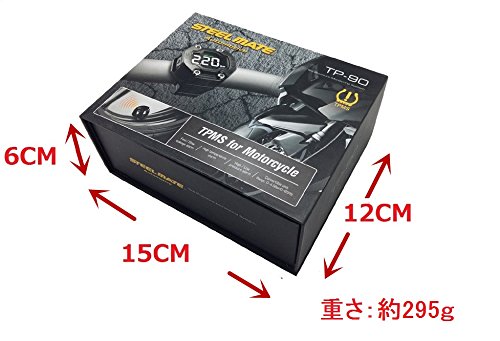
Image 7.1: Diagram showing the dimensions of the STEELMATE TP-90 product packaging.
8. Safety Information
- Always ensure sensors are securely tightened to prevent air leaks or detachment during riding.
- Do not attempt to disassemble the monitor unit.
- This device is an aid for monitoring; it does not replace regular manual tire pressure checks.
- Pay attention to alarms and address tire issues promptly.
- Keep batteries out of reach of children.
9. Warranty and Support
For warranty information and technical support, please refer to the documentation included with your product or contact your retailer. Specific warranty terms may vary by region and purchase location.