
1. Introduction
The TekPower TP1830SB is a professional DC regulated power supply designed for various applications requiring a stable and adjustable DC voltage and current. This unit features a linear output, ensuring high stability and low ripple voltage, making it suitable for sensitive electronic devices, Ham/CB radio equipment, and amplifiers. It provides continuously adjustable output from 1.5V to 15V DC and up to 30A maximum current. The integrated digital displays offer accurate real-time readouts of voltage and current. For convenience, it includes a cigarette lighter plug output and built-in fuse protection.
2. Safety Information
Please read and understand all safety instructions before operating the TekPower TP1830SB power supply. Failure to follow these instructions may result in electric shock, fire, or damage to the unit or connected devices.
- Indoor Use Only: This device is designed for indoor use in a dry environment. Do not expose it to rain or moisture.
- Proper Ventilation: Ensure adequate ventilation around the unit. Do not block ventilation openings. Maintain at least 10 cm (4 inches) of space around the unit for proper airflow.
- Power Source: Connect the power supply only to a grounded 110V AC, 60Hz power outlet.
- Avoid Overload: Do not exceed the maximum output current of 30A. Overloading can damage the power supply and connected equipment.
- Correct Polarity: Always observe correct polarity when connecting devices to the output terminals (+ to + and - to -). Incorrect polarity can damage the connected device.
- Fuse Protection: The unit is equipped with an 8A fuse. If the fuse blows, replace it only with a fuse of the same type and rating.
- No User Serviceable Parts: Do not attempt to open or repair the unit. Refer all servicing to qualified service personnel.
- Disconnect Power: Always disconnect the power supply from the AC outlet before making or changing connections to the output terminals.
3. Product Overview
3.1 Front Panel
The front panel of the TP1830SB features all controls, indicators, and output terminals for convenient operation.
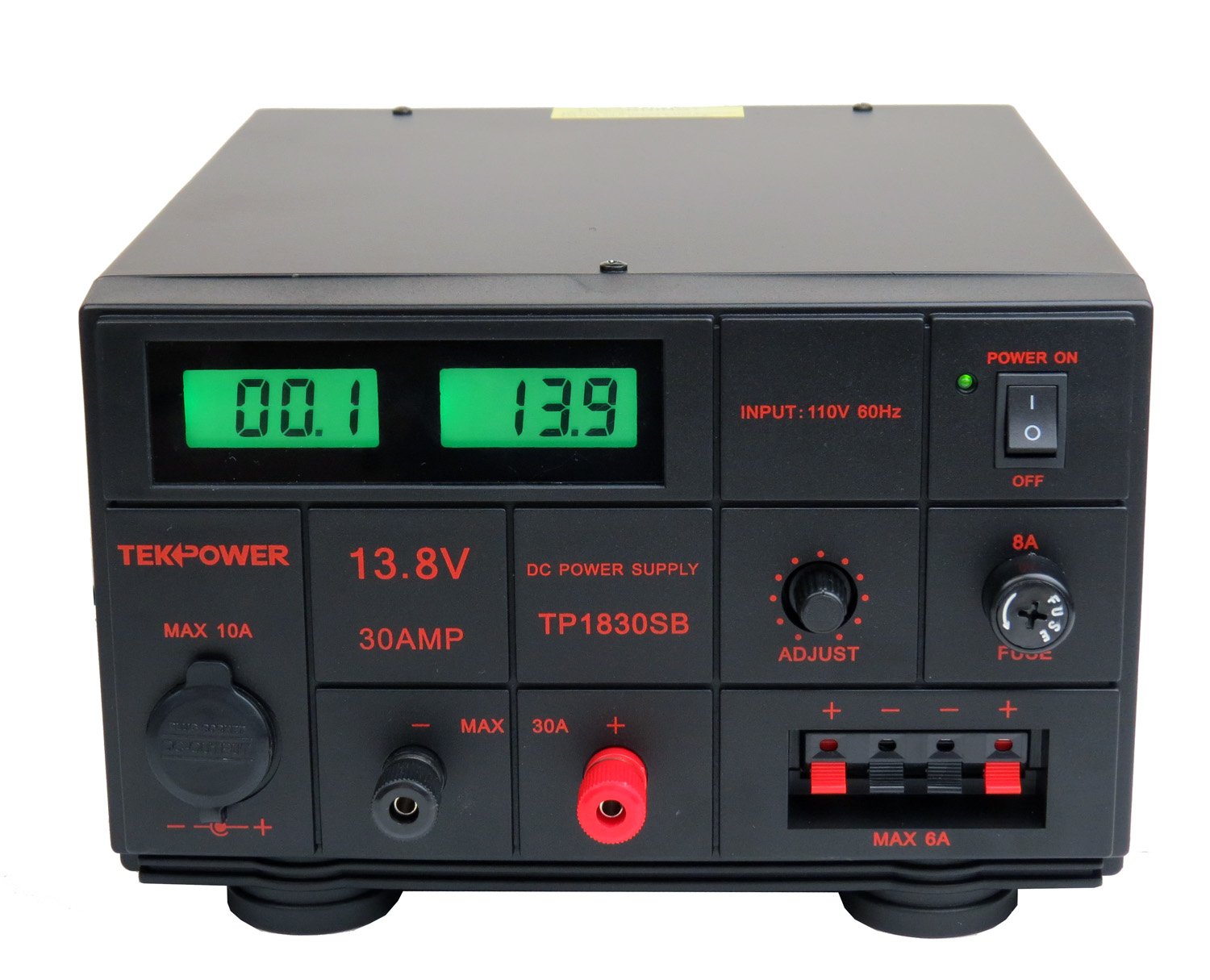
Figure 1: Front view of the TekPower TP1830SB DC Adjustable Power Supply. This image shows the digital voltage and current displays, the power switch, the adjustment knob, the main output terminals, the cigarette lighter socket, and the fuse holder.
- Digital Displays: Two LCD displays show the output voltage (V) and current (A).
- Power Switch: Toggles the unit on and off.
- Power On Indicator: Green LED illuminates when the unit is powered on.
- Adjust Knob: Used to precisely adjust the output voltage from 1.5V to 15V.
- Main Output Terminals (Red/Black): Heavy-duty binding posts for connecting high-current loads (up to 30A).
- Auxiliary Output Terminals (Red/Black): Spring-clip terminals for lower current applications (up to 6A).
- Cigarette Lighter Socket: Provides a 12V DC output for compatible devices (up to 10A).
- Fuse Holder: Contains the 8A fuse for circuit protection.
3.2 Rear Panel
The rear panel includes the AC power input and cooling fan.

Figure 2: Rear view of the TekPower TP1830SB DC Adjustable Power Supply. This image displays the AC power cord input and the cooling fan grille.
- AC Power Input: Connection point for the detachable AC power cord.
- Cooling Fan: Thermally controlled fan to dissipate heat and maintain optimal operating temperature.
4. Setup
Follow these steps to set up your TekPower TP1830SB power supply.
- Unpacking: Carefully remove the power supply from its packaging and inspect it for any signs of damage. Retain the packaging for future transport or storage.
- Placement: Place the unit on a stable, level surface in a well-ventilated area. Ensure that the front and rear ventilation openings are not obstructed. Avoid placing the unit near heat sources or in direct sunlight.
- AC Power Connection: Ensure the power switch on the front panel is in the OFF position. Connect the provided AC power cord to the AC power input on the rear panel of the power supply, then plug the other end into a grounded 110V AC, 60Hz wall outlet.
- Initial Check: Before connecting any load, turn the power supply ON. The digital displays should illuminate, showing default voltage and current readings. Turn the Adjust knob fully counter-clockwise to set the voltage to its minimum (approximately 1.5V).
5. Operating Instructions
5.1 Powering On/Off
- To turn the unit ON, press the power switch to the 'I' position. The green 'Power On' indicator will light up.
- To turn the unit OFF, press the power switch to the 'O' position. The displays and indicator will turn off.
5.2 Connecting a Load
Always ensure the power supply is OFF before connecting or disconnecting any load.
- Main Output Terminals (Max 30A): For high-current applications, use the large red (+) and black (-) binding posts. Loosen the terminal caps, insert the wire, and tighten the caps securely. Ensure good contact.
- Auxiliary Output Terminals (Max 6A): For lower-current applications, use the spring-clip terminals. Press the clip, insert the wire, and release.
- Cigarette Lighter Socket (Max 10A): Plug compatible 12V DC devices directly into this socket.
- Polarity: Always connect the positive (+) terminal of the load to the red (+) terminal of the power supply and the negative (-) terminal of the load to the black (-) terminal of the power supply.

Figure 3: Close-up view of the output terminals, including the main binding posts, auxiliary spring clips, and the cigarette lighter socket.
5.3 Adjusting Output Voltage
- With the power supply ON and no load connected (or a very light load), turn the ADJUST knob clockwise to increase the output voltage.
- Turn the ADJUST knob counter-clockwise to decrease the output voltage.
- Monitor the voltage display to set the desired output voltage.
- Once the desired voltage is set, you can connect your load. The current display will show the current drawn by the load.
5.4 Understanding the Digital Display
- The left display shows the output voltage in Volts (V).
- The right display shows the output current in Amperes (A).
- These displays provide real-time feedback on the power supply's output.
6. Maintenance
Proper maintenance ensures the longevity and reliable operation of your power supply.
- Cleaning: Disconnect the power supply from the AC outlet before cleaning. Use a soft, dry cloth to wipe the exterior. Do not use abrasive cleaners or solvents.
- Ventilation: Regularly check that the ventilation openings on the sides and rear of the unit are free from dust and obstructions. A blocked fan can lead to overheating.
- Fuse Replacement: If the power supply fails to turn on or provide output, check the 8A fuse located on the front panel. To replace, unscrew the fuse holder cap, remove the old fuse, and insert a new 8A fuse of the same type. Tighten the cap securely.
- Storage: When not in use for extended periods, store the power supply in a cool, dry place, away from direct sunlight and excessive dust.
7. Troubleshooting
If you encounter issues with your TekPower TP1830SB, refer to the table below for common problems and solutions.
| Problem | Possible Cause | Solution |
|---|---|---|
| Unit does not power on. | No AC power; Blown fuse; Faulty power cord. | Check AC outlet and power cord connection. Replace the 8A fuse if blown. |
| No output voltage/current. | Output terminals not connected; Voltage knob set to minimum; Internal fault. | Ensure load is properly connected. Adjust voltage knob clockwise. If problem persists, contact support. |
| Output voltage is unstable or incorrect. | Loose connections; Overload; Internal component issue. | Check all connections. Reduce load to within specifications. Contact support if issue continues. |
| Unit overheats or fan runs constantly/loudly. | Blocked ventilation; Excessive load; Fan malfunction. | Ensure clear airflow around the unit. Reduce load. If fan is excessively loud or not working, contact support. |
| Cigarette lighter socket not working. | Device incompatibility; Internal wiring issue. | Verify device compatibility with 12V DC. Test with another compatible device. |
8. Specifications
Technical specifications for the TekPower TP1830SB DC Adjustable Power Supply:
| Input Voltage | 110V AC, 60Hz |
| Output Voltage | Adjustable 1.5V - 15V DC |
| Output Current | 30A (Maximum) |
| Output Wattage | 120 Watts |
| Cigarette Lighter Plug Output | 12V DC, 10A (Maximum) |
| Fuse Protection | 8A |
| Cooling Method | Air (Thermally Controlled Fan) |
| Product Dimensions (L x W x H) | 9.5 x 6 x 12 inches |
| Item Weight | 20 Pounds |
9. Warranty Information
The TekPower TP1830SB DC Adjustable Power Supply comes with a 1-year USA warranty. This warranty covers defects in materials and workmanship under normal use. It does not cover damage resulting from misuse, abuse, unauthorized modification, or improper installation. Please retain your proof of purchase for warranty claims.
10. Customer Support
For technical assistance, warranty service, or general inquiries regarding your TekPower TP1830SB power supply, please contact TekPower customer support. Refer to the contact information provided with your purchase or visit the official TekPower website for the most up-to-date support details.
When contacting support, please have your model number (TP1830SB) and proof of purchase readily available.


