
Beurer 748.16
Beurer BF195 Body Analysis Bathroom Scale User Manual
Model: 748.16 | Brand: Beurer
1. Introduction and Overview
The Beurer BF195 Body Analysis Bathroom Scale is designed for comprehensive full-body monitoring, providing more than just weight measurement. It utilizes Bioelectric Impedance Analysis (BIA) to determine key body metrics, assisting users in managing their health and fitness goals.
This manual provides detailed instructions for the setup, operation, maintenance, and troubleshooting of your BF195 scale, ensuring accurate and consistent performance.

Image 1: Beurer BF195 Body Analysis Bathroom Scale - Top View
2. Package Contents
Please check the package contents upon unboxing to ensure all components are present:
- 1x Beurer BF195 Body Analysis Bathroom Scale
- 2x 3V CR2032 batteries
- 1x Instructions for use (this manual)

Image 2: Beurer BF195 Scale - Angled View
3. Key Features
The Beurer BF195 scale offers a range of features for comprehensive body analysis:
- Full Body Analysis: Measures body weight, body fat, body water, muscle mass, bone mass, calorie requirement (AMR/BMR), and Body Mass Index (BMI).
- Illuminated Digital Display: Features a unique circular digital display with blue illumination and easy-to-read 28mm digits.
- Touch-Key Operation: Modern and intuitive touch-key controls for ease of use.
- Multiple User Memories: Stores data for up to 10 different users, making it suitable for the whole family.
- High Accuracy: 180kg weight capacity with a 100g graduation and overload indicator.
- Quick-Start Technology: Activates automatically when you step on the scale.
- Automatic Switch-Off: Conserves battery life by turning off when not in use.
- Activity Levels: Supports 5 activity levels for more accurate calorie requirement calculation.
- Unit Conversion: Easily switch between kilograms (kg), pounds (lb), and stones (st).
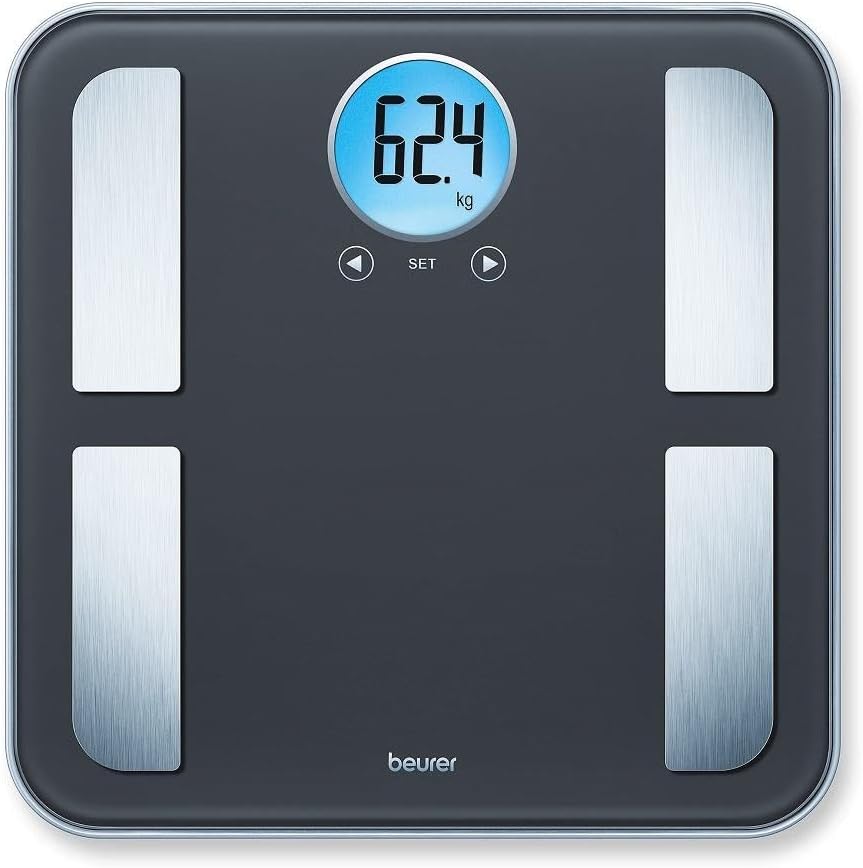
Image 3: Illuminated Digital Display
4. Setup
4.1 Battery Installation
- Locate the battery compartment on the underside of the scale.
- Open the battery compartment cover.
- Insert the two 3V CR2032 batteries, ensuring correct polarity (+/-).
- Close the battery compartment cover securely.
4.2 Initial Placement
For accurate measurements, place the scale on a firm, flat, and level surface. Avoid carpets or uneven flooring, as this can affect readings.
4.3 User Profile Setup (First Use)
To utilize the body analysis functions, you will need to set up a user profile. The scale can store up to 10 user profiles.
- Step onto the scale briefly to turn it on.
- Press the "SET" button.
- Use the arrow buttons (◀ / ▶) to select a user memory slot (P1-P10). Press "SET" to confirm.
- Enter your personal data: height, age, gender, and activity level (1-5) using the arrow buttons and confirming each with "SET".
- Once all data is entered, the scale will save your profile.
5. Operating Instructions
5.1 Taking a Measurement
- Ensure the scale is on a flat, stable surface.
- Step onto the scale barefoot, placing your feet on the stainless steel electrodes. Stand still.
- The scale will automatically turn on and display your weight.
- If a user profile is selected, the scale will then proceed to measure and display your body fat, body water, muscle percentage, bone mass, AMR/BMR, and BMI in sequence.
- Step off the scale once all measurements are displayed. The scale will automatically switch off after a few seconds.
Note: For accurate body analysis readings, ensure your feet are clean and dry. Slightly moistening your feet can improve contact with the electrodes if you experience inconsistent readings.
5.2 Selecting User Profile
Before stepping on the scale, briefly tap the scale to turn it on. Use the arrow buttons (◀ / ▶) to cycle through the user profiles (P1-P10). Once your profile number is displayed, step onto the scale to begin measurement.
5.3 Changing Measurement Units
The scale can display weight in kilograms (kg), pounds (lb), or stones (st). To change the unit, locate the unit switch on the underside of the scale (usually near the battery compartment) and slide it to your desired unit.
6. Maintenance and Care
6.1 Cleaning the Scale
- Wipe the scale surface with a slightly damp cloth.
- Do not use abrasive cleaning agents or harsh chemicals.
- Ensure no water enters the interior of the scale.
- Dry the scale thoroughly after cleaning.
6.2 Battery Replacement
When the display shows a low battery indicator, replace both 3V CR2032 batteries as described in Section 4.1. Always replace both batteries at the same time with new ones of the same type.
6.3 Storage
Store the scale in a dry place, away from extreme temperatures and direct sunlight. Do not place heavy objects on the scale when not in use.
7. Troubleshooting
| Problem | Possible Cause | Solution |
|---|---|---|
| Inconsistent weight readings | Scale not on a firm, flat surface; movement during measurement. | Place scale on a hard, level floor. Stand still during measurement. |
| Body analysis readings not appearing or inconsistent | Feet not making good contact with electrodes; incorrect user profile data. | Ensure bare feet are clean and slightly moist. Re-check user profile settings. |
| Display shows "Err" or "OL" (Overload) | Weight exceeds maximum capacity (180kg). | Do not exceed the maximum weight capacity. |
| Scale does not turn on | Batteries are dead or incorrectly installed. | Replace batteries (2x 3V CR2032) or re-install them correctly. |
| Difficulty setting up user profiles | Incorrect button sequence or timing. | Refer to Section 4.3 and follow steps carefully. Try removing and re-inserting batteries to reset. |
8. Specifications
| Specification | Detail |
|---|---|
| Model Number | 748.16 |
| Functions | Body weight, body fat, body water, muscle mass, bone mass, AMR/BMR, BMI |
| Weight Capacity | 180 kg (396 lb / 28 st) |
| Graduation | 100 g for body weight and bone mass; 0.1% for body fat, body water, muscle percentage |
| Display | Illuminated LCD, 28 mm digit height |
| Weighing Surface | Safety glass with brushed stainless steel electrodes |
| Product Dimensions | 31 x 31 x 2.3 cm |
| Product Weight | Approx. 1.68 kg (1670 g) |
| Batteries | 2 x 3V CR2032 (included) |
| User Memories | 10 |
| Activity Levels | 5 |
| Automatic Features | Quick-Start, Automatic Switch-Off |

Image 4: Beurer BF195 Scale - Full View
9. Warranty and Support
The Beurer BF195 Body Analysis Bathroom Scale comes with a 5-year guarantee, ensuring quality and reliability.
For any issues not covered in the troubleshooting section or for warranty claims, please contact Beurer customer support. Refer to the contact information provided in the original packaging or visit the official Beurer website for assistance.
Always retain your proof of purchase for warranty purposes.