
1. Overview
The DJI Osmo+ is a handheld gimbal with an integrated zoom camera, designed for stable and high-quality video and photo capture. It features a 7x zoom (3.5x optical and 2x digital lossless zoom at 1080p) with a focal length of 22mm to 77mm, offering enhanced control over composition. This device is engineered for smooth, professional-grade footage and sharp still images.
Key Features:
- 22-77mm zoom lens, featuring 3.5x optical and 2x digital lossless zoom (digital lossless zoom is available only when shooting at 1080p).
- Capable of recording 4K video and capturing 12-megapixel photos with silent operation.
- Professional 3-axis stabilization ensures smooth and steady footage.
- Achieve sharper selfies with a minimum focus distance of 50cm.
- Supports advanced shooting modes including motion timelapse, panorama, and long exposure.
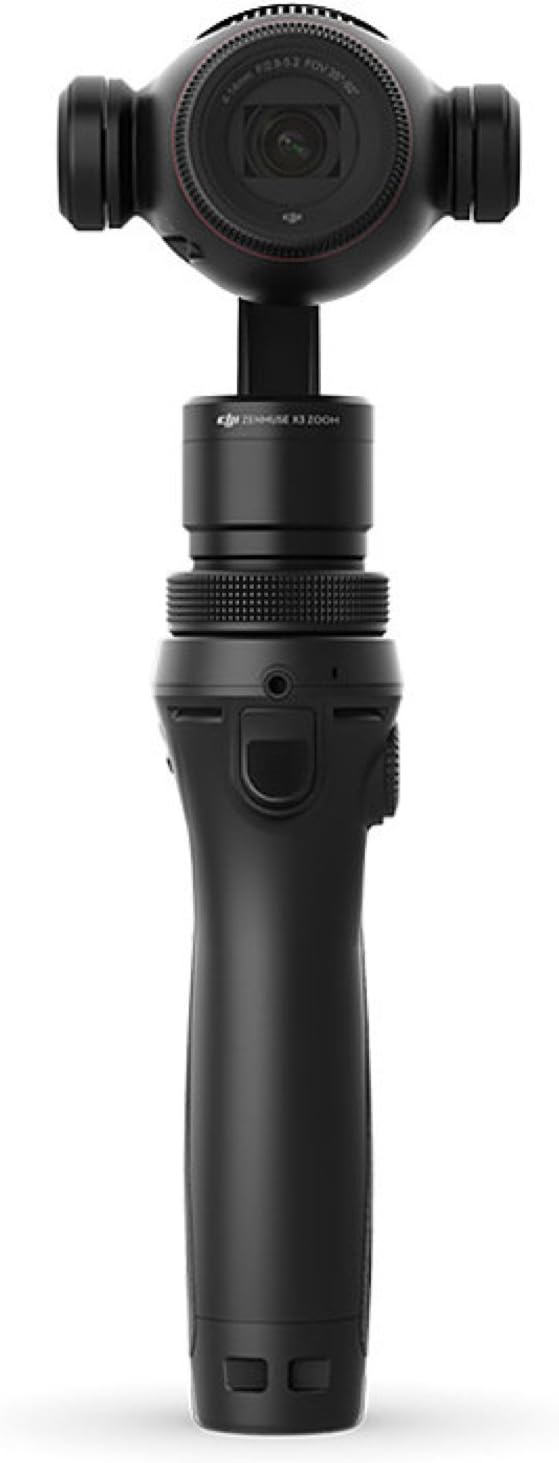
Figure 1: Front view of the DJI Osmo+ Handheld 4K Camera.
2. What's in the Box
Upon unboxing your DJI Osmo+, verify that all the following components are included:
- Handheld Gimbal and Camera
- Mobile Device Holder
- Wrist Strap
- Shoulder Strap
- High Capacity Intelligent Battery
- Battery Charger
- 16GB Micro SD Card
- Charger Power Cable
- Flexi Microphone
- Storage Case
- Rosette Protection Cap
- Manuals

Figure 2: DJI Osmo+ and its accessories neatly arranged in the storage case.
3. Setup
3.1. Battery Installation
- Locate the battery compartment at the bottom of the Osmo+ handle.
- Slide the latch to open the battery compartment cover.
- Insert the High Capacity Intelligent Battery, ensuring the contacts align correctly.
- Close the compartment cover and slide the latch to secure it.
3.2. Mobile Device Holder Attachment
- Attach the mobile device holder to the side of the Osmo+ handle.
- Adjust the holder to securely grip your smartphone, which will serve as your monitor and control interface.

Figure 3: DJI Osmo+ with a mobile device attached, ready for operation.
3.3. Micro SD Card Insertion
- Locate the Micro SD card slot on the camera unit.
- Insert the provided 16GB Micro SD card until it clicks into place.
3.4. Powering On and App Connection
- Press and hold the power button on the handle to turn on the Osmo+.
- Download and install the DJI Go app on your mobile device.
- Connect your mobile device to the Osmo+ via Wi-Fi as prompted by the app. The app is essential for controlling camera settings, viewing live feed, and accessing advanced features.
4. Operating the DJI Osmo+
4.1. Basic Controls
- Joystick: Use the joystick on the handle to control the camera's pan and tilt movements.
- Record Button: Press the red button to start/stop video recording.
- Still Shutter Button: Press the black button to capture a still photograph.
- Gimbal Lock: Unlock the gimbal collar to allow for free range of motion.
4.2. Zoom Functionality
The Osmo+ features a 3.5x optical zoom and an additional 2x digital lossless zoom when recording in 1080p. Use the zoom controls within the DJI Go app to adjust your focal length from 22mm to 77mm.
4.3. Shooting Modes
Explore various shooting modes available through the DJI Go app:
- Motion Timelapse: Capture dynamic timelapse videos with camera movement.
- Panorama: Create stunning panoramic photos.
- Long Exposure: Ideal for low-light photography and capturing light trails.
4.4. Audio Considerations
The Osmo+ includes a Flexi Microphone. For enhanced audio quality, an external microphone can be connected via the 3.5mm headphone jack located on the handle. Be aware that the internal cooling fan may produce some noise during operation, which can be picked up by the microphone.
5. Maintenance
5.1. Battery Care
- Charge the Intelligent Battery using the provided charger and power cable.
- Always ensure the battery is fully charged before extended use.
- Store batteries in a cool, dry place when not in use.
5.2. Cleaning
- Use a soft, lint-free cloth to clean the camera lens and body.
- Avoid using harsh chemicals or abrasive materials.
- Ensure the device is powered off before cleaning.
5.3. Firmware Updates
Regularly check for and install firmware updates via the DJI Go app to ensure optimal performance, access new features, and resolve potential issues. Always ensure a stable internet connection and sufficient battery life during updates.
6. Troubleshooting
If you encounter issues with your DJI Osmo+, refer to the following common problems and solutions:
| Problem | Possible Cause | Solution |
|---|---|---|
| Blurry Photos/Videos | Incorrect focus, low light conditions, camera shake. | Ensure proper focus using the app. Use adequate lighting or adjust ISO/shutter speed. Utilize the 3-axis stabilization effectively. |
| Wi-Fi Connection Issues | Interference, incorrect password, app glitch. | Restart both the Osmo+ and your mobile device. Ensure you are connecting to the correct Osmo+ Wi-Fi network. Reinstall the DJI Go app if necessary. |
| App Functionality Problems | Outdated app, mobile device compatibility, software bug. | Update the DJI Go app to the latest version. Check if your mobile device meets the app's system requirements. Restart the app and device. |
| Poor Audio Quality | Internal fan noise, inadequate microphone. | Consider using an external microphone connected via the 3.5mm jack for clearer audio. Position the microphone away from the device's fan. |
| Short Battery Life | Heavy usage, old battery, cold environment. | Carry spare batteries. Avoid extreme temperatures. Reduce continuous recording time. |
For more complex issues, refer to the official DJI support resources or contact customer service.
7. Specifications
| Feature | Detail |
|---|---|
| Product Dimensions | 4.13 x 4.53 x 9.7 inches |
| Item Weight | 1 pounds |
| Item Model Number | CP.ZM.000425 |
| Batteries | 1 Lithium Polymer battery required (included) |
| Date First Available | August 25, 2016 |
| Manufacturer | DJI Europe B.V. |
| Photo Sensor Technology | CMOS |
| Video Capture Resolution | 4K |
| Maximum Focal Length | 77 Millimeters |
| Maximum Aperture | 3.5 f |
| Video Capture Format | 4K, UHD |
| Supported Audio Format | AAC, MP3, or PCM |
| Screen Size | 3 inches (via connected mobile device) |
| Color | Black |
8. Warranty & Support
The DJI Osmo+ is covered by a manufacturer's warranty. For detailed warranty information, including terms, conditions, and duration, please refer to the warranty card included in your product packaging or visit the official DJI website.
For technical support, service, or further inquiries, please contact DJI Customer Support through their official website or the contact information provided in your product documentation. Ensure you have your product model number (CP.ZM.000425) and proof of purchase available when seeking support.


