
1. Important Safety Information
Please read this entire instruction manual before installation. If you have any questions regarding these instructions, please contact your retailer or a qualified installer. The manufacturer is not responsible for damage or injury caused by incorrect mounting or use.
- Weight Capacity: This TV wall mount is designed for televisions weighing up to 30 kg (66 lbs). Do not exceed this weight limit.
- Screen Size: Compatible with TV screens from 26 to 55 inches.
- VESA Compatibility: Supports VESA mounting patterns including 200x200, 300x200, 400x200, 300x300, and 400x400 mm.
- Wall Type: Ensure the mounting surface (wall) can safely support the combined weight of the mount and the television. This mount is suitable for solid concrete walls, brick walls, and solid wood stud walls. Do not install on drywall alone.
- Professional Installation: If you are unsure about the installation process or the suitability of your wall, seek assistance from a professional installer.
- Children: Keep children away during installation. Small parts may be a choking hazard.
- Damage: Do not use the product if any parts are missing or damaged.
2. Package Contents
Verify that all components are present and undamaged before beginning installation. Refer to the image below for a visual representation of the included parts.

Figure 2.1: All components included with the Maclean MC-711N TV wall mount. This includes the main articulating arm, two vertical TV mounting rails, a variety of screws (M4, M5, M6, M8) in different lengths, plastic spacers, metal washers, concrete anchors, and an Allen key for assembly.
Tools Required (Not Included):
- Pencil
- Phillips Head Screwdriver
- Drill
- Drill Bit (appropriate for wall anchors)
- Stud Finder (for wood stud installation)
- Level
- Hammer (for concrete anchors)
- Socket Wrench or Adjustable Wrench
3. Setup and Installation
Follow these steps carefully to ensure a secure and stable installation of your TV wall mount.
Step 3.1: Attach TV Brackets to TV
- Carefully place your TV face-down on a soft, clean surface to prevent screen damage.
- Identify the VESA mounting holes on the back of your TV.
- Select the appropriate screws (M4, M5, M6, or M8) and spacers that fit your TV's mounting holes. Ensure the screws are long enough to securely fasten the brackets without damaging internal components.
- Attach the two vertical TV brackets to the back of your TV using the selected screws and washers. Ensure the brackets are centered and level. The hooks on the brackets should face downwards.

Figure 3.1: Front view of the assembled TV wall mount, showing how the TV brackets attach to the main mounting plate.
Step 3.2: Mount Wall Plate to Wall
- Determine the desired height for your TV. Mark the position of the top mounting hole on the wall.
- Hold the wall plate against the wall, ensuring it is level, and mark the positions for all mounting holes.
- For Wood Studs: Use a stud finder to locate the center of the wood studs. Drill pilot holes (recommended size: 5.5mm) into the studs at the marked locations. Secure the wall plate using the provided lag bolts and washers.
- For Concrete/Brick Walls: Drill holes (recommended size: 10mm) at the marked locations. Insert the concrete anchors flush with the wall surface. Secure the wall plate using the provided lag bolts and washers.
- Ensure the wall plate is securely fastened and level before proceeding.

Figure 3.2: Side view of the wall mount fully extended, illustrating the articulating arm mechanism and the wall plate attachment.

Figure 3.3: Detailed dimensions of the wall mount, including wall plate size, arm extension, and VESA mounting points. Note the wall plate dimensions are approximately 248mm high and 66mm wide, with an arm extension from 63mm to 610mm.
Step 3.3: Hang TV on Wall Mount
- With assistance, carefully lift the TV with the attached brackets and hook them onto the wall plate.
- Ensure the TV is securely seated on the wall plate.
- Tighten the security screws located on the bottom of the TV brackets to prevent accidental dislodgement.
4. Operating and Adjustments
The Maclean MC-711N mount offers various adjustments for optimal viewing angles.
- Tilt Adjustment: The TV can be tilted from +10° (upwards) to -15° (downwards). Loosen the tilt adjustment knobs on the TV brackets, adjust to the desired angle, and then re-tighten securely.
- Swivel Adjustment: The articulating arm allows for a 180° swivel range (+90° to -90°). Gently push or pull the TV to the desired left or right angle.
- Horizontal Adjustment: Fine-tune the horizontal level by +3° to -3°. This adjustment is typically found on the TV mounting plate where it connects to the arm.
- Distance from Wall: The mount allows the TV to extend from 63mm (2.5 inches) to 610mm (24 inches) from the wall. Extend or retract the arm as needed.
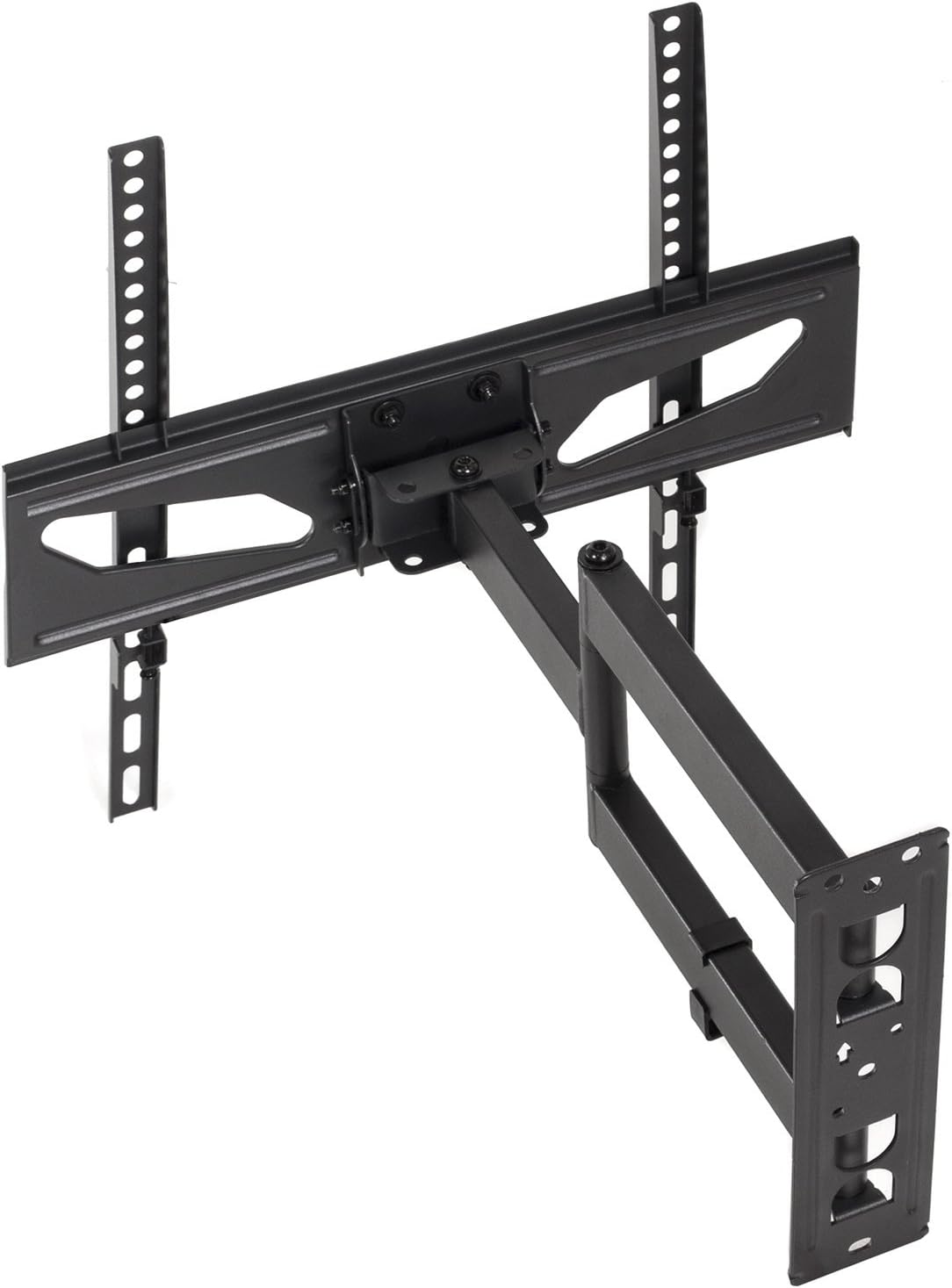
Figure 4.1: The wall mount extended and angled, demonstrating its full range of motion for optimal viewing.
5. Maintenance
Regular maintenance ensures the longevity and safety of your TV wall mount.
- Periodic Checks: Periodically check all screws and connections to ensure they remain tight and secure. Re-tighten if necessary.
- Cleaning: Clean the mount with a soft, dry cloth. Avoid using abrasive cleaners or solvents that could damage the finish.
- Moving Parts: The articulating joints are designed for smooth movement. No lubrication is typically required. If movement becomes stiff, check for debris or loose components.
6. Troubleshooting
If you encounter issues during or after installation, refer to the following common problems and solutions.
| Problem | Possible Cause | Solution |
|---|---|---|
| TV is not level. | Wall plate not level during installation, or horizontal adjustment needed. | Use the horizontal adjustment feature (+3° to -3°) on the mount. If this is insufficient, re-check the wall plate's level and re-install if necessary. |
| Mount feels unstable. | Loose screws, incorrect wall anchors, or unsuitable wall type. | Ensure all wall mounting screws are fully tightened. Verify that the correct anchors were used for your wall type. If the wall is not strong enough, consult a professional. |
| TV does not fit the mount. | Incorrect VESA pattern or TV size/weight. | Check your TV's VESA pattern against the mount's specifications. Ensure your TV's weight and size are within the mount's limits. |
7. Specifications
| Feature | Specification |
|---|---|
| Model Number | MC-711N |
| Brand | Maclean |
| Screen Size Compatibility | 26" - 55" |
| Maximum Load Capacity | 30 kg (66 lbs) |
| VESA Compatibility | 200x200, 300x200, 400x200, 300x300, 400x400 mm |
| Tilt Angle | +10° to -15° |
| Swivel Angle | 180° (+90° to -90°) |
| Horizontal Adjustment | +3° to -3° |
| Distance from Wall | 63mm - 610mm (2.5" - 24") |
| Color | Black |
| Material | Metal |
8. Warranty and Support
The Maclean MC-711N TV Wall Mount comes with a Lifetime Guarantee, ensuring peace of mind regarding its quality and durability.

Figure 8.1: Product packaging highlighting key features such as certified quality, lifetime guarantee, and inclusion of all necessary mounting materials.
For technical support, warranty claims, or any questions not covered in this manual, please contact your point of purchase or visit the official Maclean website for customer service information.
Manufacturer: Maclean Energy