1. Introduction
This manual provides detailed instructions for the installation, operation, and maintenance of your Alcatel T56 corded phone. Please read this manual thoroughly before using the device to ensure proper functionality and to prevent damage.
2. Safety Information
- Do not expose the phone to water or moisture.
- Avoid placing the phone near heat sources or direct sunlight.
- Use only the provided cables and accessories.
- Do not attempt to open or repair the phone yourself. Refer to qualified service personnel.
- Keep the phone away from strong electromagnetic fields.
3. Package Contents
Verify that your package contains the following items:
- Alcatel T56 Corded Phone Base Unit
- Handset
- Coiled Handset Cord
- Telephone Line Cord
- User Manual
4. Setup and Installation
4.1 Connecting the Handset
Connect one end of the coiled handset cord to the handset and the other end to the handset jack on the left side of the phone base unit.
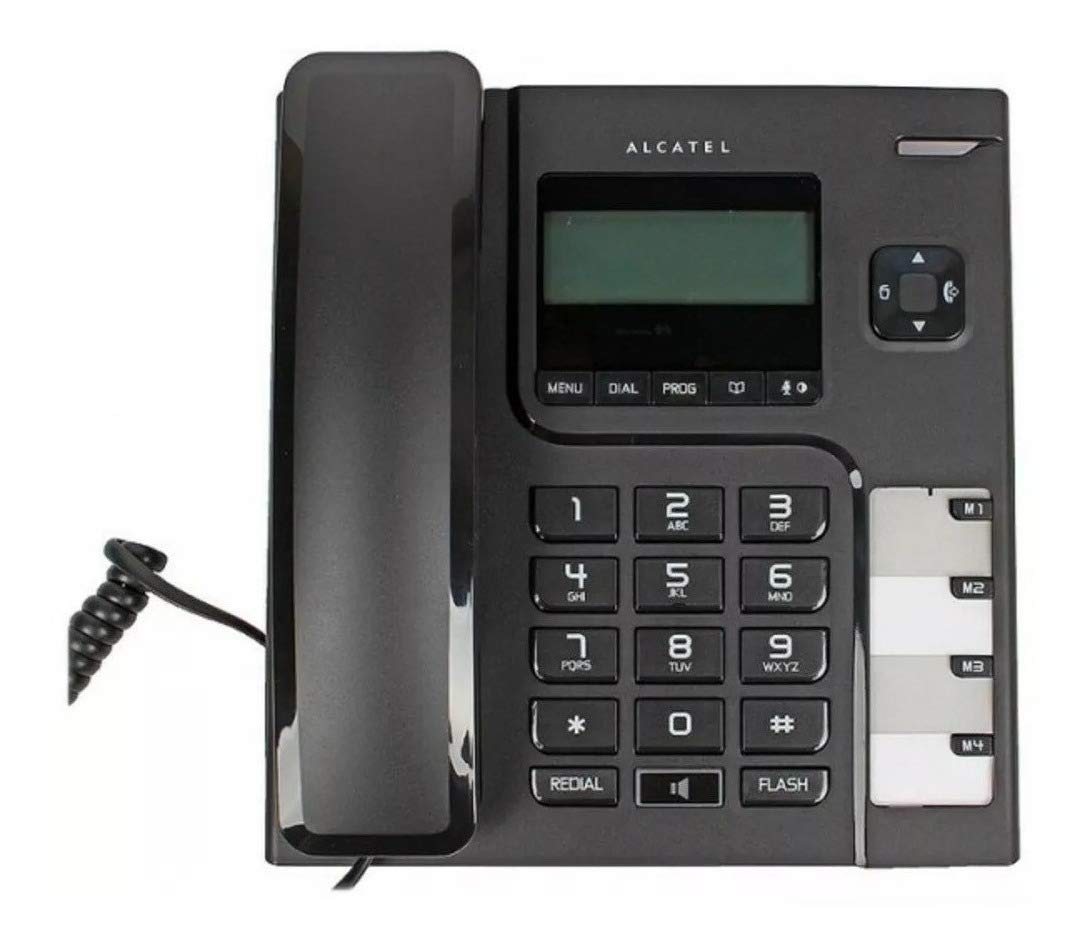
Image: Alcatel T56 corded phone with the handset connected to the base unit. This shows the overall appearance of the phone ready for use.
4.2 Connecting the Telephone Line
Connect one end of the telephone line cord to the LINE jack on the back of the phone base unit and the other end to your wall telephone jack.

Image: Side view of the Alcatel T56 phone, illustrating the connection point for the coiled handset cord and the telephone line cord.
4.3 Wall Mounting (Optional)
The Alcatel T56 can be wall-mounted. Use the provided wall mount bracket (if included) and follow the instructions to secure it to a wall. Ensure the handset cradle is reversed to hold the handset securely when wall-mounted.
5. Operating Instructions
5.1 Making a Call
- Lift the handset.
- Dial the desired telephone number using the keypad.
- Wait for the call to connect.
- To end the call, replace the handset on the base unit.
5.2 Answering a Call
When the phone rings, simply lift the handset to answer the call.
5.3 Redial Function
To redial the last number called, lift the handset and press the REDIAL button.
5.4 Flash Function
The FLASH button is used for network services such as call waiting or transferring calls. Consult your telephone service provider for specific instructions on using this feature.
5.5 Mute Function
During a call, press the MUTE button to temporarily disable your microphone. The other party will not hear you. Press it again to resume the conversation.
5.6 Hands-free Speakerphone
To use the speakerphone function, press the SPEAKER button during a call or before dialing. Adjust the volume using the volume control buttons.
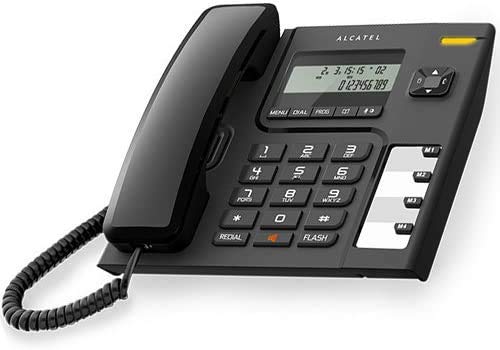
Image: Alcatel T56 corded phone displaying time and a dialed number on its LCD screen, highlighting the user interface.
5.7 Caller ID Function
If you subscribe to Caller ID service, the phone's display will show the incoming caller's number and name (if available) before you answer. You can scroll through the call log using the navigation buttons.
5.8 Phonebook / Memory Dialing
The Alcatel T56 features memory buttons (M1, M2, M3, M4) for one-touch dialing and a phonebook for storing frequently used numbers. Refer to the programming section for instructions on storing numbers.
6. Programming Features
6.1 Storing Numbers in One-Touch Memory (M1-M4)
- Lift the handset.
- Press the PROG button.
- Dial the telephone number you wish to store.
- Press the PROG button again.
- Press the desired memory button (M1, M2, M3, or M4).
- Replace the handset. The number is now stored.
6.2 Using One-Touch Memory
Lift the handset and press the desired memory button (M1-M4) to automatically dial the stored number.
6.3 Setting Date and Time
To set the date and time, press the MENU button, navigate to the 'Set Date/Time' option using the navigation keys, and follow the on-screen prompts to enter the correct information. Press MENU to confirm and exit.
7. Maintenance and Care
- Clean the phone with a soft, damp cloth. Do not use abrasive cleaners or solvents.
- Keep the phone free from dust and debris.
- Ensure all cords are securely connected and not tangled.
8. Troubleshooting
| Problem | Possible Cause | Solution |
|---|---|---|
| No dial tone | Telephone line cord is disconnected or faulty. | Check the telephone line cord connections. Try a different line cord if available. Contact your service provider. |
| Cannot make or receive calls | Line cord issue, service outage, or phone malfunction. | Verify line cord connection. Check with your service provider for outages. Test with another phone if possible. |
| Caller ID not displayed | Caller ID service not subscribed or not active. | Contact your telephone service provider to ensure Caller ID service is active on your line. |
| Display is blank or dim | No power (if applicable) or display settings. | The Alcatel T56 is line-powered. Ensure the telephone line is connected. Check display contrast settings if available in the menu. |
9. Specifications
- Model: Alcatel T56
- Type: Corded Landline Phone
- Display: LCD (Numerical Display)
- Caller ID: Yes (requires subscription)
- Hands-free Speakerphone: Yes
- Redial: Last number redial
- Memory: One-touch memory buttons (M1-M4), Phonebook
- Mounting: Desk or Wall Mountable
- Power Source: Line Powered (No batteries required for basic operation)
- Dimensions: Approximately 23.7 x 20.2 x 5.4 cm
- Weight: Approximately 376 g
- Country of Origin: China
10. Warranty and Support
For warranty information and technical support, please refer to the warranty card included with your product or visit the official Alcatel website. Keep your purchase receipt as proof of purchase for warranty claims.
Please note: The product information provided in the source data indicates a "no return policy" as a legal disclaimer. This manual focuses on product usage and does not override specific retailer return policies.


