
Introduction
The ADJ FC-DOTZ is a dedicated foot controller designed for seamless integration with the ADJ DOTZ TPAR SYS lighting system. This device provides hands-free control over essential lighting functions, allowing performers and operators to manage their light show efficiently without interrupting their performance.
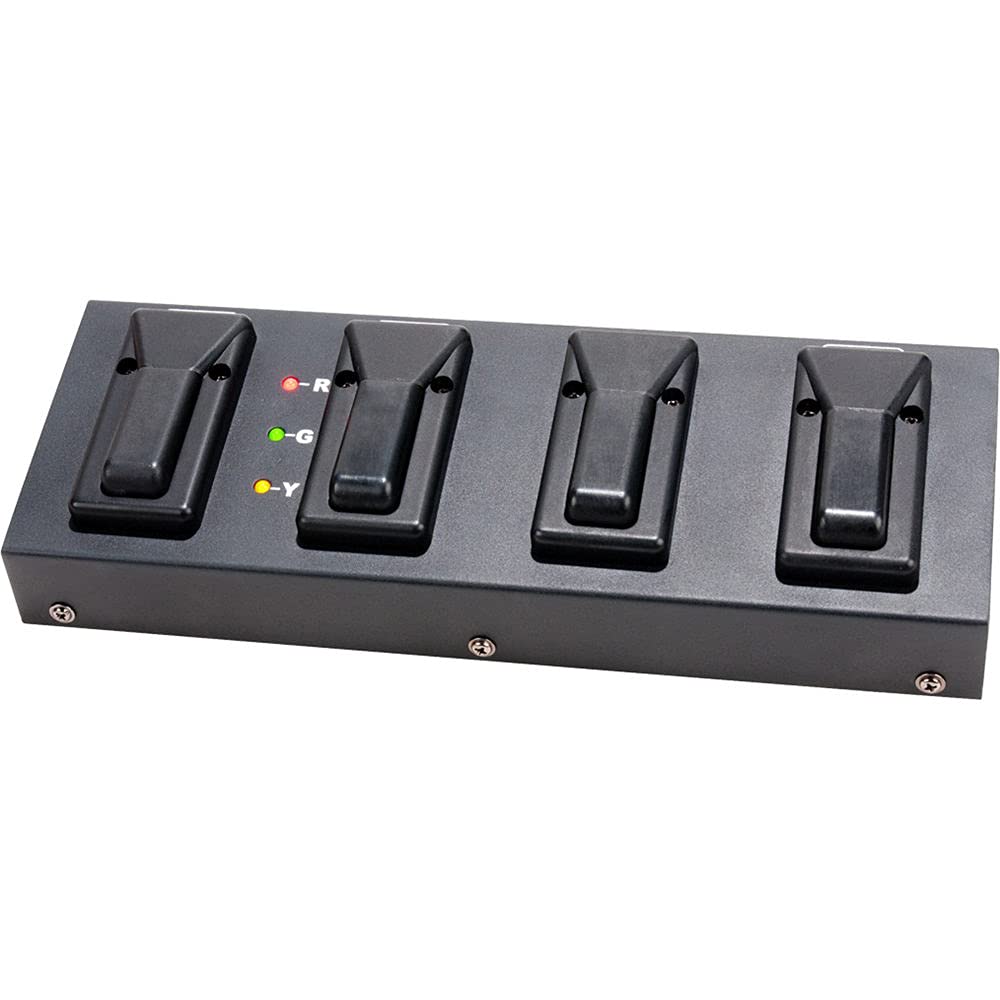
Image of the ADJ FC-DOTZ Foot Controller, showing its compact design and foot pedals for operation.
Safety Information
- Always connect the unit to a grounded power source.
- Do not expose the unit to rain or moisture.
- Ensure proper ventilation around the unit.
- Do not attempt to service the unit yourself. Refer all servicing to qualified personnel.
- Avoid placing heavy objects on the controller.
- Use only in dry locations.
Setup
- Unpack: Carefully remove the FC-DOTZ Foot Controller from its packaging.
- Placement: Position the foot controller on a stable, flat surface where it can be easily accessed during operation.
- Connection: Connect the FC-DOTZ foot controller to your ADJ DOTZ TPAR SYS using the appropriate control cable (cable not included). Refer to your DOTZ TPAR SYS manual for the correct connection port and cable type.
- Power On: Ensure the DOTZ TPAR SYS is powered on and properly configured to receive commands from the foot controller.
Operating Instructions
The FC-DOTZ Foot Controller provides four distinct functions to control your DOTZ TPAR SYS:
- Mode Button: This button allows you to cycle through three different operational modes available on the DOTZ TPAR SYS. Pressing this button will switch between these modes, which may include sound-active, auto-program, or static color modes, depending on the TPAR SYS configuration.
- Black Out Button: Pressing this button will instantly activate or deactivate the black out function. When activated, all lights connected to the DOTZ TPAR SYS will turn off. Pressing it again will restore the previous lighting state.
- Program Change (Up) Button: Use this button to scroll forward through the available static colors and built-in programs on your DOTZ TPAR SYS. Each press will advance to the next color or program in the sequence.
- Program Change (Down) Button: This button allows you to scroll backward through the available static colors and built-in programs. Each press will move to the previous color or program in the sequence.
Familiarize yourself with the DOTZ TPAR SYS manual for specific details on the programs and modes controlled by the FC-DOTZ.
Maintenance
- Cleaning: Clean the exterior of the unit with a soft, dry cloth. Do not use abrasive cleaners, solvents, or harsh chemicals, as these can damage the finish.
- Storage: When not in use, store the FC-DOTZ Foot Controller in a cool, dry place, away from direct sunlight and extreme temperatures.
- Inspection: Periodically inspect the control cable for any signs of wear or damage. Replace damaged cables immediately.
Troubleshooting
- Unit Not Responding:
- Ensure the control cable is securely connected between the FC-DOTZ and the DOTZ TPAR SYS.
- Verify that the DOTZ TPAR SYS is powered on and functioning correctly.
- Check the settings on your DOTZ TPAR SYS to ensure it is configured to accept external foot controller input.
- Incorrect Functionality:
- Refer to the DOTZ TPAR SYS manual to confirm the expected behavior of each foot controller function.
- Ensure no other control devices are interfering with the TPAR SYS.
If problems persist, contact ADJ Products customer support for assistance.
Specifications
| Feature | Detail |
|---|---|
| Model Number | FC-DOTZ |
| Item Weight | 3.87 pounds |
| Product Dimensions | 13.5 x 6 x 4.25 inches |
| Batteries | 1 Lithium Ion battery required (included) |
| Country of Origin | China |
| Package Dimensions | 11.3 cm L x 16.3 cm W x 35.7 cm H |
| Package Weight | 4.01 lbs |
Warranty and Support
For detailed warranty information, technical support, or service inquiries regarding your ADJ FC-DOTZ Foot Controller, please visit the official ADJ Products website or contact their customer service department directly. Keep your purchase receipt as proof of purchase for any warranty claims.
ADJ Products Contact Information:
Please refer to the ADJ Products official website for the most current contact details, including phone numbers, email addresses, and support hours.
