
1. Introduction
Thank you for choosing the XQISIT 15600mAh Power Bank. This portable power bank is designed to provide reliable and efficient charging for your mobile devices on the go. Please read this manual carefully before using the product to ensure proper operation and to maximize its lifespan.
2. Safety Information
To prevent damage to the power bank or injury to yourself, please observe the following safety precautions:
- Do not expose the power bank to extreme temperatures (above 60°C / 140°F or below -10°C / 14°F), direct sunlight, or fire.
- Do not immerse the power bank in water or other liquids.
- Do not disassemble, modify, or attempt to repair the power bank yourself. Refer all servicing to qualified personnel.
- Keep out of reach of children.
- Use only certified charging cables and adapters.
- Avoid dropping or subjecting the power bank to strong impacts.
- Dispose of the power bank responsibly according to local regulations for electronic waste. Do not dispose of it in household waste.
3. Package Contents
Please check the package for the following items:
- XQISIT 15600mAh Power Bank
- Micro USB Charging Cable
- User Manual (this document)
4. Product Overview
Familiarize yourself with the components of your XQISIT Power Bank:

Figure 4.1: Front view of the XQISIT 15600mAh Power Bank. Note the power button and LED indicators at the top.

Figure 4.2: Angled view showing the top surface with controls and the end with charging ports.

Figure 4.3: Detailed view of the input and output ports. From left to right: OUT1 (USB-A), IN (Micro USB), OUT2 (USB-A), and a small LED light.
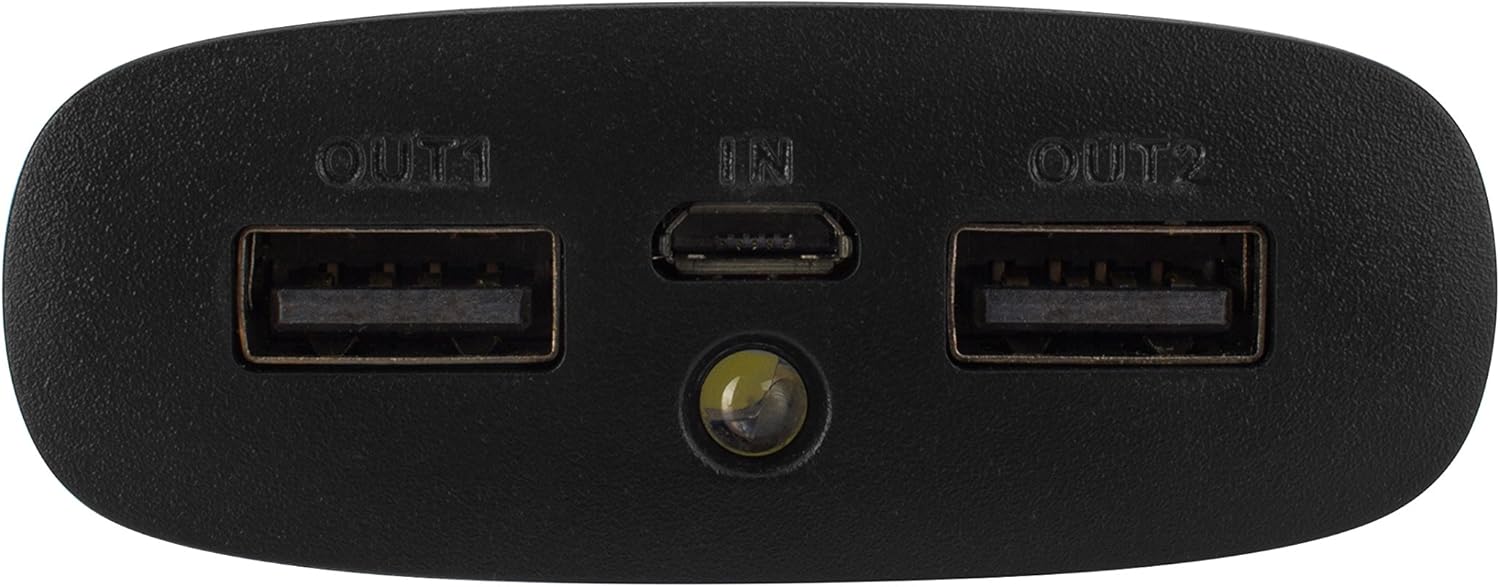
Figure 4.4: Rear view of the power bank, showing printed model and electrical specifications.
Components:
- Power Button: Press once to check battery level or to begin charging. Press and hold to turn on/off the integrated LED light.
- LED Indicators: Four LED lights indicate the remaining battery capacity. Each light typically represents 25% of the charge.
- Micro USB Input (IN): Used to charge the power bank itself.
- USB Output 1 (OUT1): Standard USB-A port for charging external devices (5V/1A output).
- USB Output 2 (OUT2): High-speed USB-A port for charging external devices (5V/2.1A output).
- LED Light: Small integrated flashlight.
5. Setup
Before first use, it is recommended to fully charge your XQISIT Power Bank.
- Connect the supplied Micro USB cable to the IN port on the power bank.
- Connect the other end of the Micro USB cable to a USB wall charger (not included) or a computer's USB port.
- The LED indicators will light up and blink during charging, indicating the current charge level. All four LEDs will be solid when the power bank is fully charged.
6. Operating Instructions
6.1. Charging the Power Bank
To recharge your power bank:
- Use the provided Micro USB cable.
- Plug the Micro USB connector into the IN port of the power bank.
- Plug the USB-A connector into a USB power source (e.g., wall adapter, computer USB port).
- The LED indicators will show charging progress. A full charge may take several hours depending on the power source.
6.2. Charging External Devices
To charge your smartphone, tablet, or other USB-powered devices:
- Connect your device's charging cable to either the OUT1 (1A) or OUT2 (2.1A) USB port on the power bank. For faster charging of compatible devices, use the 2.1A port.
- Connect the other end of the cable to your device.
- The power bank should automatically begin charging your device. If not, press the power button once to initiate charging.
- The LED indicators will show the remaining battery level of the power bank during discharge.
6.3. Using the LED Light
To turn the integrated LED light on or off, press and hold the power button for approximately 2-3 seconds.
7. Maintenance
- Cleaning: Wipe the power bank with a soft, dry cloth. Do not use harsh chemicals or abrasive cleaners.
- Storage: Store the power bank in a cool, dry place away from direct sunlight and extreme temperatures. For long-term storage, it is recommended to charge the power bank to about 50-75% every 3-6 months to maintain battery health.
- Battery Care: Avoid fully discharging the power bank frequently, as this can reduce its overall lifespan.
8. Troubleshooting
| Problem | Possible Cause | Solution |
|---|---|---|
| Power bank not charging. | Loose cable connection; faulty cable/adapter; power bank fully charged. | Ensure cables are securely connected. Try a different cable or USB adapter. Check LED indicators; if all are solid, it's fully charged. |
| Device not charging from power bank. | Power bank is discharged; loose cable connection; device not compatible; power button not pressed. | Recharge the power bank. Ensure cable is securely connected to both power bank and device. Press the power button once. Try a different USB port on the power bank. |
| Slow charging. | Using 1A output for a device that supports faster charging; faulty cable. | Ensure you are using the 2.1A output port (OUT2) for devices that support it. Try a different charging cable. |
| LED light not working. | Power button not held long enough; power bank discharged. | Press and hold the power button for 2-3 seconds. Recharge the power bank. |
9. Specifications
| Model Number | 26398 |
| Battery Capacity | 15600 mAh |
| Battery Type | Lithium-Ion |
| Input | Micro USB, 5V |
| Output 1 (OUT1) | USB-A, 5V/1A |
| Output 2 (OUT2) | USB-A, 5V/2.1A |
| Dimensions (L x W x H) | 16 cm x 6.2 cm x 2.4 cm (6.3 in x 2.44 in x 0.94 in) |
| Weight | 420 grams (0.93 lbs) |
| Manufacturer | XQISIT |
| First Available Date | August 10, 2016 |
10. Warranty and Support
XQISIT products are designed and manufactured to the highest quality standards. For information regarding warranty coverage, technical support, or service inquiries, please refer to the warranty card included with your product or visit the official XQISIT website. Please retain your proof of purchase for warranty claims.
